
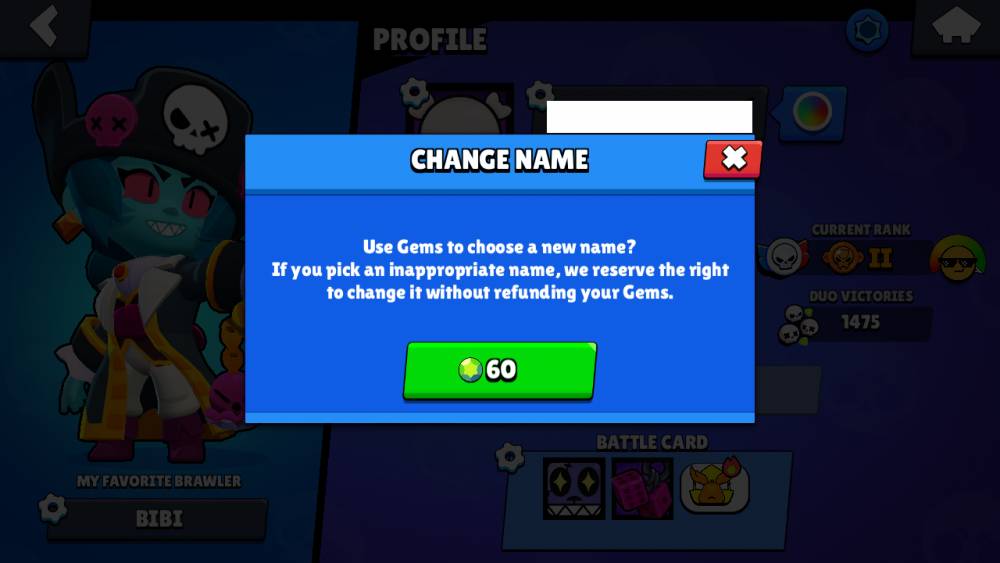
How to Change Your Name on Brawl Stars
Are you tired of your current name on Brawl Stars? Do you want a fresh new identity to dominate the gaming world? Look no further! In this article, we will guide you through the process of changing your name on Brawl Stars, with and without spending gems.
Requirements For Changing Your Name
Before we dive into the nitty-gritty, let’s cover the basic requirements for changing your name. You’ll need to have achieved level 5 in Brawl Stars. If you haven’t reached this milestone yet, don’t worry! Just continue playing to accumulate more experience and level up.
How Much Does it Cost?
The first modification of your name is free! However, subsequent modifications will require gems, with each new change costing a slightly higher number of gems than the last. So, if you want to change your name multiple times, be prepared to shell out some cash.
Step-by-step Guide: Changing Your Name Without Spending Gems
To change your name without spending gems, follow these steps:
- Open the Brawl Stars app and wait for it to load.
- Tap on your current name in the top-left corner of the screen.
- If you haven’t achieved level 5 yet, tap on the “Play” button to start a new game and earn experience points.
- Once you’ve reached level 5, tap on the cog icon next to your current name.
- Select the “Free” option to change your name without spending gems.
Step-by-step Guide: Changing Your Name With Gems
If you want to change your name multiple times or need a specific number of gems for the modification, follow these steps:
- Open the Brawl Stars app and wait for it to load.
- Tap on your current name in the top-left corner of the screen.
- If you haven’t achieved level 5 yet, tap on the “Play” button to start a new game and earn experience points.
- Once you’ve reached level 5, tap on the cog icon next to your current name.
- Select the option that corresponds to the number of gems you have.
How to Get Gems For Free
Don’t worry if you don’t have enough gems to change your name! You can earn them for free by advancing in the Trophy Road and completing challenges. Alternatively, you can purchase gems from the Brawl Stars shop using real money.
Changing Your Name Color on Brawl Stars
Want to mix things up and change your name color instead of your actual name? No problem! This feature is completely free and available to all players, regardless of their level.
To change your name color, follow these steps:
- Open the Brawl Stars app and wait for it to load.
- Tap on your current name in the top-left corner of the screen.
- Select a new color from the palette to change your name color.
Tips And Tricks
- Make sure to check the rules before changing your name, as some names may be considered offensive or inappropriate.
- If you’re having trouble getting enough gems to change your name, consider purchasing them from the shop using real money.
- Don’t forget to follow our guides on how to play Brawl Stars and how to shop for gems to get the most out of your gaming experience!
Conclusion
Changing your name on Brawl Stars is a simple process that can be completed in just a few steps. Whether you want to change your actual name or your name color, we’ve got you covered! Just remember to follow our guides and tips to ensure a smooth and enjoyable experience.
Frequently Asked Questions (FAQs)
- What Are The Requirements For Changing my Name on Brawl Stars?
To change your name on Brawl Stars, you’ll need to have achieved level 5 in the game. - How Much Does it Cost to Change my Name on Brawl Stars?
The first modification of your name is free! However, subsequent modifications will require gems, with each new change costing a slightly higher number of gems than the last. - Can I Get Gems For Free on Brawl Stars?
Yes! You can earn gems for free by advancing in the Trophy Road and completing challenges. - How do I Change my Name Color on Brawl Stars?
To change your name color, tap on your current name and select a new color from the palette. - What if I Don’t Have Enough Gems to Change my Name?
Don’t worry! You can purchase gems from the shop using real money or earn them for free by advancing in the Trophy Road and completing challenges.
We hope this guide has been helpful! If you have any further questions, feel free to ask. Happy gaming!


