
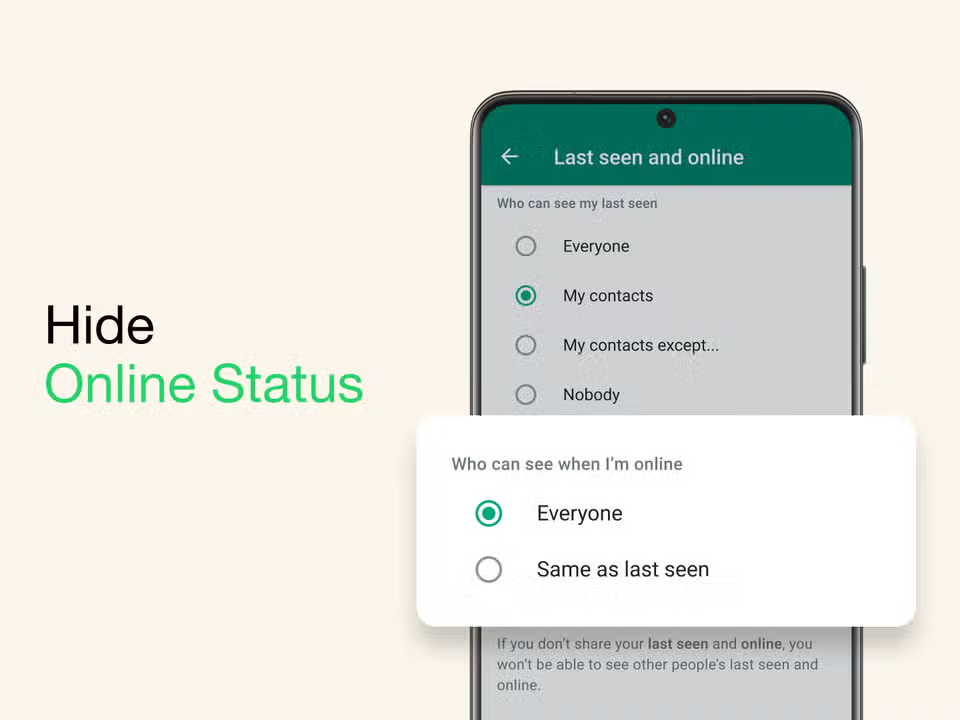
How to Remove “Online” Status on Whatsapp: A Step-by-step Guide
Are you tired of your friends and family seeing when you’re online on WhatsApp? Do you want to know how to remove that pesky “online” status without giving up the app altogether? Look no further! In this article, we’ll show you exactly how to do it.
Why Can’t I Just Not Use Whatsapp?
We understand that using WhatsApp might not be the most ideal solution for everyone. However, for many of us, it’s an essential tool for staying connected with loved ones and friends. So, what can you do?
How to Remove “Online” Status on Whatsapp: The Ultimate Guide
Removing the “online” status on WhatsApp is a relatively simple process that can be done on both Android and iOS devices. Here’s how:
On Smartphones (Android And Ios)
- Close the WhatsApp app on your device.
- If you’re using an Android device, simply press the Home button to close the app.
- On iOS devices (iPhone 8 and later), swipe up from the bottom of the screen to close the app.
Note: Closing the WhatsApp app will not completely disconnect you from the internet; however, it will remove your online status on WhatsApp.
On Computers (Windows And Macos)
If you’re using WhatsApp on a computer, you can follow these steps:
- Close the WhatsApp window or tab.
- On Windows devices, click the “X” button in the top-right corner of the window to close it.
- On macOS devices, click the red circle with a line through it to close the app.
What Happens When I Remove My Online Status?
Removing your online status on WhatsApp means that others will not be able to see when you were last active or if you’re currently online. This can help maintain some level of privacy and prevent unwanted messages or calls.
Disabling Last Seen Access And Online Status
You can also disable the “last seen” access feature, which shows others when you last accessed WhatsApp. To do this:
- On Android devices:
- Open WhatsApp
- Tap on the three dots in the top-right corner
- Select “Settings”
- Choose “Account”
- Tap on “Privacy”
- On iOS devices:
- Open WhatsApp
- Tap on the Settings icon (gear)
- Select “Account”
- Tap on “Privacy”
Disabling Read Receipts
You can also disable read receipts, which show others when you’ve read their messages.
- On Android devices:
- Open WhatsApp
- Tap on the three dots in the top-right corner
- Select “Settings”
- Choose “Account”
- Tap on “Privacy”
- On iOS devices:
- Open WhatsApp
- Tap on the Settings icon (gear)
- Select “Account”
- Tap on “Privacy”
Hiding Updates of State
You can also hide updates of state, which show others when you’ve updated your status.
- On Android devices:
- Open WhatsApp
- Tap on the three dots in the top-right corner
- Select “Settings”
- Choose “Account”
- Tap on “Privacy”
- On iOS devices:
- Open WhatsApp
- Tap on the Settings icon (gear)
- Select “Account”
- Tap on “Privacy”
Blocking Contacts
If you want to take it a step further, you can block contacts who are bothering you.
- On Android devices:
- Open WhatsApp
- Tap on the three dots in the top-right corner
- Select “Settings”
- Choose “Account”
- Tap on “Privacy”
- On iOS devices:
- Open WhatsApp
- Tap on the Settings icon (gear)
- Select “Account”
- Tap on “Privacy”
Conclusion
Removing your online status on WhatsApp is a simple process that can be done on both smartphones and computers. By following these steps, you can maintain some level of privacy and avoid unwanted messages or calls.
Frequently Asked Questions (FAQs)
- Q: Will Removing my Online Status Affect How I Receive Messages?
A: No, removing your online status will not affect how you receive messages. - Q: Can I Still Send Messages if I Remove my Online Status?
A: Yes, you can still send messages even if you remove your online status. - Q: Will Disabling Last Seen Access And Online Status Affect How Others See my Messages?
A: No, disabling last seen access and online status will not affect how others see your messages. - Q: Can I Block Contacts Who Are Bothering Me?
A: Yes, you can block contacts who are bothering you by following the steps outlined above. - Q: Will Blocking Contacts Affect my Ability to Send Messages?
A: No, blocking contacts will not affect your ability to send messages.


