
Recovering Forgotten Passwords: A Guide to The Best Programs
Are you tired of forgetting your passwords? Do you struggle to access your online accounts, email, or Wi-Fi networks? Don’t worry, we’ve got you covered! In this article, we’ll explore the best programs for recovering forgotten passwords, making it easy to regain access to your digital life.
Understanding Password Forgetting
Forgetting passwords is a common phenomenon in today’s digital age. With so many online accounts and services to keep track of, it’s no wonder that passwords can slip our minds. But what happens when you need to access an important account or network? That’s where these programs come in – to help you recover your forgotten password.
Programs For Recovering Wi-fi Passwords
When you connect to a wireless network on Windows, the operating system stores the password in its database. If you forget this password, Wirelesskeyview is here to help. This free program retrieves the password from the Windows database and displays it in plain text.
To use WirelessKeyView, simply download and install the software, then launch it. The program will display a list of wireless networks you’ve connected to, along with their passwords. If you’re having trouble finding the password, you can also update the list by clicking on the “Update” button.
Programs For Recovering Email Passwords
If you’ve forgotten your email account password, Mail Passview is another great tool to try. This program retrieves email account passwords from various email clients, including Microsoft Outlook and Mozilla Thunderbird. Mail PassView is free and doesn’t require installation.
To use Mail PassView, simply download the software, then launch it. The program will display a list of email accounts you’ve saved in your browser or email client, along with their corresponding passwords. If you need to save multiple passwords, you can do so by selecting the “Save All” option.
Programs For Recovering Social Media Passwords
For recovering social media passwords, such as Facebook and Instagram, Password Memorised in The Browser is a useful technique. This method allows you to recover your password by accessing the browser where it was saved. Here’s how:
- For Chrome, click on the three dots in the top-right corner of the browser window and select “Settings.”
- Click on “Automatic logins and passwords” from the left menu.
- Select the option to display saved passwords.
Similarly, you can access saved passwords for Facebook and Instagram by using their respective browser extensions. Follow these steps:
- For Facebook, go to Settings > Passwords and look up your account name.
- For Instagram, click on the three dots in the top-right corner of the app window and select “Settings.”
Programs For Recovering Rar File Passwords
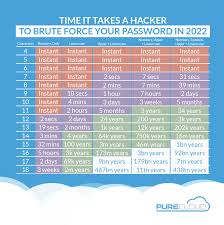
If you’ve forgotten the password for a compressed file (RAR), Advanced Archive Password Recovery is here to help. This software uses brute-force attacks to recover long passwords, making it suitable for recovering passwords up to 4 characters.
To use Advanced Archive Password Recovery, download and install the software, then launch it. Select the RAR file you want to access, choose a password type, and let the program work its magic.
Conclusion
Recovering forgotten passwords is now easier than ever with these programs! Whether you’ve forgotten your Wi-Fi network password, email account password, or social media password, there’s a solution for each. Remember, always use caution when accessing sensitive information, and never attempt to recover someone else’s password without their permission.
Frequently Asked Questions (FAQs)
- Q: What if I don’t have any programs installed on my computer?
A: No worries! Most of these programs are free and can be downloaded from the web. - Q: Will these programs work for Macs?
A: Some programs, like Access Portachiavi, are specifically designed for Macs. - Q: Are these programs safe to use?
A: Yes, all the programs mentioned here are legitimate and safe to use. - Q: Can I recover someone else’s password without their permission?
A: No! Attempting to access someone else’s password without consent is a serious breach of privacy.
Recommended Reading
- How to Recover Facebook Password
- How to Recover Instagram Password
- How to Recover Email Account Passwords
By following these steps and using the recommended programs, you’ll be well on your way to recovering forgotten passwords with ease!


