
How to Open Pst Files: A Step-by-step Guide
Are you looking for a way to access your old email messages stored in a PST file? Look no further! In this article, we will guide you through the process of opening PST files using various methods.
What is a Pst File?
A PST (Personal Storage Table) file is a proprietary format used by Microsoft Outlook to store email messages, contacts, and other data. While PST files are commonly used with Microsoft Outlook, there are also ways to access them without the software.
Method 1: Opening Pst Files With Outlook
If you’re using Microsoft Outlook, opening a PST file is relatively straightforward.
Step 1: Open Outlook
Launch Microsoft Outlook on your computer.
Step 2: Go to File Menu
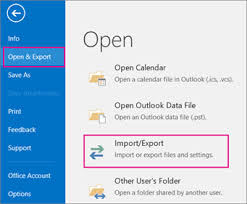
Click on the “File” menu and select “Open & Export”.
Step 3: Choose Open Outlook Data File
From the drop-down menu, choose “Open Outlook Data File”.
Step 4: Select Pst File
Browse to the location of your PST file and select it.
Step 5: Follow Prompts
Follow the prompts to open the PST file and access its contents.
Method 2: Opening Pst Files With Gmail
If you’re using Google’s email service, Gmail, there are also ways to access your PST files.
Step 1: Download Google Workspace Migration For Microsoft Outlook
Download the Google Workspace Migration for Microsoft Outlook tool from the official website.
Step 2: Run The Tool
Run the tool and follow the prompts to import your PST file into Gmail.
Step 3: Access Imported Data
Once the import process is complete, access the imported data in Gmail by going to Labels > [Imported PST File Name].
Method 3: Opening Pst Files With Outlook Viewer
If you don’t have Microsoft Outlook installed on your computer, there are alternative tools that can help you open PST files.
Step 1: Download Kernel For Pst Viewer
Download the free Kernel for PST Viewer tool from its official website.
Step 2: Run The Tool
Run the tool and select “Open single PST file”.
Step 3: Browse to Pst File
Browse to the location of your PST file and select it.
Step 4: Follow Prompts
Follow the prompts to open the PST file and access its contents.
Method 4: Opening Pst Files With Pst Bridge (on Mac)
If you’re using a Mac, there are also ways to access your PST files without Outlook.
Step 1: Download Pst Bridge
Download the free PST Bridge tool from its official website.
Step 2: Run The Tool
Run the tool and select “Open PST file”.
Step 3: Browse to Pst File
Browse to the location of your PST file and select it.
Step 4: Follow Prompts
Follow the prompts to open the PST file and access its contents.
Method 5: Opening Pst Files With View Pst Online (online)
If you don’t have Microsoft Outlook installed on your computer, there are also online tools that can help you open PST files.
Step 1: Visit View Pst Online
Visit the View PST Online website and click “Browse rows”.
Step 2: Select Pst File
Select the PST file you want to open from your computer.
Step 3: Follow Prompts
Follow the prompts to access the contents of the PST file online.
Conclusion
In this article, we’ve provided a step-by-step guide on how to open PST files using various methods. Whether you’re using Microsoft Outlook or Gmail, there are ways to access your old email messages stored in PST files. We hope this article has been helpful!
Frequently Asked Questions (FAQs)
- Q: What is a Pst File?
A: A PST file is a proprietary format used by Microsoft Outlook to store email messages, contacts, and other data.
- Q: Can I Open Pst Files Without Microsoft Outlook?
A: Yes, there are alternative tools that can help you open PST files without Outlook.
- Q: How do I Open a Pst File With Gmail?
A: You can use the Google Workspace Migration for Microsoft Outlook tool to import your PST file into Gmail.
- Q: Can I Access my Pst Files Online?
A: Yes, there are online tools that allow you to access and view PST files without installing any software on your computer.
- Q: What Happens if my Pst File is Damaged or Corrupted?
A: Some tools, like Kernel for PST Viewer, can help recover damaged or corrupted PST files.
- Q: Can I Export my Pst File to Another Format?
A: Yes, some tools allow you to export your PST file to other formats, such as MBOX or PDF.
- Q: How do I Import Pst Files Into Gmail Using The Google Workspace Migration For Microsoft Outlook Tool?
A: Follow the steps outlined in Method 2 above to import your PST file into Gmail using the Google Workspace Migration for Microsoft Outlook tool.
- Q: Can I Access my Pst Files on a Mac Without Installing Any Software?
A: Yes, you can use tools like PST Bridge to open and view PST files on a Mac without installing any additional software.


