
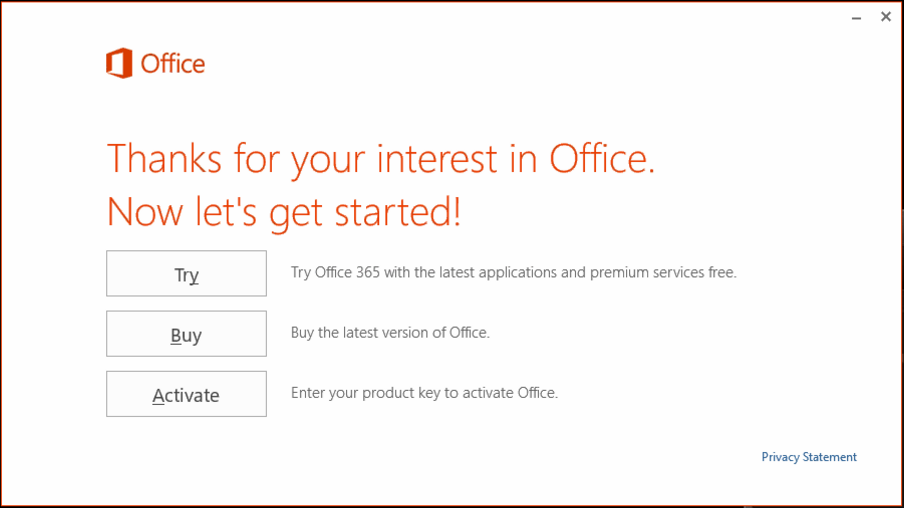
Microsoft 365 or Office 2016: Which One is Right For You?
Are you considering switching from Microsoft Office 2016 to Microsoft 365, but unsure about the differences between the two? Look no further! In this article, we’ll break down the features and benefits of both options, so you can make an informed decision that’s right for your needs.
What is Microsoft 365?
Microsoft 365 is a subscription-based service that offers access to Office 2016, as well as additional cloud-based productivity tools. This means you’ll get the latest version of Office, plus a range of online features like OneDrive storage and Skype minutes. With Microsoft 365, you can install Office on up to five devices, including desktops, laptops, tablets, and smartphones.
What Are The Benefits of Microsoft 365?
The main advantages of Microsoft 365 include:
- Access to the latest version of Office
- Additional cloud-based productivity tools like OneDrive storage and Skype minutes
- Ability to install Office on up to five devices
- Regular software updates and security patches
How Does Microsoft 365 Compare to Office 2016?
The main differences between Microsoft 365 and Office 2016 are:
- Subscription model vs. One-time purchase: With Microsoft 365, you’ll pay a monthly or annual subscription fee for access to the service. With Office 2016, you’ll pay a one-time upfront cost.
- Cloud-based productivity tools: Microsoft 365 includes additional cloud-based features like OneDrive storage and Skype minutes, which are not included in Office 2016.
- Software updates and security patches: With Microsoft 365, you’ll get regular software updates and security patches, which is not the case with Office 2016.
How do I Acquire Office 2016?
If you prefer to purchase a one-time license for Office 2016, you can buy it from Microsoft or a third-party retailer like Mr. Key Shop. Be sure to check the system requirements and compatibility before making your purchase.
How do I Activate Office 2016 With a Subscription to Microsoft 365?
To activate Office 2016 using a Microsoft 365 subscription, follow these steps:
- Go to the Microsoft website and sign in with your Microsoft account.
- Click on the “Install Office” button and choose the version of Office you want to install (Office 2016).
- Follow the prompts to download and install Office.
What Are Some Common Problems I Might Encounter When Activating Office 2016?
Some common issues that may arise when trying to activate Office 2016 include:
- Unable to download or install Office due to network connectivity issues.
- Error messages indicating that the product key is not valid or has already been used.
- Difficulty disconnecting from an old Microsoft account.
How do I Resolve These Problems?
To troubleshoot common activation issues, follow these steps:
- Check your internet connection and try downloading Office again.
- Verify that your product key is correct and has not been previously used.
- Follow the prompts to disconnect from your old Microsoft account and connect a new one.
What Are Some Alternative Solutions For Electronic Mail Certified?
If you have a PEC (Certified Electronic Mail) box, you can use the same email client as before, with some adjustments. Simply configure the IMAP parameters correctly to access your PEC account.
Can I Use Mobile Apps For Electronic Mail on my Smartphone or Tablet?
Yes! There are many excellent mobile apps available for electronic mail, including Microsoft Outlook and Gmail. Choose the one that best suits your needs and preferences.
In conclusion, Microsoft 365 offers a range of benefits over Office 2016, including access to cloud-based productivity tools, software updates, and security patches. If you’re unsure which option is right for you, consider your specific needs and preferences before making a decision.
Frequently Asked Questions
- What is The Difference Between Microsoft 365 And Office 2016?
Microsoft 365 is a subscription-based service that includes access to Office 2016, while Office 2016 is a one-time purchase. - How Much Does Microsoft 365 Cost?
The cost of Microsoft 365 varies depending on the plan you choose. There are two main options: Personal (7 euros/month or 69 euros/year) and Family (10 euros/month or 99 euros/year). - Can I Install Office on Multiple Devices With Microsoft 365?
Yes! With Microsoft 365, you can install Office on up to five devices. - What Happens if I Lose Access to my Microsoft Account?
If you lose access to your Microsoft account, simply follow the prompts to disconnect from the old account and connect a new one. - Can I Use a Third-party Retailer Like Mr. Key Shop to Buy Office 2016?
Yes! You can purchase Office 2016 from a third-party retailer like Mr. Key Shop, but be sure to check compatibility and system requirements before making your purchase. - How do I Troubleshoot Common Activation Issues With Microsoft 365?
Follow the prompts to disconnect from an old Microsoft account and connect a new one, or try re-downloading Office if you encounter network connectivity issues. - What Are Some Alternative Solutions For Electronic Mail Certified?
You can use the same email client as before, with some adjustments to configure IMAP parameters correctly. - Can I Use Mobile Apps For Electronic Mail on my Smartphone or Tablet?
Yes! There are many excellent mobile apps available for electronic mail, including Microsoft Outlook and Gmail.
We hope this article has provided you with a clear understanding of the benefits and differences between Microsoft 365 and Office 2016. If you have any further questions or concerns, please don’t hesitate to reach out.


