
Discovering Private Numbers: A Guide to Finding Hidden Contacts
As we navigate our increasingly complex digital lives, unwanted phone calls have become a constant nuisance. No one wants to deal with telemarketers, spammers, or other annoying callers, but sometimes it’s difficult to track down their numbers and block them. That’s why we’ve put together this guide on discovering private numbers, featuring the best apps and services to help you identify and block unwanted calls.
The Problem of Unknown Numbers
Have you ever received a mysterious call from an unknown number? It can be frustrating and even unsettling when you don’t know who’s behind the call. That’s why we’ve looked into various solutions that can help you identify private numbers and block unwanted calls.
Apps to Discover Private Numbers
There are several apps available on both Android and iOS that can help you discover private numbers and block unwanted calls. Here are some of the most effective ones:
- Sync.Me: This app allows you to access a massive database of contacts, including phone numbers, addresses, and other information. With Sync.ME, you can identify and block unwanted calls from spammers, telemarketers, and more.
- Truecaller: Truecaller is another popular app that uses crowdsourced data to help you identify and block unwanted calls. You can search for numbers in the database, report spam numbers, and even join a community of users who share their experiences.
- Should I Answer: This app allows you to identify and block unwanted calls from spammers and telemarketers. It also provides a feature to update your phone’s built-in blocking functionality.
How Sync.Me Works
Sync.ME is an innovative service that helps you identify private numbers and block unwanted calls. Here’s how it works:
- Registering Your Phone Number: When you sign up for Sync.ME, you’ll need to register your phone number with the service.
- Accessing The Database: Once registered, you can access a massive database of contacts, including phone numbers, addresses, and other information.
- Identifying Unwanted Calls: With Sync.ME, you can identify and block unwanted calls from spammers, telemarketers, and more.
Using Truecaller to Block Unwanted Calls
Truecaller is another effective app for identifying and blocking unwanted calls. Here’s how it works:
- Signing Up: When you sign up for Truecaller, you’ll need to register your phone number with the service.
- Searching For Numbers: You can search for numbers in the database, report spam numbers, and even join a community of users who share their experiences.
- Blocking Unwanted Calls: With Truecaller, you can block unwanted calls from spammers and telemarketers.
Should I Answer: A Review
Should I Answer is another app that helps you identify and block unwanted calls. Here’s our review:
- Ease of Use: The app is easy to use and navigate, even for those who are not tech-savvy.
- Effectiveness: Should I Answer is effective in identifying and blocking unwanted calls from spammers and telemarketers.
- Features: The app provides a range of features, including the ability to update your phone’s built-in blocking functionality.
Conclusion
Discovering private numbers and blocking unwanted calls can be a challenging task, but with the right apps and services, it becomes much easier. Sync.ME, Truecaller, and Should I Answer are just some of the many solutions available to help you identify and block unwanted calls.
Frequently Asked Questions (FAQs)
- What is The Best App For Blocking Unwanted Calls?
The best app for blocking unwanted calls depends on your personal preferences and needs. Sync.ME, Truecaller, and Should I Answer are all effective options. - How do I Block a Number on my Phone?
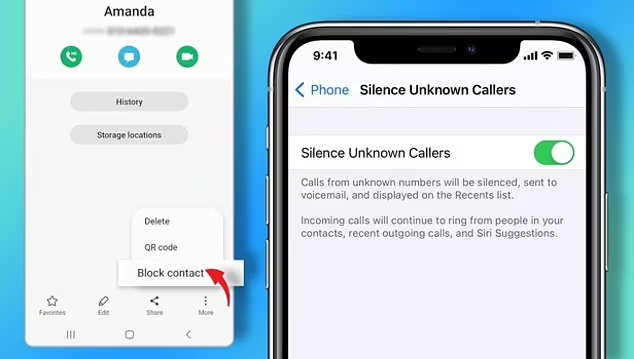
To block a number on your phone, you can use the built-in blocking feature or download an app like Sync.ME or Truecaller to help you identify and block unwanted calls. - Can I Report Spam Numbers to The Authorities?
Yes, you can report spam numbers to the authorities. Many apps, including Sync.ME and Truecaller, allow you to report spam numbers and join a community of users who share their experiences. - How do I Update my Phone’s Blocking Functionality?
To update your phone’s blocking functionality, you can download an app like Should I Answer or use the built-in blocking feature on your device. - What Are The Benefits of Using an App to Block Unwanted Calls?
The benefits of using an app to block unwanted calls include improved convenience, effectiveness, and peace of mind. With apps like Sync.ME, Truecaller, and Should I Answer, you can easily identify and block unwanted calls without having to worry about remembering phone numbers or using complicated features. - Are There Any Costs Associated With Using These Apps?
Some apps, including Truecaller and Should I Answer, offer paid subscriptions for advanced features and improved functionality. However, many apps are free to download and use. - Can I Use Multiple Apps to Block Unwanted Calls?
Yes, you can use multiple apps to block unwanted calls. Many users find it helpful to combine the features of different apps to achieve maximum effectiveness in blocking unwanted calls. - How do I Report a Problem With an App or Its Functionality?
To report a problem with an app or its functionality, you can contact the app’s customer support team directly or leave a review on the app store.


