
Unlocking The Power of 3D Animation: A Comprehensive Guide
Are you eager to explore the world of 3D animation? Do you want to create stunning visuals that bring your ideas to life? Look no further! In this article, we’ll delve into the realm of 3D animation and provide you with a comprehensive guide to get started.
Introduction to 3D Animation
3D animation is a powerful tool for visual storytelling. It allows artists to create immersive experiences by combining moving images, sound effects, and music. With the rise of digital technologies, 3D animation has become more accessible than ever, making it possible for individuals to create high-quality animations without extensive expertise.
Free Solutions: Unlocking Creativity
If you’re new to 3D animation or on a budget, fear not! There are many free solutions available that can help you get started. Here are some popular options:
Blender: The Ultimate Free Solution
Available for Windows, macOS, and Linux
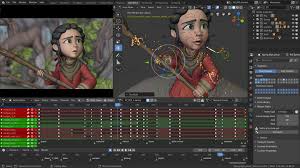
Blender is an open-source 3D creation software that’s both powerful and user-friendly. With Blender, you can create stunning animations, models, and renderings without spending a dime.
Getting Started With Blender
- Download And Install: Head over to the official Blender website and download the software for your operating system.
- Explore The Interface: Familiarize yourself with the intuitive interface, which includes an area for work, a panel for scene management, and tools for modeling and animation.
- Import 3D Models: Utilize free resources like Free3D to import pre-made models into Blender.
Example: Animating a Robotic Dog
Let’s say you want to create a short animation of a robotic dog moving across the screen. Here’s a step-by-step guide:
- Download And Import: Grab a pre-made model from Free3D and import it into Blender.
- Create an Animation: Set up a timeline and add keyframes for the dog’s movement.
- Adjust Settings: Experiment with settings like Repeat Specified to create a seamless loop.
Other Free Solutions
- Daz 3D: A free platform for creating 3D animations, models, and renderings.
- Unity: A versatile game engine that also supports 3D animation.
- Unreal Engine: A powerful tool for creating high-quality 3D animations and games.
Paid Solutions: Unleashing Professional-level Features
While free solutions can get you started, professional-level features require investment. Here are some top-notch paid options:
Autodesk Maya: The Industry Standard
Available for Windows, macOS, and Linux
Autodesk Maya is a renowned 3D computer animation software used in the film industry. Its advanced features include modeling, rigging, animation, and rendering.
Getting Started With Autodesk Maya
- Download And Install: Get the software from the official Autodesk website.
- Explore The Interface: Familiarize yourself with the interface, which includes tools for modeling, rigging, and animation.
- Import 3D Models: Utilize free resources or import your own models into Maya.
Other Paid Solutions
- Cinema 4D: A powerful tool for 3D modeling, animation, simulation, and rendering.
- Clip Studio Paint EX: A notice program that includes features for cartooning, comic creation, and 3D animation.
- Unreal Engine: A game engine that also supports 3D animation.
Conclusion
In conclusion, the world of 3D animation is vast and exciting. With this guide, you’ve taken the first step towards unlocking its secrets. Whether you’re a beginner or an experienced artist, there’s always room to grow and experiment with new tools and techniques.
Frequently Asked Questions (FAQs)
- What Are The Best Free Solutions For 3D Animation?
Answer: Blender, Daz 3D, Unity, and Unreal Engine offer powerful features without a price tag. - How do I Get Started With Autodesk Maya?
Answer: Download and install the software, explore its interface, and import 3D models to begin your journey. - What Are Some Top-notch Paid Solutions For 3D Animation?
Answer: Autodesk Maya, Cinema 4D, Clip Studio Paint EX, and Unreal Engine provide professional-level features for a fee. - Can I Use These Tools For Personal Projects?
Answer: Yes, most of the mentioned tools can be used for personal projects, with some limitations on commercial usage. - Are There Any Tutorials or Resources Available to Help me Learn?
Answer: Absolutely! Official documentation, YouTube tutorials, and online courses are abundant to aid your learning journey.
Remember: The world of 3D animation is ever-evolving, so stay curious and keep exploring the vast array of tools and techniques that await you.


