
How to See Your Phone Number on Different Platforms
Are you curious about how to see your phone number on various platforms? Look no further! In this article, we will guide you through the process of viewing your phone number on different devices and operators.
Understanding Your Phone Number
Before we dive into the specifics, let’s understand what a phone number is. A phone number is a unique sequence of digits assigned to your mobile or landline connection. It’s essential to know your phone number for various reasons, such as contacting customer support, setting up online accounts, or simply keeping track of your communication history.
Seeing Your Phone Number on Android
If you have an Android device, follow these steps:
- Access your device settings by navigating to the home screen and selecting the gear icon (Settings).
- Scroll down and select “About phone” or “About device.”
- Tap on “Status” or “SIM status.”
- Look for the “My number” section, which should display your phone number.
Seeing Your Phone Number on Iphone
If you have an iPhone, follow these steps:
- Access your device settings by navigating to the home screen and selecting the gear icon (Settings).
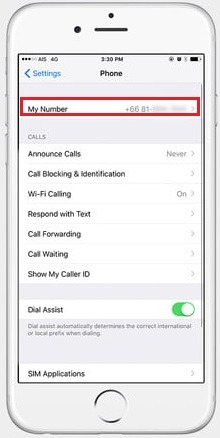
- Scroll down and select “Phone.”
- Tap on “My Number” at the top of the screen.
- Your phone number should be displayed.
Seeing Your Phone Number on Whatsapp
If you use WhatsApp, follow these steps:
- Open WhatsApp and navigate to the Chats tab.
- Tap on your profile picture or name in the top left corner.
- Select “Settings” from the menu.
- Scroll down and select “Account.”
- Tap on “Profile” and look for the “Phone Number” section.
Alternative Methods
If you’re unable to see your phone number using the above methods, don’t worry! There are alternative ways to retrieve it:
- Contact Your Operator: Reach out to your mobile operator’s customer support team and ask them to provide your phone number.
- Check Your Account Online: Log in to your online account with your operator or carrier to view your phone number.
- Use a Third-Party App: There are various apps available that can help you retrieve your phone number, such as “Phone Number” or “My Phone Number.”
Conclusion
In conclusion, seeing your phone number on different platforms is easier than you think. By following the steps outlined in this article, you should be able to view your phone number on Android, iPhone, WhatsApp, and other devices. Remember that if you’re having trouble accessing your phone number, you can always contact your operator or use alternative methods.
Faqs
- How do I See my Phone Number on Android?
- To see your phone number on Android, navigate to Settings > About phone > Status > SIM status.
- How do I See my Phone Number on Iphone?
- To see your phone number on iPhone, navigate to Settings > Phone > My Number.
- How do I See my Phone Number on Whatsapp?
- To see your phone number on WhatsApp, open the app and navigate to Chats > Profile picture or name > Settings > Account > Profile.
- What if I’m Unable to See my Phone Number Using The Above Methods?
- If you’re unable to see your phone number using the above methods, try contacting your operator’s customer support team or checking your online account.
- Can I Use a Third-party App to Retrieve my Phone Number?
- Yes, there are various apps available that can help you retrieve your phone number, such as “Phone Number” or “My Phone Number.”
- How do I Contact my Operator For Assistance?
- To contact your operator, call their customer support number or visit their website to initiate a live chat.
- What Information Will I Need to Provide to Retrieve my Phone Number?
- You may be asked to provide your identification details, such as your name and address, to verify your identity.
Additional Resources
For more information on phone numbers and related topics, check out these resources:
- Wikipedia: Phone number
- Google: Phone number lookup
- Your operator’s website: Phone number retrieval guide


