
Creating Secure Passwords: A Guide to Protecting Your Online Accounts
As we navigate the digital world, it’s essential to take steps to protect our online accounts from unauthorized access. One of the most effective ways to do this is by using strong, unique passwords for each account. In this article, we’ll explore how to choose a password that’s safe and secure, as well as discuss some tools and techniques you can use to test your passwords’ effectiveness.
The Importance of Password Security
Password security is crucial in today’s digital age. With the rise of data breaches and cyber attacks, it’s more important than ever to take steps to protect our personal and financial information. Using weak or easily guessable passwords can leave you vulnerable to attack, so it’s essential to choose a password that’s strong and secure.
Choosing a Password
When choosing a password, there are several factors to consider:
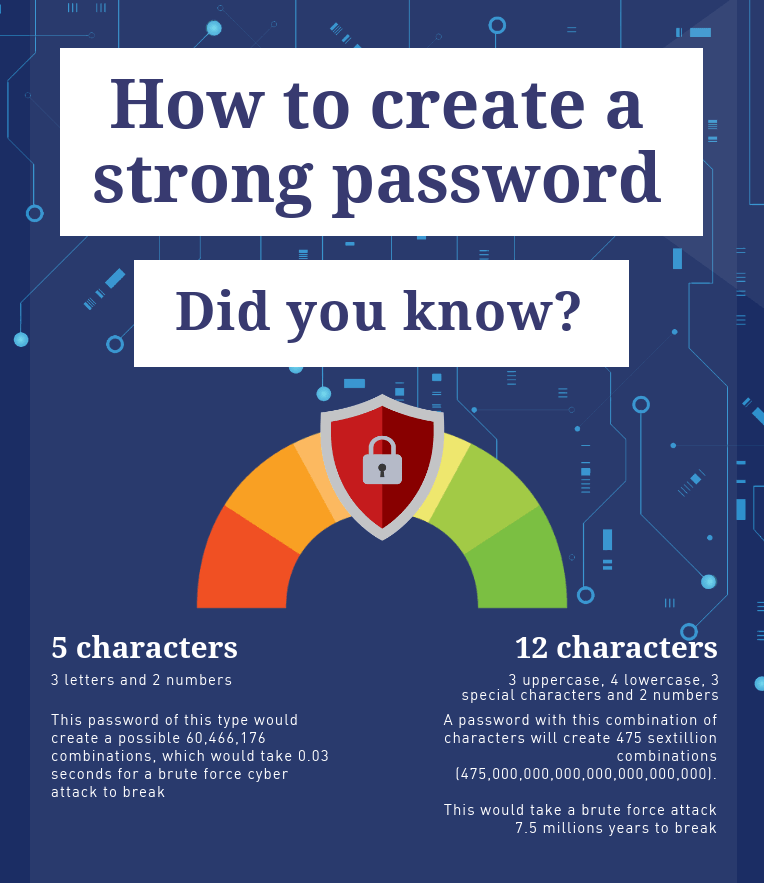
- Length: A longer password is more secure than a shorter one. Aim for at least 15 characters.
- Complexity: Your password should include a mix of uppercase and lowercase letters, numbers, and special characters.
- Uniqueness: Avoid using the same password across multiple accounts.
- Avoid Common Patterns: Don’t use easily guessable information like your name, birthdate, or common words.
Password Generation Tools
Fortunately, there are tools available to help you generate strong, unique passwords. Some popular options include:
- Keepass: A free, open-source password manager that allows you to generate and store complex passwords.
- Bitwarden: A cloud-based password manager that offers a range of features, including password generation and two-factor authentication.
- 1Password: A comprehensive password manager that includes password generation, storage, and management features.
Testing Your Passwords
Once you’ve generated your passwords, it’s essential to test them for strength and security. Here are some tools and techniques you can use:
- Kaspersky Password Checker: An online tool that analyzes your password’s strength and security.
- Have I Been Pwned?: A database of compromised passwords that allows you to check if your password has been stolen.
Conclusion
Choosing a secure password is just the first step in protecting your online accounts. By using strong, unique passwords and testing them regularly, you can help ensure your personal and financial information remains safe and secure. Remember, password security is an ongoing process, so be sure to stay vigilant and adapt to new threats as they emerge.
Frequently Asked Questions
- Q: How Often Should I Change my Passwords?
A: It’s recommended to change your passwords every 2-3 months to ensure maximum security. - Q: Can I Use The Same Password Across Multiple Accounts?
A: No, it’s essential to use unique passwords for each account to prevent unauthorized access. - Q: How Can I Remember my Complex Passwords?
A: Consider using a password manager or writing down your passwords in a secure location. - Q: Are There Any Free Tools Available to Help me Generate Strong Passwords?
A: Yes, KeePass and Bitwarden offer free versions that allow you to generate and store complex passwords.


