
How to Download Apps on Your Smartphone or Tablet: A Step-by-step Guide
Are you excited about your new smartphone or tablet, but not sure how to download the apps you need? Well, you’re in luck! In this article, we’ll guide you through the process of downloading apps on various devices, including Android, iPhone, iPad, PC, and Smart TV.
Why Download Apps?
Before we dive into the details, let’s talk about why downloading apps is important. Apps can enhance your device’s functionality, provide entertainment, and make your life easier. From social media to productivity tools, there are countless apps available for download on various platforms.
Downloading Apps on Android Devices
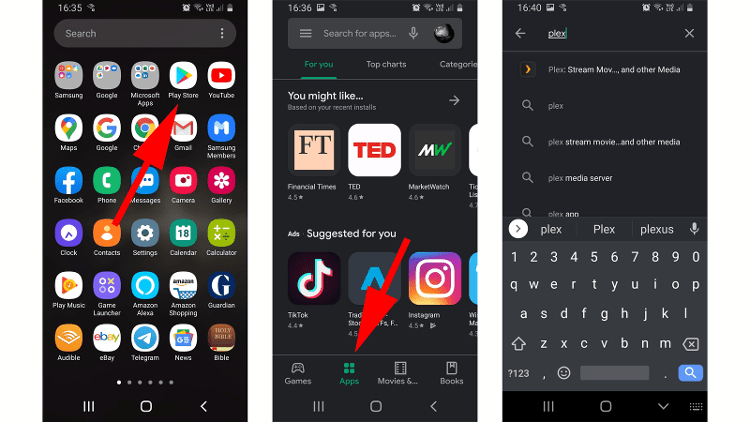
If you have an Android device, follow these steps to download apps:
- Access The Play Store: Open the Google Play Store app on your device or access it from the home screen.
- Search For Apps: Type the name of the app you want to download in the search bar at the top of the screen.
- Choose an App: Select the app you want to download from the search results.
- Check Reviews And Ratings: Look at the reviews and ratings from other users to ensure the app is safe and useful.
- Download or Install: Tap the “Install” button to start the download process.
- Wait For Installation: Wait for the app to install on your device.
Downloading Apps on Iphone And Ipad Devices
If you have an iPhone or iPad, follow these steps to download apps:
- Access The App Store: Open the Apple App Store app on your device or access it from the home screen.
- Search For Apps: Type the name of the app you want to download in the search bar at the top of the screen.
- Choose an App: Select the app you want to download from the search results.
- Check Reviews And Ratings: Look at the reviews and ratings from other users to ensure the app is safe and useful.
- Download or Install: Tap the “Get” button to start the download process.
- Wait For Installation: Wait for the app to install on your device.
Downloading Apps on PC Devices
If you have a Windows PC, follow these steps to download apps:
- Access The Microsoft Store: Open the Microsoft Store app on your device or access it from the taskbar.
- Search For Apps: Type the name of the app you want to download in the search bar at the top of the screen.
- Choose an App: Select the app you want to download from the search results.
- Check Reviews And Ratings: Look at the reviews and ratings from other users to ensure the app is safe and useful.
- Download or Install: Click the “Install” button to start the download process.
- Wait For Installation: Wait for the app to install on your device.
Downloading Apps on Smart TV Devices
If you have a Smart TV, follow these steps to download apps:
- Access The App Store: Open the app store on your Smart TV (e.G., Samsung Smart Hub, LG Content Store).
- Search For Apps: Type the name of the app you want to download in the search bar.
- Choose an App: Select the app you want to download from the search results.
- Check Reviews And Ratings: Look at the reviews and ratings from other users to ensure the app is safe and useful.
- Download or Install: Follow the on-screen instructions to start the download process.
Tips And Tricks
Here are some tips and tricks to keep in mind when downloading apps:
- Always check the app’s permissions and reviews before installing it.
- Be cautious of suspicious or unknown sources that may try to trick you into installing malware or unwanted software.
- Regularly update your device’s operating system and installed apps to ensure you have the latest security patches.
Conclusion
Downloading apps is a straightforward process on various devices. By following these step-by-step guides, you can access a wide range of apps that can enhance your device’s functionality and provide entertainment. Remember to always be cautious when downloading apps, and never install software from suspicious sources.
Faqs
Here are some frequently asked questions about downloading apps:
- Q: What is The Difference Between Installing an App on Android And Ios Devices?
A: The installation process for Android and iOS devices is similar, but the user interface may vary slightly. - Q: Can I Download Apps Directly From a Website or Source?
A: Yes, you can download apps directly from a website or source, but be cautious of suspicious or unknown sources that may try to trick you into installing malware or unwanted software. - Q: How do I Know if an App is Safe And Useful?
A: Always check the app’s reviews and ratings from other users before installing it. - Q: Can I Download Apps on Multiple Devices at Once?
A: Yes, most devices allow you to download apps simultaneously, but be aware of any storage or memory limitations. - Q: How do I Update my Device’s Operating System And Installed Apps?
A: Regularly check for updates from your device’s manufacturer or app store to ensure you have the latest security patches.
We hope this article has been helpful in guiding you through the process of downloading apps on various devices!


