
How to Bypass a Company Firewall: A Guide
Are you tired of being blocked from accessing your favorite websites and online services by your company’s firewall? Do you want to learn how to bypass the restrictions and stay connected during work hours? Look no further! In this article, we’ll show you three valid solutions to help you bypass your company’s firewall.
Informational Preliminaries
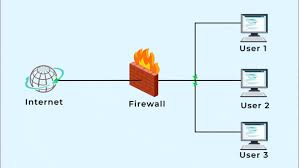
Before we dive into the details, let’s cover some basic information about firewalls. A company firewall is an instrument that adds levels of safety to a specific internet connection by monitoring data in and out. It can be a physical device connected to the modem/router or a software installed on your computer.
In most cases, administrators set up firewalls to limit navigation in office or school environments, protect computers from viruses and malware, and prevent distractions during work hours. However, there are ways to bypass these restrictions using various tools and services.
How to Bypass a Company Firewall
Use a Vpn
The first solution is to use a Virtual Private Network (VPN). A VPN interposes between your device and the internet site you want to access, making your communication anonymous by camouflaging your public IP address and geographic location. We recommend using NordVPN, Surfshark, ExpressVPN, or PrivadoVPN.
Using a VPN is straightforward: Initiate the software, choose a region, and click on the start button. You can disconnect at any time by clicking on the stop button. Some of these services also offer additional features like ad-blocking and malware protection.
Use a Web Proxy
Another solution is to use a Web Proxy. A Web Proxy is an online service that links your device to the internet site you want to access, bypassing local blocks enforced by the firewall. There are many Web Proxies available, including ProxySite, HideMyAss, and CroxyProxy.
To use a Web Proxy, simply enter the URL of the website you want to visit in the designated field on the proxy’s homepage. Select your preferred server location from the menu options, and click “GO.” Wait for a few seconds before accessing the site.
Keep in mind that Web Proxies can be slower than VPNs and may not guarantee privacy or safety. It’s also worth noting that some websites might not work properly with Web Proxies.
Use a Portable Browser
If none of the above solutions work, you can try using a portable browser. A portable browser is the lightest version of a classic browser that doesn’t require installation on your device. You can carry it on a USB stick and plug it into any computer to access blocked websites.
One popular choice for a portable browser is Tor Browser, based on Firefox. It allows you to browse the internet anonymously and avoid censorship. However, be aware that some companies might block access to Tor.
Conclusion
Bypassing your company’s firewall can be achieved through various means, including using a VPN, Web Proxy, or portable browser. Remember to use these solutions responsibly and in accordance with your company’s policies.
Frequently Asked Questions (FAQs)
-
What is The Purpose of a Company Firewall?
A company firewall adds levels of safety to a specific internet connection by monitoring data in and out. -
Can I Bypass my Company’s Firewall Using a Vpn?
Yes, you can use a VPN to bypass your company’s firewall. -
Are Web Proxies Safe to Use?
Web Proxies may not guarantee privacy or safety, as they can be slower than VPNs and might not work properly with some websites. -
What is The Difference Between a Vpn And a Web Proxy?
A VPN interposes between your device and the internet site you want to access, while a Web Proxy links your device to the website without encrypting your data. -
Can I Use a Portable Browser on Any Computer?
Yes, you can carry a portable browser on a USB stick and plug it into any computer to access blocked websites. -
Which is The Best Solution For Bypassing my Company’s Firewall?
The best solution depends on your specific situation. If you’re looking for security and anonymity, use a VPN. If speed and simplicity are more important, try using a Web Proxy.


