
Installing Operating Systems on a Usb Drive: A Comprehensive Guide
Are you tired of dealing with CDs and DVDs when installing operating systems? Do you want to know how to install Windows or macOS on your computer without using a physical installation media? Look no further! In this article, we will guide you through the process of installing operating systems directly from a USB drive.
Why Install Operating Systems From a Usb Drive?
Installing an operating system from a USB drive offers several advantages over traditional methods. Firstly, it eliminates the need for physical installation media such as CDs or DVDs, which can be bulky and prone to damage. Secondly, it provides a convenient way to carry your operating system on a portable device, making it easy to install on multiple computers. Finally, it allows you to create a bootable USB drive that can be used to install the operating system on any computer with a compatible BIOS.
Installing Windows From a Usb Drive
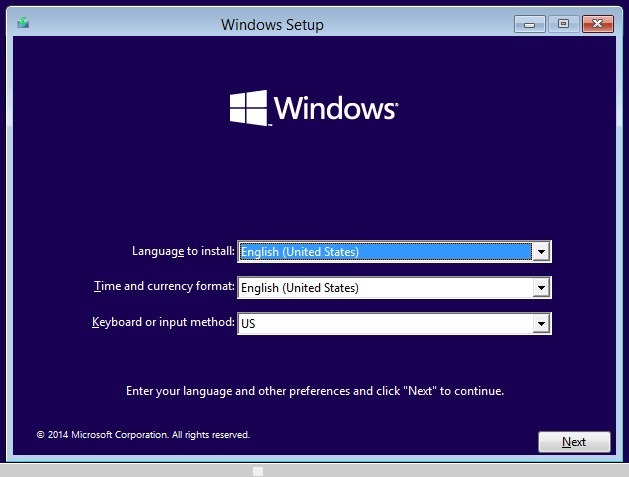
To install Windows from a USB drive, you will need to use Microsoft’s Media Creation Tool. This free program allows you to download Windows 10 and Windows 11 directly from the internet and create a bootable USB drive.
Here are the steps to follow:
- Download the Media Creation Tool from Microsoft’s website.
- Insert a blank USB drive with at least 8 GB of storage capacity.
- Run the Media Creation Tool and select the option to create a bootable USB drive.
- Choose the language, edition, and architecture of Windows you want to install.
- Select the USB drive as the installation media.
- Click “Next” and follow the on-screen instructions to complete the process.
Installing Macos From a Usb Drive
To install macOS from a USB drive, you will need to use the Terminal command softwareupdate --fetch-full-installer. This command downloads the latest version of macOS directly from Apple’s servers.
Here are the steps to follow:
- Download the installer for macOS from the Mac App Store.
- Insert a blank USB drive with at least 12 GB of storage capacity.
- Open the Terminal app on your Mac and run the command
softwareupdate --fetch-full-installer. - Follow the on-screen instructions to complete the process.
Installing Linux From a Usb Drive
To install Linux from a USB drive, you can use the “Create disc” tool in Ubuntu or other Linux distributions. This tool allows you to create a bootable USB drive with the Linux operating system installed.
Here are the steps to follow:
- Download the ISO file for your preferred Linux distribution.
- Insert a blank USB drive with at least 8 GB of storage capacity.
- Open the “Create disc” tool and select the ISO file you downloaded.
- Choose the USB drive as the installation media.
- Click “Next” and follow the on-screen instructions to complete the process.
Installing Ps4 Operating System From a Usb Drive
To install the PS4 operating system from a USB drive, you will need to download the firmware directly from Sony’s servers.
Here are the steps to follow:
- Download the firmware for your PS4 console.
- Insert a blank USB drive with at least 1.1 GB of storage capacity.
- Transfer the firmware onto the USB drive.
- Initialize the PS4 settings using the USB drive.
Conclusion
Installing operating systems from a USB drive is a convenient and efficient way to carry out installations without relying on physical media. Whether you’re installing Windows, macOS, Linux, or even the PS4 operating system, this guide has provided you with step-by-step instructions on how to do it successfully.
Frequently Asked Questions (FAQs)
- What Are The Requirements For Creating a Bootable Usb Drive?
A: A blank USB drive with at least 8 GB of storage capacity is required.
- Can I Install an Operating System From a Usb Drive Without Using a Physical Installation Media?
A: Yes, you can install an operating system directly from a USB drive by following the instructions provided in this guide.
- How do I Download Windows or Macos For Creating a Bootable Usb Drive?
A: You can download Windows and macOS directly from Microsoft’s website and Apple’s servers respectively.
- What is The Process For Installing Linux on a Usb Drive?
A: The process involves downloading the ISO file, inserting a blank USB drive, opening the “Create disc” tool, selecting the ISO file, and choosing the USB drive as the installation media.
- Can I Install The Ps4 Operating System From a Usb Drive?
A: Yes, you can install the PS4 operating system by downloading the firmware directly from Sony’s servers, transferring it onto a blank USB drive, and initializing the PS4 settings using the USB drive.
- What Are The Benefits of Installing an Operating System From a Usb Drive?
A: The benefits include eliminating the need for physical installation media, providing a convenient way to carry your operating system on a portable device, and making it easy to install on multiple computers.
- Can I Use This Guide to Install Any Operating System on a Usb Drive?
A: Yes, you can follow these instructions to install Windows, macOS, Linux, or even the PS4 operating system from a USB drive.
- Are There Any Specific Requirements For Creating a Bootable Usb Drive For Each Operating System?
A: Yes, each operating system has its own specific requirements, which are detailed in this guide.


