
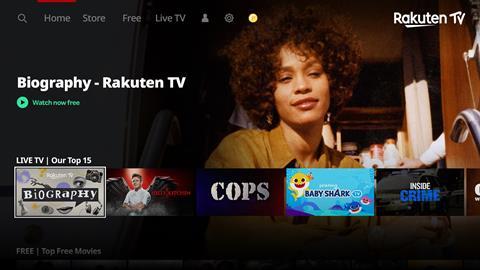
The Ultimate Guide to Rakuten Tv: A Comprehensive Review
Are you looking for a streaming service that offers a wide range of movies, TV shows, and documentaries? Look no further than Rakuten TV! In this article, we will delve into the world of Rakuten TV, exploring its features, pricing, and compatible devices. Whether you’re a movie buff or a fan of TV series, Rakuten TV has something for everyone.
What is Rakuten Tv?
Rakuten TV is a streaming service that offers a vast library of movies, TV shows, documentaries, and more. With a user-friendly interface and a vast selection of content, Rakuten TV is the perfect destination for anyone looking to unwind with some quality entertainment.
Is Rakuten TV Free?
Yes, Rakuten TV is free! You can access the service’s free section without creating an account, and enjoy a wide range of movies and TV shows with some advertising interruptions. The free section includes popular channels like Sportitalia and FIFA+, as well as a selection of movies and TV shows.
How Does Rakuten TV Work?
Creating an account on Rakuten TV is easy! Simply click on the “Recorded” button on the top right corner of the screen, enter your email address, create a password, and accept the service’s terms and conditions. You can also access the service using the app on your smartphone or tablet.
What Devices Are Compatible With Rakuten Tv?
Rakuten TV is compatible with a wide range of devices, including:
- Smartphones (Android and iOS)
- Tablets (Android and iOS)
- Smart TVs (Samsung, Sony, Philips, LG, Hisense, and more)
- Chromecast
- Apple TV
- Fire TV Stick
- Gaming consoles (PS5 and PS4)
How Do I Access Rakuten Tv’s Free Section?
To access the free section of Rakuten TV, simply click on the “Free” button in the menu. You can browse through a wide range of movies and TV shows, including popular channels like Sportitalia and FIFA+. You can also search for specific titles or genres using the search bar.
How Do I Purchase Content From Rakuten Tv’s Store?
To purchase content from Rakuten TV’s store, simply click on the “Store” button in the menu. You can browse through a wide range of movies and TV shows, select the title you want to purchase, and proceed with the payment. You can pay using credit or debit card, PayPal, or Apple ID.
What is Rakuten Tv’s Pricing?
Rakuten TV’s pricing is very competitive! The service offers two main options: Renting a movie or TV show for 2.99 Euros, or purchasing it for 4.99 Euros. You can also earn points by purchasing content and redeem them to get discounts on future purchases.
How Do I Download Content From Rakuten Tv?
To download content from Rakuten TV, simply click on the “Download” button next to the title you want to download. The content will be saved to your device’s storage, allowing you to watch it offline.
Conclusion
In conclusion, Rakuten TV is a fantastic streaming service that offers a wide range of movies, TV shows, and documentaries. With its user-friendly interface, competitive pricing, and compatible devices, Rakuten TV is the perfect destination for anyone looking to unwind with some quality entertainment. Whether you’re a movie buff or a fan of TV series, Rakuten TV has something for everyone.
Frequently Asked Questions
- Is Rakuten TV Free?
Yes, Rakuten TV’s free section is available without creating an account, and offers a wide range of movies and TV shows with some advertising interruptions.
- How do I Create an Account on Rakuten Tv?
To create an account on Rakuten TV, simply click on the “Recorded” button on the top right corner of the screen, enter your email address, create a password, and accept the service’s terms and conditions.
- What Devices Are Compatible With Rakuten Tv?
Rakuten TV is compatible with smartphones (Android and iOS), tablets (Android and iOS), smart TVs (Samsung, Sony, Philips, LG, Hisense, and more), Chromecast, Apple TV, Fire TV Stick, gaming consoles (PS5 and PS4).
- How do I Purchase Content From Rakuten Tv’s Store?
To purchase content from Rakuten TV’s store, simply click on the “Store” button in the menu, select the title you want to purchase, and proceed with the payment.
- What is Rakuten Tv’s Pricing?
Rakuten TV’s pricing is very competitive! The service offers two main options: Renting a movie or TV show for 2.99 Euros, or purchasing it for 4.99 Euros.
- How do I Download Content From Rakuten Tv?
To download content from Rakuten TV, simply click on the “Download” button next to the title you want to download.
- Is Rakuten TV Available in my Country?
Rakuten TV is available in several countries, including Italy, Spain, and Portugal. However, please check the service’s website for availability in your specific region.
- How do I Earn Points on Rakuten Tv?
You can earn points by purchasing content from Rakuten TV’s store. You can redeem these points to get discounts on future purchases.
- Can I Watch Content Offline With Rakuten Tv?
Yes, you can download content from Rakuten TV and watch it offline using the service’s app on your smartphone or tablet.
- How do I Contact Rakuten Tv’s Customer Support?
You can contact Rakuten TV’s customer support by visiting the service’s website and clicking on the “Contact Us” button.


