
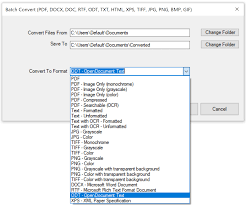
Converting Pdf Files to Odt Format: A Step-by-step Guide
Are you tired of dealing with cumbersome PDF files? Do you want to convert them into a more editable and shareable format, like ODT (OpenDocument Text)? Look no further! In this article, we’ll show you how to easily transform your PDF files into ODT format using various methods.
Why Convert Pdfs to Odt?
Before diving into the conversion process, let’s briefly discuss why it’s beneficial to convert PDFs to ODT. PDFs are great for sharing and viewing documents, but they can be difficult to edit. ODT, on the other hand, is a more flexible format that allows for easy editing and modification.
Method 1: Using Microsoft Word
If you have Microsoft Word installed on your computer, you can use it to convert PDF files to ODT format. Here’s how:
- Open Microsoft Word and click on “Open” in the top menu bar.
- Select the PDF file you want to convert and click “OK”.
- In the “Open” dialog box, select the “Save as type” dropdown menu and choose “ODT (OpenDocument Text)”.
- Click “Save” to save the converted document.
Method 2: Using Online Services
If you don’t have Microsoft Word or prefer not to download any software, there are several online services that can help you convert PDFs to ODT. Here are a few options:
- Zamzar: ZamZar is a popular online service that allows you to convert PDF files to various formats, including ODT.
- Docspal: DocsPal is another reliable online service that provides fast and accurate conversions of PDF files to ODT format.
- Convertio: Convertio is an online tool that can convert PDFs to ODT and other formats.
Method 3: Using Smartphone Apps
If you’re using a smartphone or tablet, you can also use specialized apps to convert PDFs to ODT. Here are some popular options:
- Rows Converter (Android/iOS): This app allows you to convert PDF files to various formats, including ODT.
- Document Converter (iOS/iPadOS): This app provides a simple and intuitive way to convert PDF files to ODT format.
Tips And Variations
While the methods above are straightforward, there are some variations and tips to keep in mind:
- Free Vs. Paid Options: Some online services offer free conversions with limitations, while others require payment for full functionality.
- File Size Limits: Be aware of file size limits when using online services or apps, as they may restrict the maximum size of files you can upload.
- Quality And Accuracy: The quality and accuracy of converted files may vary depending on the method used.
Conclusion
Converting PDFs to ODT format is a relatively simple process that can be accomplished using various methods. Whether you prefer online services, smartphone apps, or desktop software, there’s an option for everyone. By following these steps, you’ll be able to transform your cumbersome PDF files into editable and shareable documents.
Faqs
- What Are The Benefits of Converting Pdfs to Odt?
Converting PDFs to ODT format allows for easy editing and modification of documents. - Can I Use Microsoft Word to Convert Pdfs to Odt?
Yes, you can use Microsoft Word to convert PDF files to ODT format. - What Are Some Online Services That Can Help me Convert Pdfs to Odt?
Popular online services include ZamZar, DocsPal, and Convertio. - Are There Smartphone Apps Available For Converting Pdfs to Odt?
Yes, specialized apps like Rows Converter (Android/iOS) and Document Converter (iOS/iPadOS) allow you to convert PDF files to ODT format. - What Are Some Tips For Converting Pdfs to Odt Successfully?
Be aware of file size limits, quality variations, and potential limitations when using online services or apps. - Can I Use These Methods to Convert Other Types of Files to Odt?
Some online services and apps may support conversion of other file formats, but it’s best to check compatibility before attempting a conversion. - Are There Any Free Alternatives For Converting Pdfs to Odt?
Yes, some online services offer free conversions with limitations, while others require payment for full functionality. - How do I Ensure The Quality And Accuracy of Converted Files?
Choose reputable online services or apps, follow instructions carefully, and verify file contents after conversion.


