
How to Sign Digitally With Aruba: A Comprehensive Guide
Are you looking for a secure and efficient way to sign documents digitally? Look no further than Aruba’s digital signature service! In this article, we will guide you through the process of signing documents digitally with Aruba, covering everything from the concept of digital signatures to the renewal of your certificate.
What is a Digital Signature?
A digital signature is a qualified electronic signature that guarantees the authenticity, integrity, and non-repudiation of a document. It is a legally binding signature that is recognized in Italy and throughout the European Union.
Differences Between Electronic Signatures, Digital Signatures, And Remote Digital Signatures
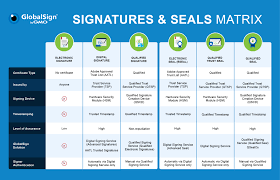
Before we dive into the process of signing documents digitally with Aruba, let’s clarify the differences between electronic signatures, digital signatures, and remote digital signatures.
- Electronic Signature: An electronic signature is a basic form of electronic signature that may not be guaranteed in absolute terms. Its validity is assessed on a case-by-case basis by a judge.
- Digital Signature: A digital signature is a more advanced form of electronic signature that has a legal guarantee. It is realized with qualified means that ensure the identity of the signer and the integrity of the documents signed.
- Remote Digital Signature: A remote digital signature is similar to a digital signature, but it uses a server-based system instead of a physical device.
How Does Aruba’s Digital Signature Service Work?
Aruba’s digital signature service offers two main options: Remote Digital Signature and Kit of Digital Signature. Both services provide the same level of safety and legal validity, but they differ in their mode of use and devices required.
- Remote Digital Signature: This service uses a server-based system to sign documents digitally. You can access your account on the Aruba website and sign documents using your username and password.
- Kit of Digital Signature: This option requires a physical device, such as a smart card reader or a USB token, to sign documents digitally.
How to Sign Documents Digitally With Aruba
Signing documents digitally with Aruba is a straightforward process. Here’s a step-by-step guide:
- Choose Your Service: Select the type of digital signature service you need: Remote Digital Signature or Kit of Digital Signature.
- Create an Account: Create an account on the Aruba website and provide your identity information.
- Download Software: Download the software required for your chosen service.
- Install Software: Install the software on your computer.
- Sign Documents: Sign documents digitally using your username and password or physical device.
Renewal of Your Certificate
Your digital signature certificate has a validity period of three years. You will need to renew it before it expires to continue signing documents digitally.
- Remote Digital Signature: Renew your certificate online on the Aruba website.
- Kit of Digital Signature: Contact Aruba’s customer support to renew your certificate.
Frequently Asked Questions (FAQs)
Q: What is a digital signature?
A: A digital signature is a qualified electronic signature that guarantees the authenticity, integrity, and non-repudiation of a document.
Q: How do I sign documents digitally with Aruba?
A: To sign documents digitally with Aruba, you can choose between Remote Digital Signature and Kit of Digital Signature. Follow the step-by-step guide provided above to sign documents digitally.
Q: What are the differences between electronic signatures, digital signatures, and remote digital signatures?
A: Electronic signatures, digital signatures, and remote digital signatures differ in their level of safety, mode of use, and devices required.
Q: How do I renew my certificate?
A: To renew your certificate, contact Aruba’s customer support or follow the instructions provided on the Aruba website.
Q: Is Aruba’s digital signature service secure?
A: Yes, Aruba’s digital signature service is secure and provides a high level of safety and legal validity.
Q: Can I use my smartphone to sign documents digitally with Aruba?
A: Yes, you can use your smartphone to sign documents digitally with Aruba using the Remote Digital Signature service.
Q: How do I check an already signed document?
A: To check an already signed document, access the document on the Aruba website and follow the instructions provided.
Conclusion
Signing documents digitally with Aruba is a secure and efficient way to manage your digital signature needs. With our comprehensive guide, you can choose the right service for your needs and sign documents digitally with confidence. Don’t hesitate to contact Aruba’s customer support if you have any questions or need further assistance.


