
How to Connect Bluetooth Earphones to Your Devices: A Step-by-step Guide
Are you looking to upgrade your listening experience with Bluetooth earphones? This article will guide you through the process of connecting them to various devices, including Android, iOS, Windows, macOS, PS4, and smartwatches.
Understanding Bluetooth Earphones
Before we begin, it’s essential to understand how Bluetooth earphones work. These earphones use wireless technology to connect to your device, allowing you to listen to music, take calls, and control your device hands-free.
Pre-setup Checklist
Before setting up your Bluetooth earphones:
- Ensure your device has a built-in Bluetooth chip
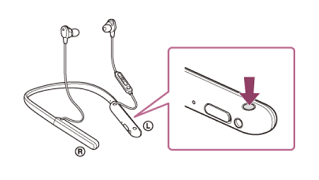
- Put the earphones in pairing mode
- Charge the earphones if they’re low on battery
Connecting Bluetooth Earphones to Your Device
Android
- Go to Settings > Bluetooth
- Turn Bluetooth on
- Select the earphones from the list of available devices
- Wait for the pairing process to complete
- Enter the PIN code (0000) if prompted
Ios
- Go to Settings > Bluetooth
- Turn Bluetooth on
- Select the earphones from the list of available devices
- Wait for the pairing process to complete
- Enter the PIN code (0000) if prompted
Windows
- Go to Settings > Devices > Add a Device
- Select Bluetooth from the list of available devices
- Wait for the pairing process to complete
- Enter the PIN code (0000) if prompted
Macos
- Go to System Preferences > Bluetooth
- Turn Bluetooth on
- Select the earphones from the list of available devices
- Wait for the pairing process to complete
Ps4
- Acquire an adapter that connects the earphones to the PS4’s USB port
- Follow the instructions provided with the adapter
Smartwatch
- Go to Settings > Bluetooth
- Turn Bluetooth on
- Select the earphones from the list of available devices
- Wait for the pairing process to complete
Connecting Two Devices
To connect two Bluetooth earphones to one device:
- Associate both earphones with each device
- Pair them using the Bluetooth settings on your device
Tips And Tricks
- Check compatibility before attempting to pair your earphones.
- Consult the user manual or contact a professional if you encounter issues during pairing.
Conclusion
Connecting Bluetooth earphones to various devices is a straightforward process that can enhance your listening experience. By following these step-by-step guides, you’ll be able to enjoy wireless audio with ease.
Frequently Asked Questions (FAQs)
- Q: How do I Know if my Bluetooth Earphones Are Compatible With my Device?
A: Check the user manual or manufacturer’s website for compatibility information. - Q: What is Pairing Mode, And How do I Put my Earphones in It?
A: Refer to the user manual or online resources for instructions on putting your earphones in pairing mode. - Q: Can I Connect Two Bluetooth Earphones to One Device?
A: Yes, but only if both earphones support dual-device connection.
Let me know if you’d like any further changes!


