
How to Download Powtoon Free on PC
As a content writer, I’d like to guide you through the process of downloading Powtoon free on your PC.
Table 1: Features of Powtoon Free Version
| Features | Description |
|---|---|
| Limited exports | Export up to 100 MB/month or 2 GB/year for free users. |
| Logotype present | Powtoon logo will be present in exported presentations. |
Understanding The Limitations of The Free Version
While downloading Powtoon free on your PC is possible, it’s essential to understand that there are limitations associated with the free version.
- The free version allows for limited exports (100 MB/month or 2 GB/year).
- The exported presentations will have a Powtoon logo.
- You can’t download Powtoon as an application on your PC; instead, you’ll use it through a web browser.
Step-by-step Guide to Downloading Powtoon Free
To access and export your presentations from the free version of Powtoon:
- Log in to your account using Google or Facebook credentials.
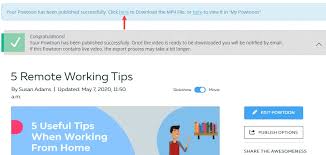
- Access your list of created presentations via the “My Powtoon” section.
- Click on the “Export” button for the desired presentation.
Additional Options: Downloading Presentations in Video Format
If you need to download a presentation in video format, you’ll have to opt for one of the paid subscription plans (Pro, Pro+, Agency). These plans come with additional features and benefits:
- Access to unlimited exports without the Powtoon logo.
- Increased storage capacity.
How to Download Powtoon on Smartphone And Tablet
Powtoon is also available as an app for Android and iOS devices. However, using the app has some limitations:
- It only allows you to visualize and share existing presentations from your account.
- You won’t be able to create new presentations directly within the app.
Steps to Download Powtoon App on Smartphone or Tablet
To download the Powtoon app on Android devices:
- Open the Google Play Store and search for “Powtoon”.
- Click on the app icon, then tap the “Install” button.
- Wait for the installation process to complete.
On iOS devices (iPhone or iPad):
- Open the App Store and search for “Powtoon”.
- Tap on the app icon, then click the “Get” button.
- You may be prompted to verify your identity using Face ID, Touch ID, or a passcode.
Subscription Plans: Unlocking Full Features
To access all features of Powtoon and unlock the full potential of this tool:
- Consider opting for one of the paid subscription plans (Pro, Pro+, Agency).
- Each plan offers additional storage capacity and increased export limits.
Conclusion
Downloading Powtoon free on your PC or device is a straightforward process. However, understanding the limitations of the free version is crucial to avoid any confusion. The paid subscription plans offer more features and benefits, making them ideal for users who require advanced functionality.
Faqs: Answers to Your Questions
- Q: Can I download Powtoon as an application on my PC?
- A: No, you can’t download Powtoon as an app on your PC; instead, use it through a web browser.
- Q: What are the limitations of the free version?
- A: The free version has limited exports (100 MB/month or 2 GB/year) and displays a Powtoon logo in exported presentations.
- Q: How do I download a presentation in video format?
- A: To download a presentation in video format, you need to opt for one of the paid subscription plans (Pro, Pro+, Agency).
- Q: Can I create new presentations directly within the Powtoon app on my smartphone or tablet?
- A: No, the app only allows you to visualize and share existing presentations from your account.
- Q: What are the benefits of the paid subscription plans (Pro, Pro+, Agency)?
- A: The paid plans offer increased storage capacity, unlimited exports without the Powtoon logo, and additional features.
Table 2: Subscription Plans Comparison
| Plan | Export Limits | Storage Capacity |
|---|---|---|
| Free | 100 MB/month or 2 GB/year | Limited |
| Pro | Unlimited (no logotype) | 1 GB |
| Pro+ | Unlimited (no logotype), boundless exports, and increased storage capacity | 10 GB |
| Agency | Unlimited (no logotype), boundless exports, increased storage capacity, and advanced animations in presentations | 20 GB |


