
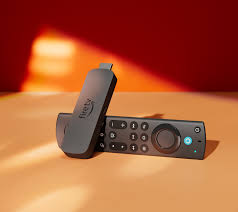
How to Watch TV on Fire Stick: A Comprehensive Guide
Are you tired of using your smartphone or tablet as a makeshift TV? Do you want to experience the thrill of watching live TV without the hassle of complicated setup processes? Look no further than Fire Stick, Amazon’s revolutionary streaming device that makes watching TV a breeze. In this article, we’ll take you through a step-by-step guide on how to watch your favorite TV shows and channels on Fire Stick.
What is Fire Stick?
Fire Stick is a streaming media player developed by Amazon. It allows users to access a wide range of entertainment content, including live TV, movies, and music, without the need for a separate set-top box or complicated installation procedures. With Fire Stick, you can enjoy your favorite TV shows and channels from anywhere in your home.
What Channels Can I Watch on Fire Stick?
One of the biggest advantages of using Fire Stick is that it allows users to watch live TV channels directly on their TVs without the need for a separate cable or satellite subscription. Some of the popular channels available on Fire Stick include:
- Rai: With Fire Stick, you can watch your favorite Rai channels, including Rai 1, Rai 2, and Rai 3.
- Mediaset: Mediaset is another Italian channel that’s now available on Fire Stick. You can watch live TV and catch up on your favorite shows with the Mediaset Infinity app.
- La7: LA7 is a popular Italian channel that offers a wide range of programming, including news, entertainment, and sports. With Fire Stick, you can watch LA7 live or catch up on past episodes.
How to Watch TV on Fire Stick: A Step-by-step Guide
Watching TV on Fire Stick is easy and straightforward. Here’s a step-by-step guide:
1. Download The App
The first step in watching TV on Fire Stick is to download the app for your favorite channel. For example, if you want to watch Rai channels, you’ll need to download the RaiPlay app.
2. Launch The App
Once you’ve downloaded the app, launch it and select the channel you want to watch. In this case, let’s say we’re watching Rai 1.
3. Select The Channel
After launching the app, select the channel you want to watch (in our example, Rai 1). You’ll be taken to a new menu where you can select from various options, including live TV and catch-up content.
4. Watch Live Tv
To watch live TV on Fire Stick, simply select the “Live” option in the app’s menu. This will take you directly to the live TV feed for your chosen channel (Rai 1 in this case).
5. Catch Up on Past Episodes
If you’ve missed a favorite show and want to catch up on past episodes, use the app’s menu to select “Catch-up” or “On Demand.” This will give you access to a range of past content from your chosen channel.
How to Watch Mediaset Channels on Fire Stick
Watching Mediaset channels on Fire Stick is similar to watching Rai channels. Here’s how:
- Download The App: First, download the Mediaset Infinity app.
- Launch The App: Once you’ve downloaded the app, launch it and select the channel you want to watch (e.G., Italia 1).
- Select The Channel: After launching the app, select the channel you want to watch (in our example, Italia 1).
- Watch Live TV: To watch live TV on Fire Stick, simply select the “Live” option in the app’s menu.
- Catch Up on Past Episodes: If you’ve missed a favorite show and want to catch up on past episodes, use the app’s menu to select “Catch-up” or “On Demand.”
How to Watch La7 Channels on Fire Stick
Watching LA7 channels on Fire Stick is similarly straightforward:
- Download The App: First, download the LA7 app.
- Launch The App: Once you’ve downloaded the app, launch it and select the channel you want to watch (e.G., LA7).
- Select The Channel: After launching the app, select the channel you want to watch (in our example, LA7).
- Watch Live TV: To watch live TV on Fire Stick, simply select the “Live” option in the app’s menu.
- Catch Up on Past Episodes: If you’ve missed a favorite show and want to catch up on past episodes, use the app’s menu to select “Catch-up” or “On Demand.”
Other Channels Available on Fire Stick
In addition to Rai, Mediaset, and LA7 channels, there are many other TV channels available on Fire Stick. Some of these include:
- Rai 2: With the RaiPlay app, you can watch live TV from Rai 2.
- Mediaset Premium: You can access a range of premium content with the Mediaset Infinity app.
- La7d: LA7’s sister channel offers entertainment and sports programming.
Conclusion
Watching TV on Fire Stick is easy and convenient. With this comprehensive guide, you should be able to get started in no time. Whether you’re interested in watching Rai channels, Mediaset channels, or other Italian TV networks, Fire Stick makes it all possible with just a few simple steps.
Faqs
- Q: Can I Watch Live TV on Fire Stick?
A: Yes, with the various apps available for different TV channels (e.G., RaiPlay, Mediaset Infinity), you can watch live TV directly on your TV using Fire Stick. - Q: What Channels Are Available on Fire Stick?
A: A range of Italian TV networks is available, including Rai, Mediaset, and LA7 channels. - Q: Can I Catch up on Past Episodes With The Apps?
A: Yes, most of the apps (e.G., RaiPlay, Mediaset Infinity) allow you to access a range of past content from your chosen channel. - Q: Are There Other Channels Available Besides Rai And Mediaset?
A: Yes, several other Italian TV networks are also available on Fire Stick. - Q: How do I Get Started With Watching TV on Fire Stick?
A: First, download the app for your favorite channel (e.G., RaiPlay), then follow the simple steps outlined above.


