
Life360: A Comprehensive Guide to Its Features And Benefits
Are you looking for a way to stay connected with your loved ones while also enjoying the freedom of knowing their whereabouts? Look no further than Life360, a revolutionary app that enables you to share your location with family members and friends in real-time. In this article, we will delve into the world of Life360, exploring its features, benefits, and how to use it effectively.
What is Life360?
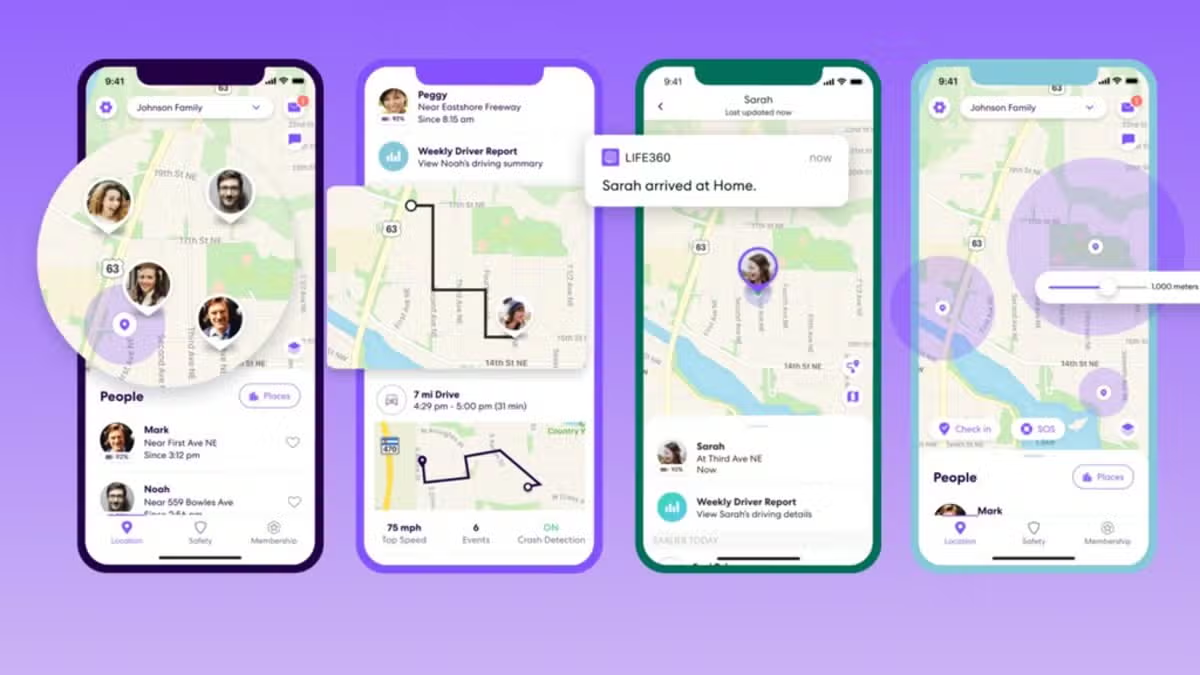
Life360 is a free application for smartphones and tablets that allows users to create groups (known as “Circles”) with family members or friends. Within these Circles, you can share your location, exchange messages, and receive notifications when group members arrive or leave specific locations. This feature is particularly useful for parents who want to keep tabs on their children’s whereabouts.
Creating a Life360 Account
To get started with Life360, you need to create an account by downloading the app from the Google Play Store (for Android devices) or the App Store (for iOS devices). Once installed, launch the app and tap on the “Start” button. You will be prompted to enter your phone number, which will serve as your login credentials.
Adding Family Members to Your Circle
To add family members or friends to your Circle, navigate to the “Create a new Circle” section and follow these steps:
- Select the option to create a new Circle.
- Enter the name of the Circle in the designated field.
- Choose the role you want to play within the Circle (e.G., Parent, child, friend).
- Add a photo to your profile if desired.
Configuring Places And Notifications
To configure places and notifications, follow these steps:
- Access the “Places” section from the main menu.
- Select the option to add a new place (e.G., Home, school, work).
- Enter the address of the place in the designated field.
- Save the place by tapping on the “Save” button.
Using Life360
Once you have created your Circle and configured places and notifications, you can start using Life360 to stay connected with your loved ones.
- Sharing Your Location: To share your location, navigate to the main menu and select the option to share your location. You will be prompted to choose which Circle(s) you want to share your location with.
- Receiving Notifications: When group members arrive or leave specific locations, you will receive notifications on your device.
Life360 Premium
To unlock additional features, such as advanced safety features and ad-free experience, consider upgrading to Life360 Premium. This subscription-based service offers a range of benefits, including:
- Advanced Safety Features: Receive alerts when group members drive recklessly or experience accidents.
- Ad-Free Experience: Enjoy an ad-free experience on the app.
Conclusion
Life360 is an innovative app that enables users to stay connected with loved ones while also enjoying the freedom of knowing their whereabouts. By following the steps outlined in this article, you can create your Circle, configure places and notifications, and start using Life360 to its full potential. Whether you’re a parent or just someone who wants to stay connected with friends and family, Life360 is an excellent choice.
Frequently Asked Questions
Q: What is Life360?
A: Life360 is a free app that allows users to create groups (known as “Circles”) with family members or friends. Within these Circles, you can share your location, exchange messages, and receive notifications when group members arrive or leave specific locations.
Q: How do I create a Life360 account?
A: To create an account, download the app from the Google Play Store (for Android devices) or the App Store (for iOS devices). Launch the app and tap on the “Start” button to begin the registration process.
Q: What are the benefits of using Life360 Premium?
A: Upgrading to Life360 Premium offers advanced safety features, such as alerts for reckless driving or accidents. You will also enjoy an ad-free experience on the app.
Q: How do I cancel my subscription to Life360 Premium?
A: To cancel your subscription, navigate to the Settings menu on your device and select the option to manage subscriptions. Follow the prompts to cancel your subscription.
Q: What is the cost of Life360 Premium?
A: The cost of Life360 Premium varies depending on the plan you choose. For Android devices, it costs €5.49 Per month or €54.99 Per year. On iOS devices, it costs €4.49 Per month or €43.99 Per year.
Q: Can I use Life360 with multiple devices?
A: Yes, you can use Life360 on multiple devices as long as they are connected to the same Circle.
Q: Is Life360 available for both Android and iOS devices?
A: Yes, Life360 is available for both Android and iOS devices.


