
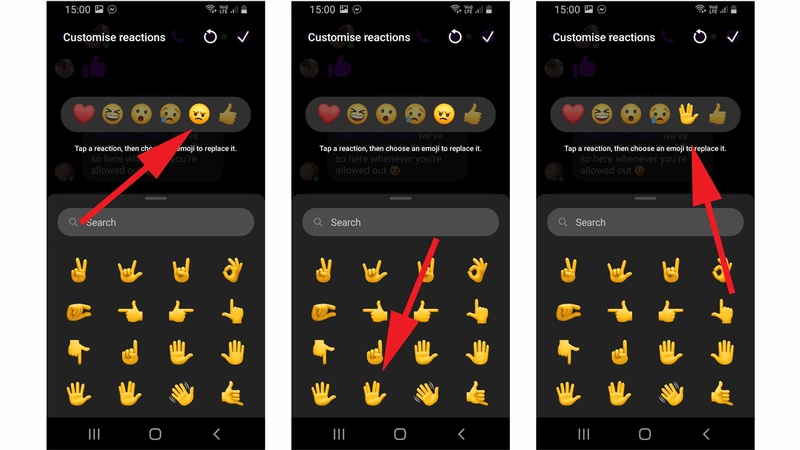
The Ultimate Guide to Modifying Emojis on Your Device
Are you tired of using the same old emojis on your device? Do you want to express yourself in a more unique and creative way? Look no further! In this comprehensive guide, we will show you how to modify emojis on various devices, including Android and iPhone.
Why Modify Emojis?
Emojis have become an essential part of our online communication. They add tone and personality to our messages, making them more engaging and fun. However, the default emojis provided by your device may not be enough to express yourself in a way that you want. By modifying emojis, you can create custom ones that reflect your personality and style.
Modifying Emojis on Android
If you have an Android device, there are several ways to modify emojis. One popular method is to use the Elite Emoji app. This app allows you to choose from various categories of emojis and customize them to your liking.
Here’s how to modify emojis using the Elite Emoji app:
- Download and install the Elite Emoji app on your Android device.
- Choose a category of emojis that suits your taste.
- Select an emoji that you want to customize.
- Tap on the + icon to access the customization options.
- Personalize your emoji by selecting different colors, shapes, and styles.
- Save your custom emoji and use it in your messages.
Modifying Emojis on Iphone
If you have an iPhone, you can modify emojis using the Memoji feature. This feature allows you to create custom emojis that resemble your face or a character.
Here’s how to modify emojis using the Memoji feature:
- Open the Messages app and start a new conversation.
- Tap on the smiley face icon to access the emoji keyboard.
- Choose the Memoji option and select a template for your emoji.
- Personalize your emoji by selecting different colors, shapes, and styles.
- Save your custom emoji and use it in your messages.
Modifying Emojis on Whatsapp
WhatsApp is one of the most popular messaging apps today. However, the default emojis provided by WhatsApp may not be enough to express yourself in a way that you want. To modify emojis on WhatsApp, you can use the New Stickers & Meme Maker app.
Here’s how to modify emojis using the New Stickers & Meme Maker app:
- Download and install the New Stickers & Meme Maker app on your device.
- Choose a pack of emojis that suits your taste.
- Add the emojis to your WhatsApp keyboard by tapping on the “Add” button.
- Use the custom emojis in your messages.
Modifying Emojis on Snapchat
Snapchat is another popular social media platform that allows you to modify emojis. To do this, follow these steps:
- Open the Snapchat app and go to the chat screen.
- Tap on the settings icon (represented by a gear).
- Select the “Personalize Emoji” option.
- Choose an emoji from the list provided.
- Customize your emoji by selecting different colors, shapes, and styles.
Conclusion
Modifying emojis is a fun and creative way to express yourself online. By following the steps outlined in this guide, you can create custom emojis that reflect your personality and style. Whether you use an Android or iPhone device, or apps like WhatsApp and Snapchat, there are plenty of options available to help you modify emojis to suit your needs.
Frequently Asked Questions (FAQs)
- Q: Why do I Need to Modify Emojis?
A: Emojis add tone and personality to our messages, making them more engaging and fun. - Q: How Can I Modify Emojis on Android?
A: You can use the Elite Emoji app or other third-party apps to customize your emojis. - Q: Can I Modify Emojis on Iphone?
A: Yes, you can use the Memoji feature in the Messages app to create custom emojis. - Q: How do I Add Custom Emojis to Whatsapp?
A: You can use the New Stickers & Meme Maker app or other third-party apps to add custom emojis to your WhatsApp keyboard. - Q: Can I Modify Emojis on Snapchat?
A: Yes, you can personalize your emoji by selecting different colors, shapes, and styles. - Q: Are There Any Risks Associated With Modifying Emojis?
A: No, there are no risks associated with modifying emojis. However, be cautious when using third-party apps to add custom emojis, as some may contain malware or other security threats. - Q: Can I Use Custom Emojis on All Social Media Platforms?
A: Unfortunately, not all social media platforms support custom emojis. Check the specific platform’s guidelines for more information. - Q: How Can I Update my Custom Emojis?
A: You can usually update your custom emojis by reinstalling the app or updating to a newer version.


