
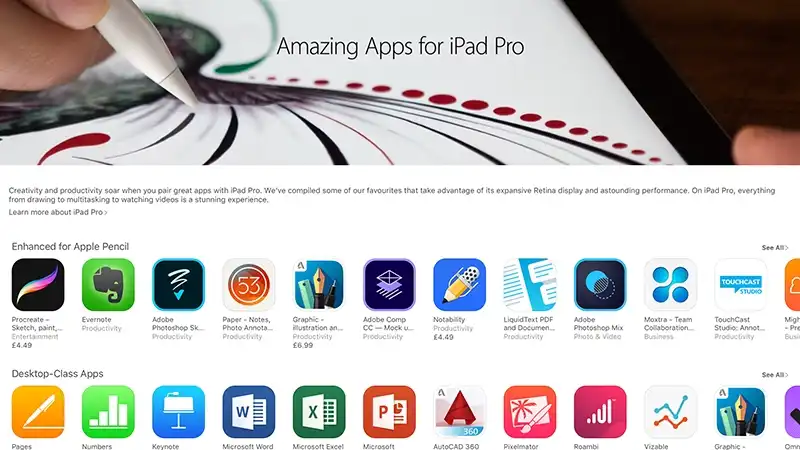
The Ultimate Guide to Designing on Ipad: Top Apps to Get You Started
Are you an aspiring digital cartoonist looking to unleash your creativity on the go? Look no further! With the rise of iPad design apps, creating stunning cartoons has never been easier or more fun. In this comprehensive guide, we’ll explore the top iPad design apps that will get you started on your artistic journey.
Why Design on Ipad?
Before we dive into the world of iPad design, let’s talk about why designing on a tablet is a great idea. The iPad’s intuitive interface and precision touch make it an ideal tool for creating digital art. Plus, with the Apple Pencil, you can enjoy an unparalleled drawing experience.
The Best Ipad Design Apps
Here are our top picks for the best iPad design apps:
1. Procreate
Procreate is a powerhouse of a design app that’s sure to impress even the most seasoned artists. With a vast array of brushes and tools at your fingertips, you’ll be able to create stunning digital paintings and cartoons with ease.
- Price: $9.99
- Features: High-definition canvases, advanced brush engine, and seamless integration with Apple Pencil
2. Adobe Fresco
Adobe Fresco is another excellent choice for iPad design enthusiasts. This app offers a range of brushes and tools that will help you create beautiful digital artworks.
- Price: Free (with in-app purchases)
- Features: A vast library of brushes, intuitive interface, and seamless integration with Apple Pencil
3. Sketchbook
SketchBook is an excellent choice for free cartoonists who want to create conceptual sketches or finished artworks. This app offers a range of brushes and tools that will help you bring your ideas to life.
- Price: Free
- Features: A wide range of brushes, intuitive interface, and seamless integration with Apple Pencil
4. Pixelmator
Pixelmator is a powerful image editing app that’s perfect for creating digital cartoons and artworks. With a range of tools and features at your fingertips, you’ll be able to create stunning images in no time.
- Price: $4.99
- Features: Advanced image editing capabilities, seamless integration with Apple Pencil, and high-definition canvases
Ipad Design Apps For 3D Creation
If you’re looking to venture into the world of 3D creation, here are some top iPad design apps that will help you get started:
1. Umake
UMake is a versatile 3D modeling app that’s perfect for creating digital cartoons and artworks. With a range of tools and features at your fingertips, you’ll be able to create stunning 3D models in no time.
- Price: $16.99/Month (with a free trial)
- Features: Advanced 3D modeling capabilities, seamless integration with Apple Pencil, and high-definition canvases
2. Sketchup Viewer
SketchUp Viewer is a powerful app that allows you to view and interact with 3D models created on the computer. With this app, you’ll be able to visualize your designs in stunning detail.
- Price: Free (with in-app purchases)
- Features: Advanced 3D visualization capabilities, seamless integration with Apple Pencil, and high-definition canvases
Ipad Design Apps For Tattoo Creation
If you’re looking to create custom tattoos on the go, here are some top iPad design apps that will help you get started:
1. Tattoo Maker – Tattoo My Photo
Tattoo Maker is a user-friendly app that allows you to create custom tattoos using pre-designed patterns or creating your own from scratch.
- Price: $4.99 (With in-app purchases)
- Features: A range of tattoo designs, seamless integration with Apple Pencil, and high-definition canvases
2. Tatuaggio Photo Hd
Tatuaggio Photo HD is another excellent choice for creating custom tattoos on the go. With a range of pre-designed patterns and tools at your fingertips, you’ll be able to create stunning tattoos in no time.
- Price: Free (with in-app purchases)
- Features: A wide range of tattoo designs, seamless integration with Apple Pencil, and high-definition canvases
Conclusion
Designing on iPad has never been easier or more fun. With these top design apps at your fingertips, you’ll be able to create stunning digital cartoons, 3D models, and custom tattoos in no time. Whether you’re a seasoned artist or a beginner, these apps will help you unleash your creativity and bring your ideas to life.
Faqs
-
Q: What is The Best Ipad Design App For Beginners?
A: Procreate is an excellent choice for beginners, with its intuitive interface and range of brushes and tools at your fingertips. -
Q: Can I Use Apple Pencil With These Apps?
A: Yes, all of the above-mentioned apps are compatible with Apple Pencil, making it easy to create stunning digital art on the go. -
Q: Are These Apps Free?
A: Some of the apps mentioned above are free, while others offer in-app purchases or subscription-based models. -
Q: Can I Export my Designs From These Apps?
A: Yes, all of the above-mentioned apps allow you to export your designs in various formats, making it easy to share them with others. -
Q: Are These Apps Compatible With Ipados?
A: Yes, all of the above-mentioned apps are compatible with iPadOS, ensuring seamless performance and integration with your device. -
Q: Can I Use These Apps For Professional Purposes?
A: Yes, many of the apps mentioned above are suitable for professional use, offering advanced features and tools that will help you create stunning digital art. -
Q: Are There Any Tutorials or Guides Available For These Apps?
A: Yes, each app has its own tutorial or guide to help you get started and learn how to use it effectively. -
Q: Can I Customize my Designs With These Apps?
A: Yes, all of the above-mentioned apps allow you to customize your designs with a range of tools and features at your fingertips.


