
How to Find The Url of a Video on Youtube, Facebook, Raiplay, And More
Are you tired of not being able to share videos with your friends and family? Do you want to know how to find the URL of a video on various platforms like YouTube, Facebook, RaiPlay, and more? Look no further! In this article, we will guide you through the process of finding the URL of a video on different platforms using your computer, smartphone, or tablet.
Why Find The Url of a Video?
Finding the URL of a video allows you to share it with others easily. Whether you want to share a funny video with friends on WhatsApp or Telegram, a trailer of a movie on Facebook, or a live stream on RaiPlay, having the URL will make it easy for you to do so.
Youtube: The Ultimate Video-sharing Platform
YouTube is one of the most popular video-sharing platforms in the world. If you want to share a video on YouTube, follow these steps:
Using Your Computer
- Open your browser and navigate to www.Youtube.Com.
- Search for the video you want to share.
- Click on the video to open it.
- Click on the “Share” button below the video player.
- Copy the URL of the video from the share box.
Using Your Smartphone or Tablet
- Open the YouTube app on your device.
- Search for the video you want to share.
- Tap on the video to open it.
- Tap on the “Share” button below the video player.
- Select the option to copy the URL of the video.
Facebook: Share Videos With Friends And Family
Facebook is another popular platform where you can share videos with your friends and family. To find the URL of a video on Facebook:
Using Your Computer
- Open your browser and navigate to www.Facebook.Com.
- Log in to your account.
- Search for the video you want to share.
- Click on the three dots below the video player.
- Select the option to copy the URL of the video.
Using Your Smartphone or Tablet
- Open the Facebook app on your device.
- Log in to your account.
- Search for the video you want to share.
- Tap on the three dots below the video player.
- Select the option to copy the URL of the video.
Raiplay: Live And On-demand Content
RaiPlay is a popular platform for live and on-demand content, including movies, series, fiction, and more. To find the URL of a video on RaiPlay:
Using Your Computer
- Open your browser and navigate to www.Raiplay.It.
- Search for the video you want to share.
- Click on the video to open it.
- Copy the URL of the video from the address bar.
Using Your Smartphone or Tablet
- Open the RaiPlay app on your device.
- Search for the video you want to share.
- Tap on the video to open it.
- Tap on the “Share” button below the video player.
- Select the option to copy the URL of the video.
Using a Browser: Chrome, Firefox, Edge, And Safari
If you want to find the URL of a video using a browser, follow these steps:
Chrome (Windows, Macos, Linux)
- Open Google Chrome.
- Search for the video you want to share.
- Click on the video to open it.
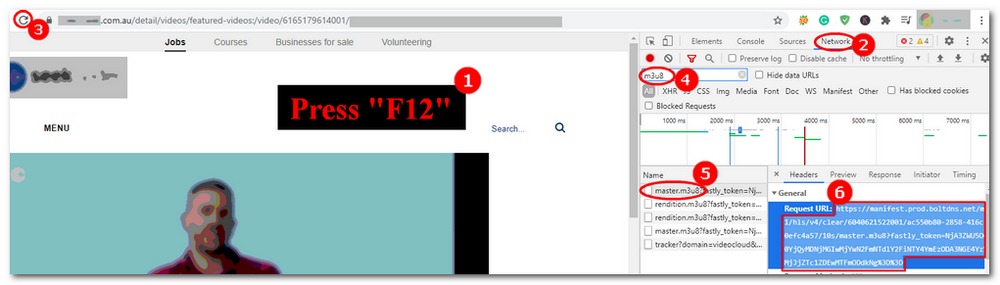
- Press Ctrl+Shift+E (Windows) or Cmd+Option+E (macOS) to open the developer tools.
- Look for the URL of the video in the address bar.
Firefox (Windows, Macos, Linux)
- Open Mozilla Firefox.
- Search for the video you want to share.
- Click on the video to open it.
- Press Ctrl+Shift+E (Windows) or Cmd+Option+E (macOS) to open the developer tools.
- Look for the URL of the video in the address bar.
Edge (Windows, Macos, Linux)
- Open Microsoft Edge.
- Search for the video you want to share.
- Click on the video to open it.
- Press Ctrl+Shift+E (Windows) or Cmd+Option+E (macOS) to open the developer tools.
- Look for the URL of the video in the address bar.
Safari (macOS)
- Open Safari.
- Search for the video you want to share.
- Click on the video to open it.
- Press Ctrl+Shift+E (Windows) or Cmd+Option+E (macOS) to open the developer tools.
- Look for the URL of the video in the address bar.
Conclusion
Finding the URL of a video on various platforms is easy and convenient. Whether you’re using YouTube, Facebook, RaiPlay, or other browsers like Chrome, Firefox, Edge, or Safari, following these steps will help you find the URL of a video in no time. So next time you want to share a funny video with friends or family, just remember to find the URL!
Frequently Asked Questions
- Q: How do I Find The Url of a Video on Youtube?
A: To find the URL of a video on YouTube, follow these steps: Open your browser and navigate to www.Youtube.Com, search for the video you want to share, click on the video to open it, click on the “Share” button below the video player, and copy the URL of the video from the share box. - Q: How do I Find The Url of a Video on Facebook?
A: To find the URL of a video on Facebook, follow these steps: Open your browser and navigate to www.Facebook.Com, log in to your account, search for the video you want to share, click on the three dots below the video player, and select the option to copy the URL of the video. - Q: How do I Find The Url of a Video on Raiplay?
A: To find the URL of a video on RaiPlay, follow these steps: Open your browser and navigate to www.Raiplay.It, search for the video you want to share, click on the video to open it, copy the URL of the video from the address bar. - Q: How do I Find The Url of a Video Using a Browser?
A: To find the URL of a video using a browser, follow these steps: Open your browser, search for the video you want to share, click on the video to open it, press Ctrl+Shift+E (Windows) or Cmd+Option+E (macOS) to open the developer tools, and look for the URL of the video in the address bar. - Q: What if I Don’t See The Url of The Video?
A: If you don’t see the URL of the video, try using an extension like Video DownloadHelper, which can help you find the URL of a video on various platforms.


