
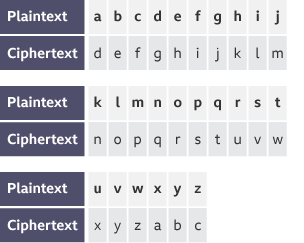
How to Encrypt Messages Online: A Guide to Safeguarding Your Privacy
As we increasingly rely on digital communication, it’s essential to protect our personal information from prying eyes. Encrypting messages online is a simple yet effective way to safeguard your privacy and maintain the confidentiality of your conversations. In this guide, we’ll explore various methods to encrypt messages online, using popular platforms like WhatsApp and email.
Why Encrypt Messages Online?
Encrypting messages online ensures that only authorized individuals can access and read your communications. This is particularly important when sharing sensitive information or engaging in online transactions. By encrypting your messages, you can:
- Prevent unauthorized access to your conversations
- Maintain confidentiality of personal information
- Protect against cyber threats and data breaches
Method 1: Using Multidec For Simple Encryption
Multidec is a website that offers an easy-to-use interface for encrypting messages online. To use it, follow these steps:
- Visit the Multidec website and select the language you prefer.
- Choose a cipher from the list provided.
- Type your message in the text box and click on the “Convert” button.
- Copy and paste the encrypted message to share with others.
Multidec uses various encryption algorithms, including AES-256 and RSA-2048. This method is ideal for simple encryption needs, such as protecting short messages or sharing information within a small group.
Method 2: Encrypting Whatsapp Messages
WhatsApp has introduced end-to-end encryption (E2EE) to ensure that conversations remain private and secure. To enable E2EE on WhatsApp:
- Open WhatsApp and navigate to the conversation you want to encrypt.
- Tap on the contact’s name, then scroll down to “Cryptography.”
- Select the “QR code” option and share it with the other party.
This will activate E2EE for your conversations, making them unreadable to anyone who doesn’t have both keys (yours and the recipient’s).
Method 3: Encrypting Email Messages
To encrypt email messages using OpenPGP:
- Download and install Thunderbird, a free email client.
- Configure Thunderbird by adding your public key.
- Generate a new key pair in Thunderbird.
- Send your public key to the recipient, who must also generate their own key pair.
Once both parties have the necessary keys, you can send encrypted emails using OpenPGP. This method provides an additional layer of security for sensitive information shared via email.
Additional Tips And Resources
- Always use a secure password to protect your encryption keys.
- Consider encrypting backups of your conversations to prevent unauthorized access.
- For more in-depth information on encryption methods, visit the OpenPGP website or consult online resources like Wikipedia.
Conclusion
Encrypting messages online is an essential step towards maintaining digital security and protecting personal information. By using methods like Multidec, WhatsApp’s E2EE, and OpenPGP, you can safeguard your conversations and prevent unauthorized access. Remember to always use secure passwords and consider encrypting backups for added protection.
Frequently Asked Questions (FAQs)
- What is The Difference Between Encryption And Decryption?
Encryption transforms plaintext into unreadable ciphertext, while decryption converts ciphertext back into readable plaintext.
- How do I Know if a Message Has Been Encrypted?
Look for indicators like encrypted symbols or codes in the message itself. You can also check with the sender to confirm that they used an encryption method.
- Can I Encrypt Messages on Other Platforms Besides Whatsapp And Email?
Yes, many messaging apps and services offer built-in encryption features. Research and explore available options to ensure your digital security.
- What Happens if I Lose my Encryption Key or Password?
If you lose your key or password, you may not be able to access encrypted messages or conversations. Consider storing backups of your keys securely.
- Is Encrypting Messages Online Enough to Prevent Cyber Threats?
No, encryption is just one aspect of digital security. Implement robust passwords, use secure protocols, and stay informed about emerging threats to protect yourself comprehensively.
- Can I Encrypt Large Files or Attachments?
Some encryption methods can handle larger files or attachments, but others may not be suitable for bulk data transfer. Consult specific documentation for each method to determine compatibility.
- How do I Enable Two-factor Authentication (2FA) For Added Security?
Enable 2FA on your accounts and devices to add an extra layer of protection against unauthorized access.
- What Resources Are Available to Learn More About Encryption And Digital Security?
Consult online resources like Wikipedia, OpenPGP’s official website, or reputable cybersecurity blogs for comprehensive information on encryption methods and best practices.
- Can I Use Encryption Methods Without Technical Expertise?
Yes, many encryption tools and services provide user-friendly interfaces, making it possible to encrypt messages online even with minimal technical knowledge.
- What Are The Consequences of Not Using Encryption or Secure Communication Methods?
Not encrypting your communications can lead to unauthorized access, data breaches, and other cyber threats. Protect yourself by implementing robust security measures.


