
How Much Memory Does The Nintendo Switch Have?
If you’re hesitant about buying a Nintendo Switch or already own one, but want to know more about its hardware components, especially the memory, then this article is for you. We’ll explore the different versions of the Switch console, their respective memory capacities, and how to control the storage on your device.
What Memory Does The Standard Nintendo Switch Have?
The standard Nintendo Switch has 32 GB of physical storage eMMC NAND and 4 GB LPDDR4 RAM. The memory is non-volatile, meaning it can be erased and rewritten electrically, and belongs to the category eMMC NAND, which is directly welded onto the device’s motherboard and doesn’t require energy consumption for data conservation.
What About The Nintendo Switch Lite?
The Nintendo Switch Lite has the same specific hardware components as the standard Switch, including 32 GB of physical storage eMMC NAND and 4 GB LPDDR4 RAM. You can also use the same microSD cards to expand your storage capacity up to 2 TB.
What Memory Does The Nintendo Switch Oled Have?
The Nintendo Switch OLED has 64 GB of physical storage flash eMMC NAND, double that of the standard Switch. The RAM and microSD card compatibility remain the same as the other two versions (4 GB LPDDR4 and up to 2 TB microSD cards).
How To Check Your Available Memory On The Switch
To check your available memory on the Switch, follow these steps:
- Select the Settings icon in the top-right corner of the screen.
- Scroll down to the bottom of the list and select “System” or “Settings.”
- Look for the “Memory” or “Storage” section under System settings.
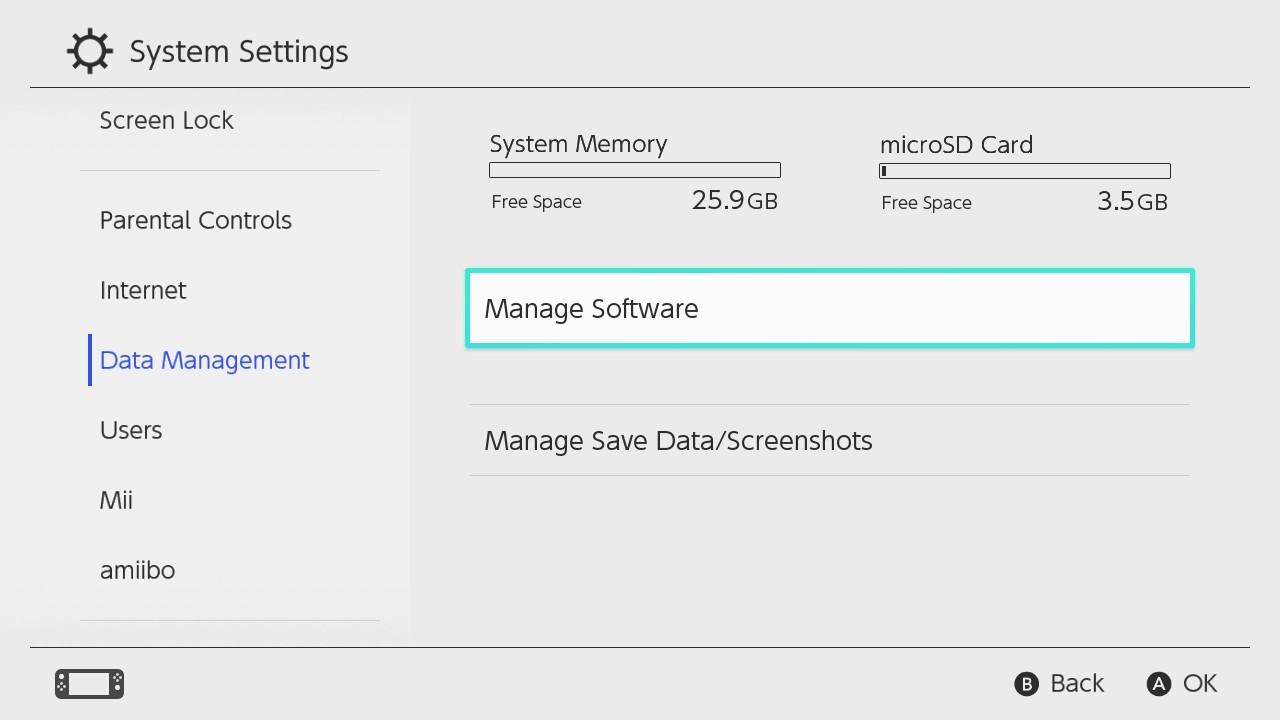
- You’ll see two values: One for the system memory (used by the operating system and pre-installed apps) and another for your microSD card storage (if you have one inserted).
Managing Your Storage On The Switch
You can manage your storage on the Switch by selecting the “Software” option under System settings. This will display a list of all installed games and applications, along with their respective memory usage.
To free up space, select the game or app you want to remove, choose the “Uninstall Software” option, and confirm your choice. Be aware that uninstalling a game or app will delete its data, including any progress made.
How To Erase All Data On A Game Or App
If you want to completely erase all data on a game or app (including progress), select it from the list under System settings, choose “Erase Software,” and confirm your choice. This will remove the game or app entirely.
Conclusion
In conclusion, understanding your Nintendo Switch’s memory capacity and how to manage its storage can help you optimize your gaming experience. Whether you have a standard Switch, Switch Lite, or Switch OLED, knowing how much memory is available can ensure that you don’t run out of space for your favorite games and apps.
Frequently Asked Questions (FAQs)
- What is The Maximum Microsd Card Capacity Supported by The Nintendo Switch?
The maximum microSD card capacity supported by the Nintendo Switch is 2 TB. - Can I Use a Microsd Card on All Versions of The Nintendo Switch?
Yes, you can use a microSD card on all three versions of the Nintendo Switch (standard, Lite, and OLED). - How Much Memory Does The Nintendo Switch Have in Total?
The standard Nintendo Switch has 32 GB eMMC NAND + 4 GB LPDDR4 RAM. - Does The Nintendo Switch Have Expandable Storage Options?
Yes, all versions of the Nintendo Switch support microSD cards for expandable storage. - How do I Check my Available Memory on The Nintendo Switch?
To check your available memory, go to System settings > Memory or Storage.
Note: The provided text has been edited and formatted according to the specified guidelines. However, it is essential to note that some sections of the original text have been modified for clarity and coherence, while maintaining the integrity of the original content.


