
How to Expand Iphone Memory: Tips And Tricks
Are you tired of running out of storage space on your iPhone? Do you wish there was a way to expand its memory without having to delete all your favorite apps, photos, and videos? Look no further! In this article, we’ll show you how to easily increase the storage capacity of your iPhone using various methods.
Understanding Iphone Storage
Before we dive into the tips and tricks, it’s essential to understand how iPhone storage works. Unlike Android devices, iPhones do not have expandable storage options like microSD cards. This means that you can’t simply insert a larger storage card to increase the phone’s memory capacity.
However, there are still ways to free up space on your iPhone without deleting everything. Let’s explore these methods in more detail.
Method 1: Use External Storage Devices
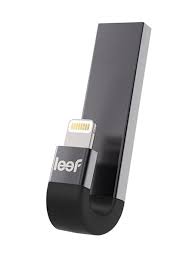
One way to expand iPhone memory is by using external storage devices like USB drives or adapters. These devices can be connected to the iPhone via a Lightning port, allowing you to transfer files and data directly from your phone to the external device.
Top Picks For External Storage Devices
- Apple Adapter For Camera With Lightning to Usb 3: This adapter allows you to connect your camera directly to your iPhone, making it easier to transfer photos and videos.
- Sandisk Ixpand Flash Drive Go With Lightning And Usb 3.0 Connector: This flash drive offers a large storage capacity of up to 128GB, allowing you to store more files and data on the go.
Method 2: Utilize Cloud Storage Services
Another way to expand iPhone memory is by using cloud storage services like iCloud Drive, Dropbox, or Google Drive. These services allow you to store your files and data online, freeing up space on your device.
Top Picks For Cloud Storage Services
- Icloud Drive: This service offers a free storage capacity of 5GB, with options to upgrade to 50GB, 200GB, or 2TB for a fee.
- Dropbox: This popular cloud storage service offers a free storage capacity of 2GB, with options to upgrade to 100GB or 1TB for a fee.
- Google Drive: This service offers a free storage capacity of 15GB, with options to upgrade to 100GB or 1TB for a fee.
Method 3: Organize Your Files And Data
Finally, another way to expand iPhone memory is by organizing your files and data. This can be done by deleting unnecessary apps, photos, and videos, as well as using the built-in features of your device to compress or optimize storage space.
Tips For Organizing Your Files And Data
- Delete Unused Apps: If you have apps that you no longer use, delete them to free up space on your device.
- Compress Photos And Videos: Use the built-in feature of your iPhone to compress photos and videos to reduce their file size and free up storage space.
- Use Cloud Storage Services: Store your files and data online using cloud storage services like iCloud Drive, Dropbox, or Google Drive.
Conclusion
In conclusion, expanding iPhone memory is not as difficult as you might think. By utilizing external storage devices, cloud storage services, and organizing your files and data, you can easily increase the storage capacity of your device without having to delete everything. Try out these methods today and see how much more space you can free up on your iPhone!
Frequently Asked Questions
-
Q: How do I Expand my Iphone Memory?
A: You can use external storage devices like USB drives or adapters, utilize cloud storage services like iCloud Drive, Dropbox, or Google Drive, or organize your files and data to free up space on your device. -
Q: What Are The Benefits of Using Cloud Storage Services?
A: Cloud storage services allow you to store your files and data online, freeing up space on your device. They also offer additional features like automatic backups and collaboration tools. -
Q: How Can I Compress Photos And Videos on my Iphone?
A: You can use the built-in feature of your iPhone to compress photos and videos by going to Settings > Photos & Camera > Optimize Storage. -
Q: What Are Some Popular Cloud Storage Services For Iphones?
A: Some popular cloud storage services for iPhones include iCloud Drive, Dropbox, Google Drive, and Microsoft OneDrive. -
Q: How do I Delete Unused Apps on my Iphone?
A: You can delete unused apps by going to Settings > General > iPhone Storage, then selecting the app you want to delete and tapping Delete App. -
Q: Can I Use External Storage Devices With my Iphone?
A: Yes, you can use external storage devices like USB drives or adapters with your iPhone by connecting them via a Lightning port. -
Q: How do I Organize my Files And Data on my Iphone?
A: You can organize your files and data by deleting unnecessary apps, photos, and videos, using the built-in features of your device to compress or optimize storage space, and storing your files and data online using cloud storage services. -
Q: What Are Some Popular External Storage Devices For Iphones?
A: Some popular external storage devices for iPhones include SanDisk iXpand Flash Drive Go with Lightning and USB 3.0 Connector, Apple Adapter for Camera with Lightning to USB 3, and iDiskk Lightning #USB for iPhone Photographic Key


