
Discovering Audible: A Comprehensive Guide to The Ultimate Audiobook Service
Are you a bookworm who loves listening to stories, but doesn’t have the time to sit down with a physical copy? Or perhaps you’re someone who prefers the convenience of carrying your favorite audiobooks on-the-go? Look no further than Audible, Amazon’s premier audiobook service.
What is Audible?
Audible is an online platform that offers a vast collection of audiobooks, podcasts, and original content. With over 70,000 titles to choose from, you’re bound to find something that suits your tastes. Whether it’s fiction, non-fiction, mystery, thriller, or even classic literature, Audible has got you covered.
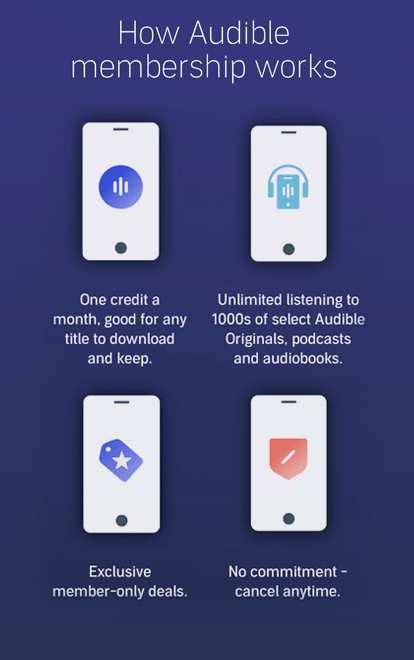
How Does Audible Work?
Signing up for Audible is easy and free! Simply go to their website, create an account, and start browsing through their extensive library of audiobooks. You can search by genre, author, title, or even browse the “Best Sellers” section to see what’s currently popular.
Benefits of Using Audible
- Convenience: With Audible, you can listen to your favorite books anywhere, anytime – be it during your daily commute, while working out, or simply relaxing at home.
- Cost-effective: By subscribing to Audible’s monthly service, you’ll get access to thousands of audiobooks for a fraction of the cost compared to buying physical copies or individual e-books.
- Variety: With such an extensive library of titles to choose from, you’re sure to find something that piques your interest.
How to Use Audible on Smartphones And Tablets
Using Audible on your mobile device is straightforward:
- Download the Audible app for Android or iOS devices.
- Sign in with your Amazon account credentials.
- Browse through their library of audiobooks, add them to your “Bookshop,” or start listening directly.
Using Audible on PC
If you prefer using your computer to access Audible:
- Go to the Audible website and sign in with your Amazon account credentials.
- Click on the “Get Started” button to begin browsing their library of audiobooks.
- You can add books to your “Bookshop,” start listening directly, or even download them for offline listening.
Using Audible on Amazon Echo
If you’re an Alexa user:
- Simply say “Alexa, play [book title] from Audible” to start listening.
- If you’ve already started a book on your PC or smartphone, you can say “Alexa, continue listening to Audible” to pick up where you left off.
Benefits of Using Audible on Amazon Echo
- Hands-free: With Alexa integration, you can control your audiobook playback without needing to physically interact with the device.
- Convenience: Start or stop listening to your favorite books with just a voice command.
- Accessibility: Perfect for those who prefer a hands-free experience.
Tips And Tricks
- Use the “Explore” section on Audible’s website to discover new titles, authors, and genres.
- Create a “Wishlist” of audiobooks you’d like to listen to in the future.
- Take advantage of Audible’s exclusive podcasts and original content.
Conclusion
Audible is an incredible service that offers something for everyone. With its vast library of audiobooks, user-friendly interface, and affordable pricing plan, it’s no wonder why millions of book lovers have made the switch to listening instead of reading. Whether you’re a seasoned reader or just looking for a new way to enjoy stories, Audible is an excellent choice.
Frequently Asked Questions
- Q: Is Audible free?
A: While signing up and exploring their library is free, access to most audiobooks requires a subscription. - Q: How do I cancel my Audible subscription?
A: Simply go to your account settings on the Audible website or app and follow the prompts to cancel your subscription. - Q: Can I download audiobooks for offline listening?
A: Yes, you can download audiobooks from the Audible app or website for offline listening. - Q: Is Audible compatible with Amazon Echo devices?
A: Yes, Audible is fully integrated with Alexa, allowing you to control playback with voice commands. - Q: Can I share my Audible account with others?
A: No, Audible accounts are individual and cannot be shared with others. - Q: How do I access exclusive podcasts on Audible?
A: You can find exclusive podcasts in the “Audible Originals” section of their website or app. - Q: Can I gift audiobooks to friends and family through Audible?
A: Yes, you can purchase individual audiobooks as gifts for others. - Q: Is there a minimum commitment required to use Audible?
A: No, you’re free to cancel your subscription at any time without penalty.
Hope this guide has helped you discover the amazing world of Audible!


