
How to Create a Gmail Account: A Step-by-step Guide
Are you looking to create a Gmail account? Look no further! This article will guide you through the process of creating a new Gmail account on your PC, Android device, iPhone, and even for minors.
Why Create a Gmail Account?
Before we dive into the steps, let’s quickly discuss why you might want to create a Gmail account. With over 1.5 Billion active users, Gmail is one of the most popular email services in the world. It’s free, easy to use, and offers a wide range of features that make it an ideal choice for personal and professional use.
Creating a Gmail Account on PC
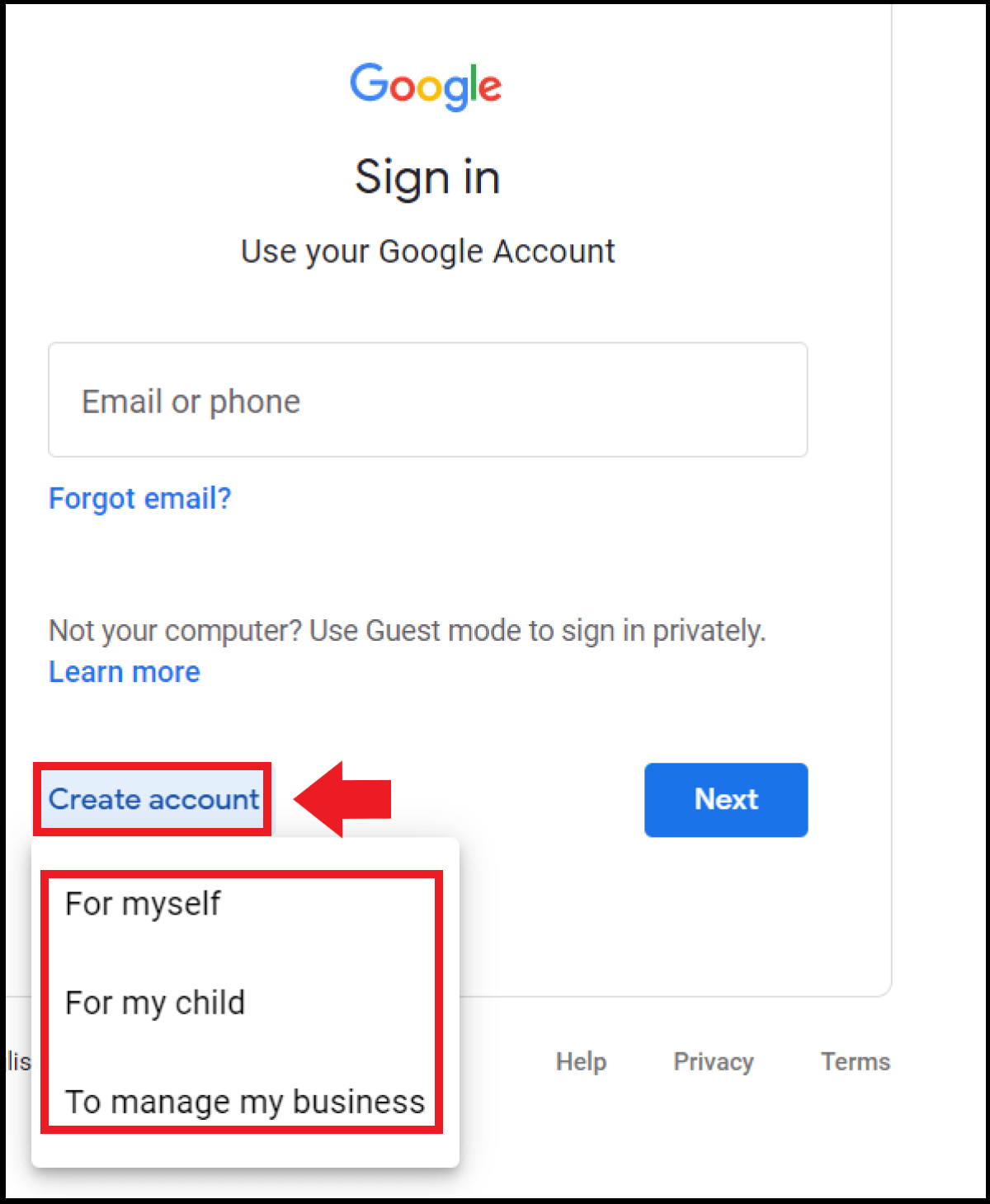
To create a Gmail account on your PC, follow these steps:
- Visit The Gmail Website: Go to the official Gmail website (www.Gmail.Com) and click on the “Create account” button.
- Enter Your Name: Enter your name in the required field.
- Choose a Username: Choose a unique username that will be used as your email address. This should be 6-30 characters long.
- Enter Your Birthdate: Enter your date of birth to verify your age.
- Select Your Gender: Select your gender from the available options.
- Create a Password: Create a strong password that is at least 8 characters long and includes a mix of uppercase and lowercase letters, numbers, and special characters.
- Confirm Your Password: Re-enter your password to confirm it.
- Enter Recovery Information: Enter an alternate email address or phone number where you can be reached in case you forget your password.
- Choose Your Account Type: Choose whether you want a basic or Google account with more features.
- Review And Accept Terms: Review the terms of service and click on “Accept” to complete the process.
Creating a Gmail Account on Android
If you’re using an Android device, here’s how you can create a Gmail account:
- Download And Install The Gmail App: Download and install the Gmail app from the Google Play Store.
- Open The App: Open the app and tap on the “Create account” button.
- Enter Your Name: Enter your name in the required field.
- Choose a Username: Choose a unique username that will be used as your email address.
- Enter Your Birthdate: Enter your date of birth to verify your age.
- Select Your Gender: Select your gender from the available options.
- Create a Password: Create a strong password that is at least 8 characters long and includes a mix of uppercase and lowercase letters, numbers, and special characters.
- Confirm Your Password: Re-enter your password to confirm it.
- Enter Recovery Information: Enter an alternate email address or phone number where you can be reached in case you forget your password.
- Choose Your Account Type: Choose whether you want a basic or Google account with more features.
Creating a Gmail Account on Iphone
If you’re using an iPhone, here’s how you can create a Gmail account:
- Download And Install The Gmail App: Download and install the Gmail app from the App Store.
- Open The App: Open the app and tap on the “Create account” button.
- Enter Your Name: Enter your name in the required field.
- Choose a Username: Choose a unique username that will be used as your email address.
- Enter Your Birthdate: Enter your date of birth to verify your age.
- Select Your Gender: Select your gender from the available options.
- Create a Password: Create a strong password that is at least 8 characters long and includes a mix of uppercase and lowercase letters, numbers, and special characters.
- Confirm Your Password: Re-enter your password to confirm it.
- Enter Recovery Information: Enter an alternate email address or phone number where you can be reached in case you forget your password.
Creating a Gmail Account For Minors
If you’re creating a Gmail account for a minor, here’s what you need to do:
- Create an Adult Account: Create an adult account first.
- Add The Minor as a Contact: Add the minor as a contact on your existing account.
- Follow The Same Steps: Follow the same steps to create a new Gmail account for the minor.
Creating a Gmail Account For School
If you’re creating a Gmail account for school, here’s what you need to do:
- Actuate Google Workspace For Education: Actuate Google Workspace for Education on your school’s behalf.
- Create Individual Accounts: Create individual accounts for students and staff using the Google Workspace for Education platform.
Creating a Gmail Account For Business
If you’re creating a Gmail account for business, here’s what you need to do:
- Choose a Plan: Choose from various plans offered by Google Workspace, including Business Starter, Business Standard, and Business Plus.
- Activate Your Account: Activate your account using the provided instructions.
Creating a Gmail Account For Association
If you’re creating a Gmail account for an association, here’s what you need to do:
- Meet The Eligibility Criteria: Meet the eligibility criteria set by Google Workspace for non-profit organizations.
- Apply For Non-profit Status: Apply for non-profit status using the provided form.
- Follow The Activation Process: Follow the activation process to create a new Gmail account.
Frequently Asked Questions
Q: How do I recover my Gmail password?
A: If you’ve forgotten your Gmail password, click on the “Forgot password” button and follow the prompts to reset it.
Q: Can I have multiple Gmail accounts?
A: Yes, you can have multiple Gmail accounts. However, each account must be created separately using a unique email address.
Q: How do I add a recovery phone number to my Gmail account?
A: To add a recovery phone number, go to your account settings and click on “Recovery options”.
Q: Can I use Gmail for business purposes?
A: Yes, you can use Gmail for business purposes. Google Workspace offers various plans tailored to meet the needs of businesses.
Conclusion
Creating a Gmail account is a straightforward process that requires basic information about yourself and your organization (if applicable). With this guide, you should now be able to create a new Gmail account on your PC, Android device, iPhone, or for minors. Remember to always follow best practices when creating passwords and securing your accounts.
Frequently Asked Questions
Q: How do I recover my Gmail password?
A: If you’ve forgotten your Gmail password, click on the “Forgot password” button and follow the prompts to reset it.
Q: Can I have multiple Gmail accounts?
A: Yes, you can have multiple Gmail accounts. However, each account must be created separately using a unique email address.
Q: How do I add a recovery phone number to my Gmail account?
A: To add a recovery phone number, go to your account settings and click on “Recovery options”.
Q: Can I use Gmail for business purposes?
A: Yes, you can use Gmail for business purposes. Google Workspace offers various plans tailored to meet the needs of businesses.
Q: How do I create a new Gmail account for my organization?
A: To create a new Gmail account for your organization, follow the same steps outlined in this guide and choose an organizational plan from Google Workspace.
Q: Can I have a Gmail account without a phone number?
A: Yes, you can have a Gmail account without a phone number. However, be aware that this may limit some features and recovery options.
Q: How do I add multiple administrators to my Gmail account?
A: To add multiple administrators to your Gmail account, follow the same steps outlined in this guide and choose an organizational plan from Google Workspace.
References
- Gmail official website
- Google Workspace official website


