
Creating a Blog With WordPress: A Step-by-step Guide
Are you eager to share your thoughts and experiences online, but don’t know where to start? Look no further than WordPress, the popular content management system (CMS) that makes creating a blog a breeze. In this article, we’ll take you through the process of setting up a blog with WordPress, covering both free and paid options.
Why Choose WordPress?
WordPress is an ideal choice for bloggers of all levels, from beginners to experienced writers. With its user-friendly interface and vast customization options, you can create a unique and engaging blog that reflects your personality and style. Plus, with millions of users worldwide, WordPress has a massive community and resources available to help you succeed.
Free Options: WordPress.Com And Altervista
If you’re on a tight budget or just want to try out blogging without committing to a paid plan, consider using WordPress.Com or Altervista.
WordPress.com: A Free Option With Limitations
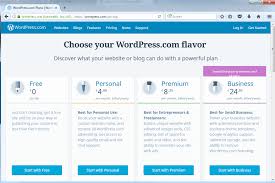
WordPress.Com is the free version of the popular CMS. While it’s a great starting point, keep in mind that it comes with some limitations:
- Storage space: Only 3GB available
- Customization: Limited plugins and themes
- Monetization: No banner advertising allowed
To get started with WordPress.Com, follow these steps:
- Sign up for an account on the website.
- Choose a username and password.
- Select your theme and customize it as desired.
- Start writing and publishing articles.
Altervista: A Free Alternative
Altervista is another free option that offers more features than WordPress.Com, including:
- Unlimited storage space
- No traffic limits
- Banner advertising allowed
To create a blog on Altervista, follow these steps:
- Sign up for an account on the website.
- Choose a theme and customize it as desired.
- Start writing and publishing articles.
Paid Options: Netsons, Aruba, Siteground, Godaddy, Register, Serverplan, And Ehiweb
If you’re serious about creating a professional blog or need more features than the free options provide, consider using one of the paid services listed below:
Netsons: A High-performance Service
Netsons offers a range of plans, including a WordPress-specific plan with 1GB storage space.
- Sign up for an account on the website.
- Choose your plan and customize it as desired.
- Start writing and publishing articles.
Aruba: An Italian Company Offering Commands And Hosting
Aruba offers a range of plans, including a WordPress-specific plan with 10GB storage space.
- Sign up for an account on the website.
- Choose your plan and customize it as desired.
- Start writing and publishing articles.
Siteground: A Reputable Service With Excellent Performance
Siteground offers a range of plans, including a WordPress-specific plan with 10GB storage space.
- Sign up for an account on the website.
- Choose your plan and customize it as desired.
- Start writing and publishing articles.
Godaddy: A Popular Service With Affordable Plans
GoDaddy offers a range of plans, including a WordPress-specific plan with 10GB storage space.
- Sign up for an account on the website.
- Choose your plan and customize it as desired.
- Start writing and publishing articles.
Register: An Italian Company Offering Hosting Services
Register offers a range of plans, including a WordPress-specific plan with 10GB storage space.
- Sign up for an account on the website.
- Choose your plan and customize it as desired.
- Start writing and publishing articles.
Serverplan: A Service Offering High-performance Hosting
ServerPlan offers a range of plans, including a WordPress-specific plan with 10GB storage space.
- Sign up for an account on the website.
- Choose your plan and customize it as desired.
- Start writing and publishing articles.
Ehiweb: A Company Offering Commands And Hosting
EhiWeb offers a range of plans, including a WordPress-specific plan with 10GB storage space.
- Sign up for an account on the website.
- Choose your plan and customize it as desired.
- Start writing and publishing articles.
Conclusion
Creating a blog with WordPress is easier than ever, thanks to the numerous options available. Whether you choose a free or paid service, follow these steps to get started:
- Sign up for an account on the website of your chosen service.
- Choose a theme and customize it as desired.
- Start writing and publishing articles.
Faqs
- Q: What Are The Limitations of WordPress.Com?
A: Storage space is limited to 3GB, customization options are limited, and monetization through banner advertising is not allowed. - Q: How do I Create a Blog on Altervista?
A: Sign up for an account on the website, choose a theme and customize it as desired, and start writing and publishing articles. - Q: What Are The Features of Netsons?
A: Offers high-performance hosting with 1GB storage space. - Q: How do I Create a Blog on Aruba?
A: Sign up for an account on the website, choose your plan and customize it as desired, and start writing and publishing articles. - Q: What Are The Features of Siteground?
A: Offers high-performance hosting with 10GB storage space. - Q: How do I Create a Blog on Godaddy?
A: Sign up for an account on the website, choose your plan and customize it as desired, and start writing and publishing articles. - Q: What Are The Features of Register?
A: Offers hosting services with 10GB storage space. - Q: How do I Create a Blog on Serverplan?
A: Sign up for an account on the website, choose your plan and customize it as desired, and start writing and publishing articles. - Q: What Are The Features of Ehiweb?
A: Offers hosting services with 10GB storage space.


