
Unlocking The Power of Padlet: A Comprehensive Guide
Are you tired of using outdated and clunky collaboration tools? Look no further than Padlet, a versatile and user-friendly platform that’s revolutionizing the way we work together. In this article, we’ll delve into the world of Padlet, exploring its features, benefits, and best practices for maximizing its potential.
What is Padlet?
Padlet is an online collaboration tool that allows users to create and share digital boards, known as “padlets,” with ease. These padlets can be used for a wide range of purposes, from educational projects to business meetings and everything in between.
Creating a Padlet: A Step-by-step Guide
To get started with Padlet, follow these simple steps:
- Sign up: Create an account on the Padlet website or download the mobile app.
- Choose Your Plan: Select from various pricing plans to suit your needs.
- Create a Padlet: Click on the “Create” button and choose from several templates or start from scratch.
- Customize: Personalize your padlet with a background image, colors, and fonts.
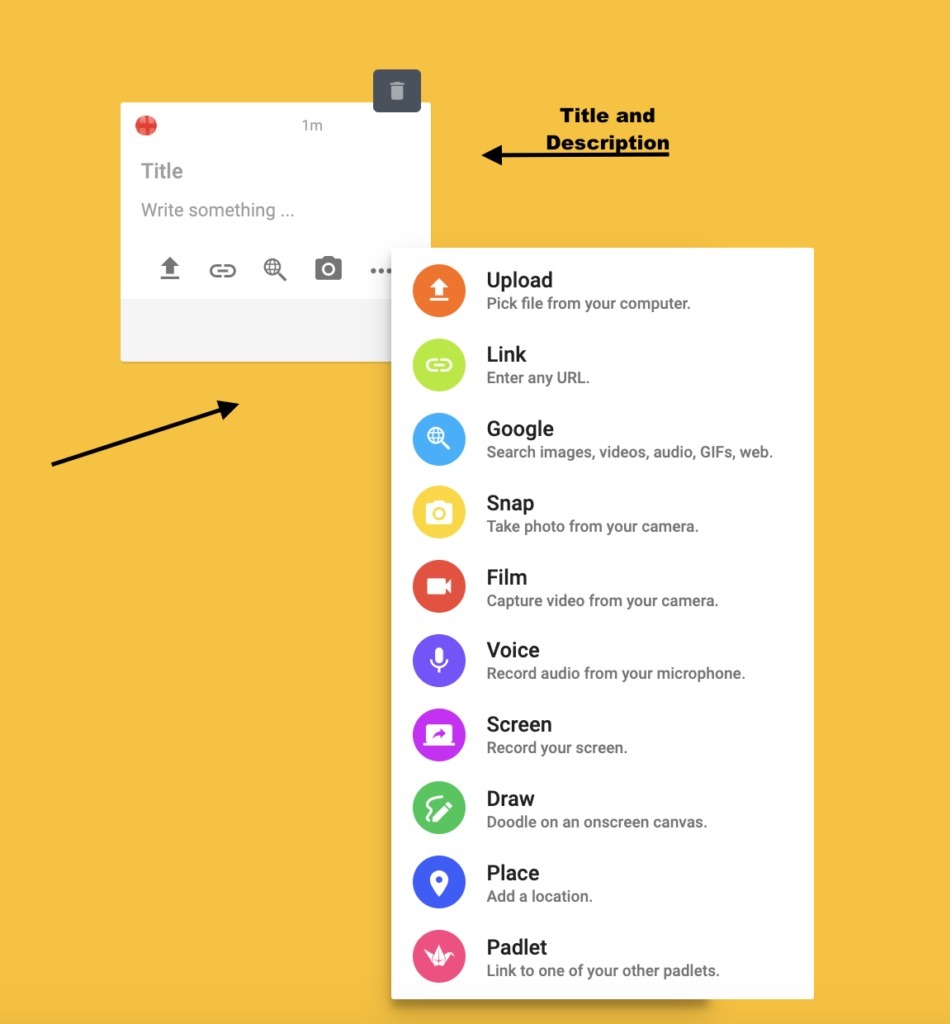
- Add Content: Drag and drop files, images, videos, and links into your padlet.
Benefits of Using Padlet
Padlet offers numerous benefits for individuals and teams:
- Collaboration Made Easy: Invite team members to contribute to padlets, facilitating seamless communication and collaboration.
- Increased Productivity: Use padlets to track progress, share resources, and allocate tasks.
- Enhanced Creativity: Utilize the interactive features of padlets to brainstorm ideas and visualize concepts.
Tips For Effective Padlet Usage
To maximize the potential of Padlet, keep these tips in mind:
- Keep it Simple: Use clear and concise language when creating content.
- Use Images And Videos: Add visual interest to your padlets with images and videos.
- Make it Interactive: Engage users by incorporating polls, quizzes, and other interactive elements.
Padlet For Education
Padlet is an invaluable tool for educators:
- Enhanced Learning Experiences: Create engaging lessons and activities that cater to diverse learning styles.
- Increased Student Engagement: Use padlets to facilitate discussions, share resources, and encourage peer-to-peer learning.
- Better Assessment: Utilize the interactive features of padlets to assess student understanding and track progress.
Padlet For Business
Padlet is an excellent collaboration tool for businesses:
- Improved Communication: Use padlets to facilitate team meetings, brainstorm ideas, and share resources.
- Increased Productivity: Track progress, allocate tasks, and manage projects with ease.
- Enhanced Decision-making: Utilize the interactive features of padlets to engage stakeholders and facilitate informed decision-making.
Conclusion
Padlet is a powerful tool that can revolutionize the way you work together. By understanding its features, benefits, and best practices, you can unlock its full potential and take your collaboration to the next level.
Frequently Asked Questions (FAQs)
- Q: What is Padlet?
A: Padlet is an online collaboration tool that allows users to create and share digital boards. - Q: How do I Create a Padlet?
A: Follow the step-by-step guide outlined above. - Q: What Are The Benefits of Using Padlet?
A: Padlet offers numerous benefits, including collaboration made easy, increased productivity, and enhanced creativity. - Q: Can I Use Padlet For Education?
A: Yes, Padlet is an excellent tool for educators, offering enhanced learning experiences, increased student engagement, and better assessment. - Q: Can I Use Padlet For Business?
A: Yes, Padlet is a great collaboration tool for businesses, improving communication, increasing productivity, and enhancing decision-making.


