
How to Sell on Instagram: A Comprehensive Guide
Are you interested in selling products or services through Instagram? Do you want to learn how to leverage this popular social media platform to reach a wider audience and drive sales? Look no further! In this article, we will provide a comprehensive guide on how to sell on Instagram.
What is Selling on Instagram?
Selling on Instagram refers to the process of promoting and selling products or services through the Instagram platform. With over 1 billion active users, Instagram has become an essential marketing tool for businesses and individuals looking to reach a wider audience.
Benefits of Selling on Instagram
There are several benefits to selling on Instagram, including:
- Increased Brand Awareness: By showcasing your products or services on Instagram, you can increase brand awareness and reach a wider audience.
- Improved Customer Engagement: Instagram allows users to engage with businesses through comments, messages, and direct messaging. This creates a more personal connection between the business and its customers.
- Targeted Advertising: Instagram’s advertising platform allows businesses to target specific audiences based on demographics, interests, and behaviors.
Requirements For Selling on Instagram
To sell on Instagram, you will need:
- A Valid Instagram Account: You must have an active Instagram account with a verified business profile.
- Product Listings: You will need to create product listings that include high-quality images, descriptions, and pricing information.
- Payment Processing: You will need to set up payment processing through Instagram’s payment system or connect your own payment gateway.
How to Create an Instagram Business Account
Creating an Instagram business account is a straightforward process. Here are the steps:
- Open the Instagram app on your mobile device.
- Tap the “Settings” icon (represented by three horizontal lines).
- Scroll down and tap “Account.”
- Tap “Switch to Business Profile.”
- Follow the prompts to set up your business profile, including adding a profile picture, bio, and contact information.
How to Sell on Instagram
Once you have created an Instagram business account, you can start selling on Instagram by following these steps:
- Create Product Listings: Use high-quality images and descriptions to showcase your products.
- Set up Payment Processing: Connect your payment gateway or use Instagram’s payment system.
- Use Relevant Hashtags: Use relevant hashtags to reach a wider audience and increase brand awareness.
- Engage With Customers: Respond to comments, messages, and direct messaging to create a more personal connection with your customers.
How to Tag Products on Instagram
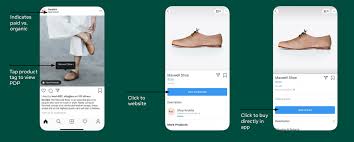
Tagging products on Instagram is an essential step in selling on the platform. Here’s how to do it:
- Open the Instagram app on your mobile device.
- Tap the “Settings” icon (represented by three horizontal lines).
- Scroll down and tap “Account.”
- Tap “Switch to Business Profile.”
- Follow the prompts to set up your business profile, including adding a profile picture, bio, and contact information.
How to Use Instagram Shopping
Instagram Shopping is a feature that allows businesses to tag products directly in their posts and stories. Here’s how to use it:
- Open the Instagram app on your mobile device.
- Tap the “Settings” icon (represented by three horizontal lines).
- Scroll down and tap “Account.”
- Tap “Switch to Business Profile.”
- Follow the prompts to set up your business profile, including adding a profile picture, bio, and contact information.
How to Use Instagram’s Payment System
Instagram’s payment system allows businesses to process payments directly through the app. Here’s how to use it:
- Open the Instagram app on your mobile device.
- Tap the “Settings” icon (represented by three horizontal lines).
- Scroll down and tap “Account.”
- Tap “Switch to Business Profile.”
- Follow the prompts to set up your business profile, including adding a profile picture, bio, and contact information.
Conclusion
Selling on Instagram is a straightforward process that can help businesses reach a wider audience and drive sales. By following these steps, you can create an Instagram business account, set up payment processing, and use relevant hashtags to increase brand awareness. Don’t forget to engage with your customers and use Instagram Shopping to tag products directly in your posts and stories.
Faqs
Here are some frequently asked questions about selling on Instagram:
- Q: Do I Need a Verified Instagram Business Account to Sell on Instagram?
A: Yes, you must have an active Instagram account with a verified business profile. - Q: Can I Use Instagram Shopping Without Setting up Payment Processing?
A: No, you must set up payment processing through Instagram’s payment system or connect your own payment gateway. - Q: How do I Tag Products on Instagram?
A: You can tag products directly in your posts and stories using the “Tag Products” feature. - Q: Can I Use Instagram’s Payment System to Process Payments Directly Through The App?
A: Yes, you can process payments directly through the app using Instagram’s payment system.
Conclusion
Selling on Instagram is a straightforward process that can help businesses reach a wider audience and drive sales. By following these steps, you can create an Instagram business account, set up payment processing, and use relevant hashtags to increase brand awareness. Don’t forget to engage with your customers and use Instagram Shopping to tag products directly in your posts and stories.
References
- Instagram Help Center: A comprehensive guide on selling on Instagram.
- Instagram Business Account Setup: A step-by-step guide on setting up an Instagram business account.
- Instagram Shopping: A feature that allows businesses to tag products directly in their posts and stories.
- Instagram’s Payment System: A payment system that allows businesses to process payments directly through the app.


