
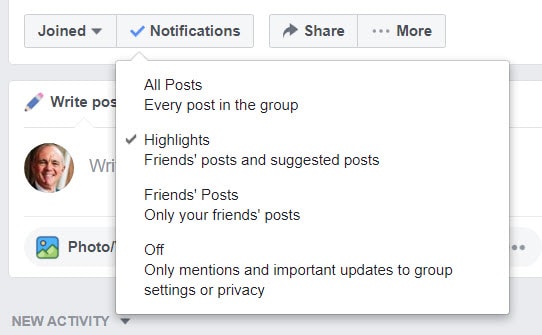
How to See All Posts on Facebook: A Comprehensive Guide
Are you tired of missing out on updates from your friends and pages on Facebook? Do you want to see all the posts, not just the ones that make it to your News Feed? Look no further! In this article, we’ll show you how to see all posts on Facebook, whether you’re using a smartphone, tablet, or computer.
Why See All Posts on Facebook?
Seeing all posts on Facebook can be beneficial in many ways. For instance, if you have friends who post frequently but don’t make it to your News Feed, you’ll want to check their pages directly to stay updated. Similarly, if you’re interested in following a particular page or brand, seeing all their posts will help you keep track of their activities and announcements.
How to See All Posts on Facebook Using The Mobile App
To see all posts on Facebook using the mobile app, follow these steps:
- Open The Facebook App: Open the Facebook app on your smartphone or tablet.
- Go to Your Profile Page: Tap on your profile picture in the top left corner of the screen to go to your profile page.
- Tap on “See All”: Tap on the “See All” button below your profile picture, which will take you to a new screen where all your posts are displayed.
- Select Your Posts: Select the type of post you want to see (e.G., Photos, videos, etc.) And choose the time frame for which you want to see posts (e.G., Today, this week, etc.).
How to See All Posts on Facebook Using The Desktop Version
To see all posts on Facebook using the desktop version, follow these steps:
- Open The Facebook Website: Open the Facebook website on your computer.
- Log In: Log in to your account by entering your email and password.
- Go to Your Profile Page: Click on your profile picture at the top right corner of the screen to go to your profile page.
- Click on “See All”: Click on the “See All” button below your profile picture, which will take you to a new page where all your posts are displayed.
How to See Posts From Specific Friends or Pages
To see posts from specific friends or pages, follow these steps:
- Search For The Friend or Page: Search for the friend or page in the search bar at the top of the screen.
- Click on Their Profile: Click on their profile picture or icon to go to their profile page.
- See All Posts: See all posts from that friend or page by clicking on the “See All” button below their profile picture.
How to See Wishes And Comments on Your Birthday
To see wishes and comments on your birthday, follow these steps:
- Open Facebook: Open Facebook on your smartphone or tablet.
- Go to Your Profile Page: Go to your profile page by tapping on your profile picture at the top left corner of the screen.
- Tap on “See All”: Tap on the “See All” button below your profile picture, which will take you to a new screen where all posts are displayed.
- Select Your Birthday Posts: Select the year and month of your birthday and choose the day when you want to see wishes and comments.
How to See Public Posts From Friends
To see public posts from friends who don’t appear in your News Feed, follow these steps:
- Search For The Friend: Search for the friend’s name in the search bar at the top of the screen.
- Click on Their Profile: Click on their profile picture or icon to go to their profile page.
- See All Public Posts: See all public posts from that friend by clicking on the “See All” button below their profile picture.
Conclusion
In conclusion, seeing all posts on Facebook can be a useful feature for staying updated on activities and announcements from friends and pages. By following these steps, you can see all posts on Facebook using either the mobile app or the desktop version.
Frequently Asked Questions (FAQs)
- Q: Why Don’t I See All Posts on my News Feed?
A: This is because Facebook’s algorithm prioritizes certain posts based on your interests and interactions. - Q: How Can I See Public Posts From Friends Who Don’t Appear in my News Feed?
A: You can search for their name, click on their profile picture, and then click on the “See All” button to see all their public posts. - Q: Can I Filter Posts by Date or Category?
A: Yes, you can filter posts by date, type (e.G., Photos, videos), and more using the mobile app or desktop version. - Q: How do I See Wishes And Comments on my Birthday?
A: You can tap on “See All” below your profile picture, select your birthday year and month, choose the day when you want to see wishes and comments, and then tap on “Other” to see all posts from friends. - Q: Can I See Public Posts From Friends Who Have Blocked Me?
A: Unfortunately, no. If a friend has blocked you, you won’t be able to see their public posts. - Q: How do I See All Posts From Specific Pages or Brands?
A: You can search for the page or brand’s name, click on their profile picture, and then click on the “See All” button to see all their posts.
Additional Resources
If you’re looking for more information on using Facebook, we recommend checking out these additional resources:
- Facebook Help Center: The official Facebook help center is a great resource for learning about how to use the platform.
- Facebook Community Forum: Join the Facebook community forum to connect with other users and get answers to your questions.
By following these steps and using the tips provided in this article, you can see all posts on Facebook and stay updated on activities and announcements from friends and pages.


