
How to See Whatsapp States Without Being Seen: A Step-by-step Guide
Are you tired of being seen when you check your friends’ WhatsApp states? Do you want to know how to see their statuses without them knowing? Look no further! In this article, we will guide you through a simple and effective way to view WhatsApp states on both Android and iOS devices.
Why Can’t I See Whatsapp States Without Being Seen?
When you check your friends’ WhatsApp states, it triggers the “blue tick” notification on their device. This means that they know you have seen their status update. But don’t worry, we’ve got a solution for you!
Seeing Whatsapp States on Android Devices
If you’re using an Android device, follow these steps to see WhatsApp states without being seen:
- Open Whatsapp: Open the WhatsApp app on your Android device.
- Go to Chat Screen: Go to the chat screen where all your active chats are listed.
- Tap on Three Dots: Tap on the three dots in the top right corner of the screen.
- Settings: Select “Settings” from the menu.
- Account And Privacy: Scroll down and select “Account and Privacy”.
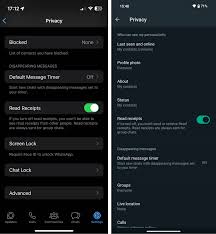
- Disable Read Receipts: Toggle off the switch next to “Read receipts”.
Seeing Whatsapp States on Ios Devices
If you’re using an iOS device, follow these steps to see WhatsApp states without being seen:
- Open Whatsapp: Open the WhatsApp app on your iPhone or iPad.
- Tap on Settings Icon: Tap on the settings icon in the bottom right corner of the screen.
- Account And Privacy: Scroll down and select “Account and Privacy”.
- Disable Read Receipts: Toggle off the switch next to “Read receipts”.
Seeing Whatsapp States on Computer
If you’re using a computer, follow these steps to see WhatsApp states without being seen:
Unfortunately, there is no direct way to disable read receipts on WhatsApp for computers or WhatsApp Web. However, if you’ve already disabled read receipts on your smartphone or tablet, the change will be automatically applied to WhatsApp Web.
Using Third-party Apps
Please note that using third-party apps to view WhatsApp states without being seen can compromise the security of your account. It’s not recommended to use such apps as they may pose a risk to your privacy.
Conclusion
Seeing WhatsApp states without being seen is now possible with these simple steps! By disabling read receipts on your device, you can view statuses without triggering the blue tick notification on your friends’ devices.
Frequently Asked Questions (FAQs)
- Will Disabling Read Receipts Affect my Ability to See When Others Have Read my Messages?
No, disabling read receipts will only prevent others from seeing when you’ve read their messages.
2. Can I Still Use Whatsapp Web if I’ve Disabled Read Receipts on my Smartphone or Tablet?
Yes, the changes made on your device will be automatically applied to WhatsApp Web.
3. Will Disabling Read Receipts Affect my Ability to See Who Has Viewed my Story?
No, disabling read receipts will only prevent others from seeing when you’ve read their messages and statuses.
4. Can I Enable Read Receipts Again if I Want To?
Yes, you can re-enable read receipts at any time by following the same steps as above.
5. Will Using Third-party Apps to View Whatsapp States Without Being Seen Compromise my Account’s Security?
Yes, it’s not recommended to use third-party apps as they may pose a risk to your privacy and security.
6. Can I See Whatsapp States Without Being Seen on Whatsapp Business?
Unfortunately, the steps above are only applicable for personal WhatsApp accounts. For WhatsApp Business, you’ll need to consult with the official WhatsApp Business guidelines.
Remember, disabling read receipts will prevent others from seeing when you’ve read their messages and statuses. However, it won’t affect your ability to see who has viewed your story or sent you a message.


