
How to Become Invisible on Facebook: A Step-by-step Guide
Are you tired of being disturbed by friends or acquaintances on Facebook? Do you want to take a break from social media without deleting your account? Look no further! In this article, we will guide you through the process of becoming invisible on Facebook, using various modes and methods.
How to Become Invisible on Facebook: Temporary Vs. Permanent
Before we dive into the steps, it’s essential to understand that there are two ways to become invisible on Facebook: Temporary and permanent. Temporary invisibility means that you can hide from specific friends or acquaintances without deleting your account. Permanent invisibility, on the other hand, involves deactivating your account for an extended period.
How to Become Invisible on Facebook Using Mobile And PC
You can use both mobile and PC versions of Facebook to become invisible. Here are the steps:
Becoming Invisible on Facebook Using Mobile:
- Open the Facebook app on your smartphone or tablet.
- Tap on the three horizontal lines (≡) in the top right corner.
- Select “Settings and privacy.”
- Choose “State of activity” from the menu.
- Turn off the switch next to “Display when active” and “Display when inactive.”
Becoming Invisible on Facebook Using Pc:
- Open Facebook on your computer or laptop.
- Click on your profile picture in the top right corner.
- Select “Settings” from the dropdown menu.
- Choose “State of activity.”
- Turn off the switch next to “Display when active.”
How to Become Invisible in Facebook Chat:
To become invisible in chat, follow these steps:
- Open Facebook Messenger on your mobile or PC.
- Tap or click on the three dots (⋯) at the top right corner of the screen.
- Select “Settings.”
- Choose “State of activity” from the menu.
- Turn off the switch next to “Display when active.”
Limiting Visibility of a Post:
To limit visibility of a post, follow these steps:
- Create a new post on Facebook using mobile or PC.
- Tap or click on the dropdown arrow next to the public icon.
- Choose “Friends” instead of “Public.”
- Select specific friends you want to see the post.
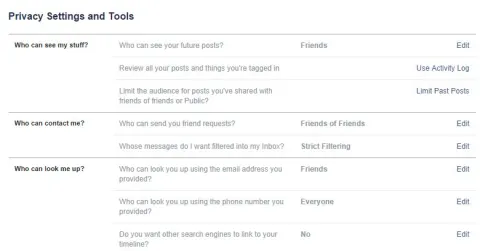
How to Avoid Being Searched on Facebook:
To avoid being searched on Facebook, follow these steps:
- Open Facebook settings using mobile or PC.
- Tap or click on “Settings and privacy.”
- Choose “Control of the privacy.”
- Turn off the switch next to “Who can suggest your profile.”
How to Deactivate Your Facebook Account:
To deactivate your Facebook account, follow these steps:
- Open Facebook settings using mobile or PC.
- Tap or click on “Settings and privacy.”
- Choose “Deactivation or elimination.”
- Select “Deactivate” from the dropdown menu.
How to Block a Person on Facebook:
To block someone on Facebook, follow these steps:
- Open the person’s profile using mobile or PC.
- Tap or click on the three dots (⋯) at the top right corner of the screen.
- Select “Block.”
- Confirm your decision.
Conclusion:
Becoming invisible on Facebook is a straightforward process that can be achieved using various modes and methods. Whether you want to take a break from social media or avoid being disturbed by friends, this guide has provided you with the necessary steps to achieve your goal. Remember, temporary invisibility means you can hide from specific friends without deleting your account, while permanent invisibility involves deactivating your account for an extended period.
Faqs:
- Q: How do I become invisible on Facebook?
A: You can use various modes and methods to become invisible on Facebook, including temporary and permanent invisibility. - Q: Can I hide from specific friends without deleting my account?
A: Yes, you can hide from specific friends using the “Friends” option instead of “Public.” - Q: How do I avoid being searched on Facebook?
A: You can turn off the switch next to “Who can suggest your profile” in the settings menu. - Q: Can I deactivate my account without deleting it?
A: Yes, you can deactivate your account by selecting the “Deactivate” option from the dropdown menu. - Q: How do I block someone on Facebook?
A: You can block someone by tapping or clicking on their profile and selecting the “Block” option. - Q: What is temporary invisibility on Facebook?
A: Temporary invisibility means you can hide from specific friends without deleting your account. - Q: Can I become invisible in chat?
A: Yes, you can turn off the switch next to “Display when active” to become invisible in chat. - Q: How do I limit visibility of a post?
A: You can tap or click on the dropdown arrow next to the public icon and choose “Friends” instead of “Public.”


