
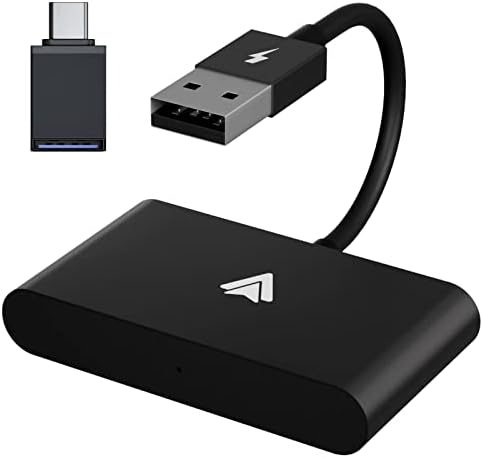
The Ultimate Guide to Android Auto Without a Cable: A Comprehensive Review
Are you tired of dealing with cables while using your smartphone in the car? Do you want to experience the freedom of wireless connectivity while navigating through your favorite routes or simply listening to music? Look no further! In this article, we will explore the world of Android Auto without a cable and provide you with a comprehensive review of its features, benefits, and limitations.
What is Android Auto Without a Cable?
Android Auto is a popular in-car infotainment system developed by Google. It allows users to access various applications, such as Google Maps, Google Play Music, and other compatible apps, directly from their car’s dashboard. With the introduction of wireless connectivity, users can now enjoy seamless navigation, music streaming, and hands-free voice control without the need for a physical cable.
Requirements For Android Auto Without a Cable
Before diving into the world of wireless Android Auto, it is essential to check if your vehicle and smartphone meet the minimum requirements. Here are some key points to consider:
- Compatible Vehicles: Ensure that your car’s infotainment system is compatible with Android Auto. Check the official Google website for a list of supported vehicles.
- Smartphone Compatibility: Verify that your smartphone runs on Android 11 or later, as this is the minimum requirement for wireless connectivity.
- Vehicle Software Update: If your vehicle does not have the necessary software update, you may need to visit an authorized dealership or service center to obtain it.
How to Connect Your Smartphone And Vehicle
Connecting your smartphone and vehicle wirelessly using Android Auto is a straightforward process. Here’s a step-by-step guide:
- Install or Update The Android Auto App: Open the Google Play Store on your smartphone and search for “Android Auto.” Download and install the latest version, or update if you already have it installed.
- Configure Your Vehicle: Follow the manufacturer’s instructions to configure your car’s infotainment system to support wireless connectivity.
- Pair Your Smartphone With Your Vehicle: Once both devices are connected to the same network, open the Android Auto app on your smartphone and select “Connect Vehicle.” Your vehicle will then search for available devices and find your smartphone.
- Confirm Pairing: When prompted, confirm the pairing on both devices by following the on-screen instructions.
Features And Benefits of Android Auto Without a Cable
Wireless Android Auto offers numerous benefits and features that enhance your driving experience:
- Seamless Navigation: Enjoy turn-by-turn directions, traffic updates, and estimated arrival times with Google Maps.
- Hands-free Voice Control: Use voice commands to initiate phone calls, send messages, or access various applications directly from the car’s dashboard.
- Music Streaming: Listen to your favorite music, podcasts, or audiobooks without the need for a physical cable.
- Multi-tasking: Access multiple apps simultaneously while keeping an eye on the road.
Limitations And Alternatives
While wireless Android Auto offers numerous benefits, there are some limitations and alternatives to consider:
- Device Compatibility: Not all smartphones or vehicles may be compatible with wireless connectivity.
- Software Updates: In some cases, a software update may be required for your vehicle to support wireless connectivity.
- Adapter Options: If your vehicle does not have built-in wireless capabilities, you can explore adapter options that allow Android Auto to function wirelessly.
Conclusion
Android Auto without a cable offers a convenient and seamless experience for drivers. With this comprehensive review, we hope to have provided you with the necessary information to understand its features, benefits, and limitations. Remember to check compatibility requirements and follow the step-by-step guide to connect your smartphone and vehicle wirelessly.
Frequently Asked Questions (FAQs)
- Q: What Are The Minimum Requirements For Wireless Android Auto?
A: Your vehicle must be compatible with Android Auto, and your smartphone must run on Android 11 or later. - Q: How do I Connect my Smartphone to my Vehicle Wirelessly Using Android Auto?
A: Follow the step-by-step guide provided in this article to configure both devices for wireless connectivity. - Q: What Are The Benefits of Wireless Android Auto?
A: Enjoy seamless navigation, hands-free voice control, music streaming, and multi-tasking capabilities without a physical cable. - Q: Are There Any Limitations or Alternatives to Wireless Android Auto?
A: Yes, device compatibility may be an issue, software updates may be required for some vehicles, and adapter options are available for non-compatible vehicles. - Q: Can I Use Apple Carplay With The Same Adapter?
A: Some adapters support both wireless Android Auto and Apple CarPlay, but always check compatibility before making a purchase. - Q: How do I Troubleshoot Connectivity Issues?
A: Refer to your vehicle’s user manual or contact an authorized dealership for assistance with resolving connectivity issues. - Q: Are There Any Additional Fees Associated With Wireless Android Auto?
A: In some cases, software updates may incur a fee, but this varies depending on the manufacturer and service provider. - Q: Can I Use Wireless Android Auto in Any Vehicle?
A: No, not all vehicles are compatible with wireless Android Auto. Check the official Google website for a list of supported vehicles.


