
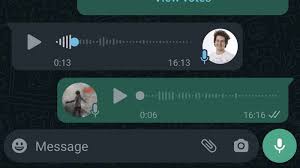
How to Speed Up Audio on Whatsapp: A Step-by-step Guide
Are you tired of listening to long, drawn-out audio messages on WhatsApp? Do you find yourself scrolling through a minute-long recording feeling like it’s taking an eternity? Well, you’re not alone! Many people experience this frustration, especially when dealing with lengthy messages. But fear not, dear reader, for we have the solution to your problem.
Introducing The Audio Speed Feature on Whatsapp
Recently, WhatsApp introduced a feature that allows you to speed up audio recordings. Yes, you read that right – speed up! This means you can finally enjoy listening to audio messages without feeling like they’re dragging on forever. But before we dive into the nitty-gritty of how to use this feature, let’s clarify one thing: This function is only available for audio recordings made directly within WhatsApp and not for external applications.
Prerequisites: Updating Whatsapp
Before you can start speeding up your audio recordings, make sure your WhatsApp app is updated to the latest version. To do this, follow these steps:
- Open The Play Store: On your Android device, open the Google Play Store.
- Search For Whatsapp: Type “WhatsApp” in the search bar and press Enter.
- Check if an Update is Available: If an update is needed, you’ll see a button that says “UPDATE”.
- Update Whatsapp: Press the Update button to install the latest version.
Speeding Up Audio on Whatsapp: Android
Now that your WhatsApp app is updated, let’s move on to the fun part – speeding up audio recordings!
- Open a Conversation: Find the conversation where you want to speed up an audio recording.
- Tap on The Audio Icon: Tap on the audio icon next to the recording.
- Select The Speed Option: A menu will appear with three speed options: 1X, 1.5X, and 2x.
- Choose Your Desired Speed: Select the speed you want to use (1x is the default).
Speeding Up Audio on Whatsapp: Iphone
If you’re an iPhone user, don’t worry! The process is almost identical.
- Open a Conversation: Find the conversation where you want to speed up an audio recording.
- Tap on The Audio Icon: Tap on the audio icon next to the recording.
- Select The Speed Option: A menu will appear with three speed options: 1X, 1.5X, and 2x.
- Choose Your Desired Speed: Select the speed you want to use (1x is the default).
Speeding Up Audio on Whatsapp: PC
If you prefer using WhatsApp on your computer, don’t worry! The process remains the same.
- Open a Conversation: Find the conversation where you want to speed up an audio recording.
- Click on The Audio Icon: Click on the audio icon next to the recording.
- Select The Speed Option: A menu will appear with three speed options: 1X, 1.5X, and 2x.
- Choose Your Desired Speed: Select the speed you want to use (1x is the default).
Tips And Variations
Here are a few tips and variations to keep in mind:
- The selected speed will remain the same for all audio recordings until you close WhatsApp or change it manually.
- If you’re using WhatsApp on multiple devices, ensure that your app is updated on each device.
And there you have it! With these simple steps, you can now enjoy listening to audio messages without feeling like they’re dragging on forever.


