
Unlocking The World of Netflix: A Guide to Subscription Plans And Prices
Are you curious about the world of Netflix? Do you want to know how much it costs to subscribe to this popular streaming platform? Look no further! In this article, we’ll delve into the details of Netflix’s subscription plans and prices, as well as provide a step-by-step guide on how to sign up for an account.
The Cost of Netflix: A Breakdown
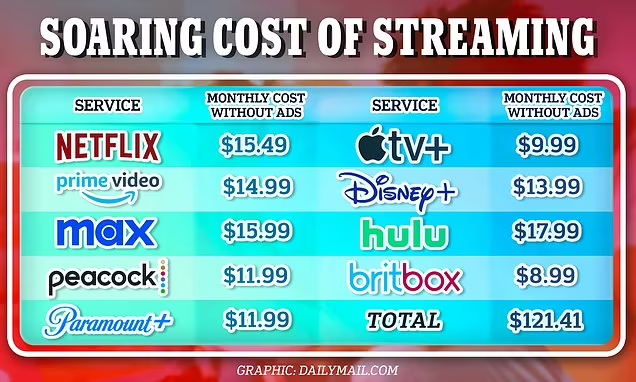
Netflix is known for its affordable pricing model. The company offers various subscription plans that cater to different needs and budgets. Here are the current prices for each plan:
- Basic Plan: This plan costs €5,49 per month and allows you to stream content in standard definition (SD) on one device at a time.
- Standard Plan: For €12,99 per month, you can enjoy high-definition (HD) streaming on two devices simultaneously.
- Premium Plan: The highest-tier plan costs €17,99 per month and offers ultra-high-definition (UHD) streaming with HDR and surround sound on up to four devices at a time.
How Much Does Netflix Cost For Multiple Users?
If you’re planning to share your Netflix account with family members or friends who live in the same household, here’s what you need to know:
- Standard Plan: For two users, the price is €12,99 per month.
- Premium Plan: For four users, the price is €17,99 per month.
Netflix Promotions And Discounts
In addition to its standard pricing plans, Netflix occasionally offers promotions and discounts. These can include:
- Discounts For Annual Subscriptions: While Netflix doesn’t currently offer annual subscription plans, you can calculate your yearly cost by multiplying the monthly fee by 12.
- Free Trials: New users can sign up for a free trial period to test out the service before committing to a paid plan.
How to Sign Up For Netflix: A Step-by-step Guide
Signing up for Netflix is easy and straightforward. Here’s how:
On PC or Mac
- Go to the Netflix website (www.Netflix.Com).
- Click on “Join Free for a Month” and enter your email address.
- Choose your subscription plan and select the type of device you’ll be using (e.G., PC, laptop, tablet).
- Create a password and agree to the terms of service.
On Smartphones or Tablets
- Download the Netflix app from the App Store (for iOS devices) or Google Play Store (for Android devices).
- Open the app and sign in with your email address and password.
- Choose your subscription plan and follow the prompts to complete the sign-up process.
On Tvs
- Check if your TV has a built-in Netflix app. If it does, launch the app and sign in with your email address and password.
- If you don’t have an existing account, go to the Netflix website on your PC or Mac and follow the steps above.
How to Sign Up For Netflix With Sky
If you’re already a Sky customer, you can sign up for Netflix through their website. Here’s how:
- Go to the Sky website (www.Sky.It).
- Click on “Intrattenimento Plus” and select your subscription plan.
- Follow the prompts to complete the sign-up process.
Other Ways to Sign Up For Netflix
You can also sign up for Netflix through other partners, such as Vodafone or TIM. These plans often include additional benefits, such as free trials or discounts on existing services.
Conclusion
In conclusion, signing up for Netflix is easy and affordable. With various subscription plans to choose from, you’re sure to find one that fits your needs and budget. Whether you’re a seasoned user or just curious about the world of streaming, we hope this guide has been helpful in getting you started with Netflix.
Frequently Asked Questions
Q: How much does Netflix cost?
A: The prices for each plan are as follows: Basic Plan (€5,49), Standard Plan (€12,99), and Premium Plan (€17,99).
Q: Can I share my Netflix account with family members or friends who live in the same household?
A: Yes, you can add up to four users to your account, but they must be cohabitants.
Q: Are there any discounts or promotions available for Netflix?
A: Occasionally, Netflix offers promotions and discounts, such as free trials or discounted annual subscriptions.
Q: How do I sign up for Netflix?
A: You can sign up on the Netflix website (www.Netflix.Com) or through other partners, such as Sky, Vodafone, or TIM.
Q: Can I use Netflix on my TV?
A: Yes, you can watch Netflix on your TV using a device with built-in access to the app (e.G., Smart TVs, streaming devices).
Q: How do I cancel my Netflix subscription?
A: You can cancel your subscription by going to the “Account” section of the Netflix website and selecting “Cancel Membership.”
Q: Can I get a refund for my Netflix subscription?
A: Netflix doesn’t offer refunds for cancelled subscriptions.
Q: Is Netflix available in my country?
A: Netflix is available in over 190 countries worldwide, but availability may vary depending on your location.


