
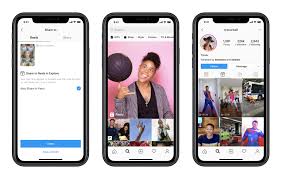
How to Re-share a Reel on Instagram: A Step-by-step Guide
Are you looking to re-share a Reel on your Instagram profile, but not sure how? You’re in luck! In this article, we’ll walk you through the simple steps to re-share a Reel on your Instagram feed.
What is a Reel?
Before we dive into the steps, let’s quickly define what a Reel is. A Reel is a short video that can be up to 60 seconds long, similar to TikTok videos. You can create a Reel using the Instagram app and share it with your followers.
Why Would You Want to Re-share a Reel?
There are several reasons why you might want to re-share a Reel:
- You created a Reel but didn’t get as many views or likes as you hoped.
- You want to feature a Reel in a different post or story.
- You made a mistake and deleted the original Reel.
Whatever your reason, we’ve got you covered. Here’s how to re-share a Reel on Instagram:
Re-sharing a Reel From Smartphone or Tablet
Re-sharing a Reel from your smartphone or tablet is a straightforward process. Here are the steps:
- Open the Instagram app and go to your profile page.
- Tap on the three horizontal lines (≡) in the top right corner of the screen.
- Select “Edit Profile” from the menu.
- Scroll down to the “Reels” section.
- Find the Reel you want to re-share and tap on it.
- Tap on the three dots (\⋯) in the bottom right corner of the screen.
- Select “Share to Feed” from the menu.
- Your Reel will now be added to your feed.
Re-sharing a Reel From Pc
If you’re using a PC to access Instagram, re-sharing a Reel is slightly more complicated. Unfortunately, the feature is not available on PC yet.
However, there are workarounds:
- You can use a third-party app or browser extension that allows you to re-share Reels.
- You can create a new post and attach the Reel to it.
We’ll cover these workarounds in more detail below.
Re-sharing a Reel Erased From Feed
If you’ve accidentally deleted a Reel from your feed, don’t worry! Instagram allows you to recover deleted content for 30 days. Here’s how:
- Go to your profile page.
- Tap on the three horizontal lines (≡) in the top right corner of the screen.
- Select “Settings” from the menu.
- Scroll down to the “Account” section.
- Tap on “Recently Deleted”.
- Find the Reel you want to recover and tap on it.
- Tap on the three dots (\⋯) in the bottom right corner of the screen.
- Select “Recover” from the menu.
How to Recover a Deleted Post on Instagram
If you’re having trouble recovering a deleted Reel, don’t worry! We’ve got a separate tutorial on how to recover deleted posts on Instagram. Check it out for more information.
Conclusion
Re-sharing a Reel on Instagram is easy and straightforward. Whether you want to feature a Reel in a different post or story, or simply re-share it because it didn’t get enough views or likes the first time around, we’ve got you covered. Just follow the steps above and you’ll be able to share your favorite Reels with your followers.
What’s Next?
Now that you know how to re-share a Reel on Instagram, what’s next? Do you have any other questions about using Instagram or social media in general? Let us know in the comments below!


