
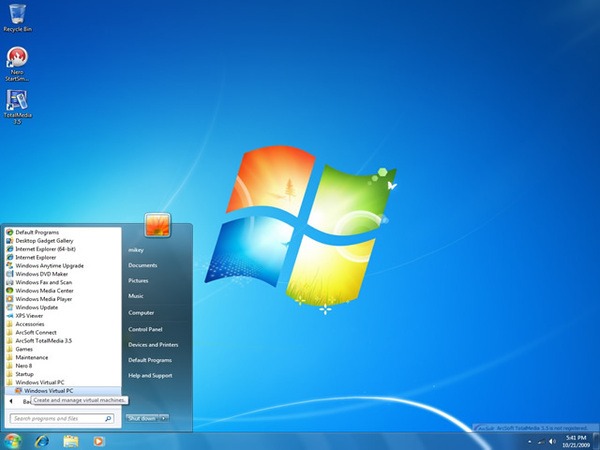
Transforming Windows XP Into Windows 7 Free: A Simple Guide
Are you tired of using an outdated operating system like Windows XP, but can’t afford to upgrade to a newer version? Do you want to give your old PC a fresh new look without breaking the bank? Look no further! In this article, we’ll show you how to transform your Windows XP into Windows 7 free using a simple and free software called Seven Remix XP.
What is Seven Remix Xp?
Seven Remix XP is a free software that allows you to transform your Windows XP into Windows 7. It’s a transformation pack that applies the theme, icons, sounds, and other graphic characteristics of Windows 7 to your old operating system. The modifications carried out by this program are deep but reversible in just a few clicks.
Benefits of Using Seven Remix XP
Using Seven Remix XP has several benefits. First, it’s free! You don’t have to spend any money on upgrading to a newer version of Windows. Second, it’s easy to install and use. The process is straightforward and doesn’t require any technical expertise. Third, it gives your old PC a fresh new look that’s similar to Windows 7.
Pre-requisites Before Installing Seven Remix XP
Before installing Seven Remix XP, there are a few things you need to do:
- Create a Recovery Point: Create a recovery point for your system in case something goes wrong during the installation process. This is a precautionary measure that will ensure you can restore your system to its previous state.
- Download And Install Seven Remix XP: Download the software from the official website and follow the installation instructions.
Step-by-step Guide to Installing Seven Remix XP
Here’s a step-by-step guide to installing Seven Remix XP:
- Create a Recovery Point: Go to the Control Panel and select System and Security > Backup and Restore (Windows 7). Click on Create a system image.
- Download Seven Remix XP: Go to the official website of Seven Remix XP and download the software.
- Install Seven Remix XP: Run the downloaded file and follow the installation instructions.
- Restart Your PC: After installation, restart your PC to apply the changes.
What Changes Will You See?
After installing Seven Remix XP, you’ll notice several changes:
- New Look: Your desktop will have a new look similar to Windows 7.
- New Theme: The theme of your system will be changed to match Windows 7.
- New Icons: The icons on your desktop and taskbar will be changed to match Windows 7.
- New Sounds: The sounds played by your system will be changed to match Windows 7.
How to Uninstall Seven Remix XP
If you’re not satisfied with the changes made by Seven Remix XP, don’t worry! You can easily uninstall it:
- Go to Control Panel: Go to the Control Panel and select Programs and Features (Windows 10) or Add/Remove Programs (Windows XP).
- Select Seven Remix XP: Select Seven Remix XP from the list of installed programs.
- Click Uninstall: Click on the Uninstall button.
Conclusion
Transforming your Windows XP into Windows 7 free using Seven Remix XP is a simple and cost-effective way to give your old PC a fresh new look. With its deep but reversible modifications, you can enjoy the benefits of a newer operating system without breaking the bank. So go ahead and try it out!
Frequently Asked Questions (FAQs)
- Q: Is Seven Remix XP Free?
A: Yes, Seven Remix XP is completely free to download and use. - Q: Is Seven Remix XP Safe to Use?
A: Yes, Seven Remix XP is a legitimate software that’s safe to use. - Q: Will Seven Remix XP Slow Down my Pc?
A: No, Seven Remix XP won’t slow down your PC. - Q: Can I Uninstall Seven Remix XP if I Don’t Like It?
A: Yes, you can easily uninstall Seven Remix XP if you’re not satisfied with its changes. - Q: Will Seven Remix XP Void my Windows XP Warranty?
A: No, using Seven Remix XP won’t void your Windows XP warranty.


