
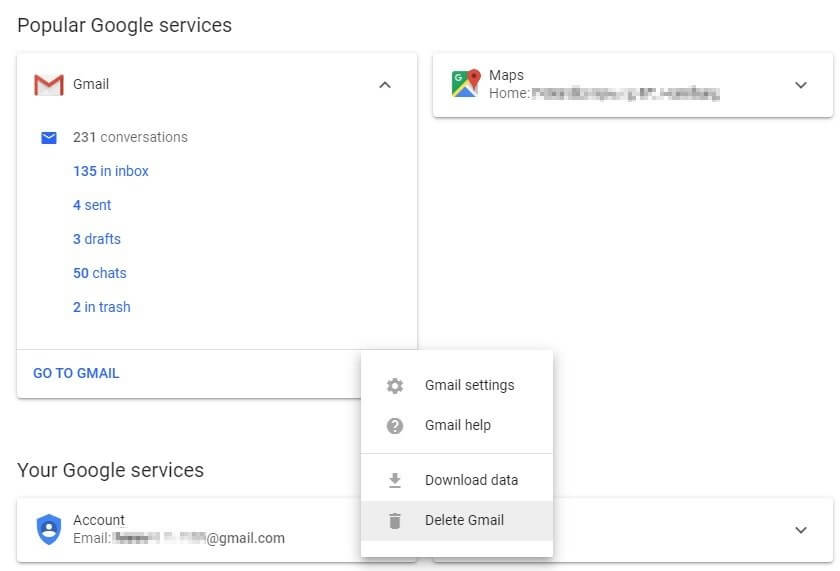
How to Delete a Gmail Account: A Step-by-step Guide
Are you thinking of deleting your Gmail account? Perhaps you’ve transferred your email correspondence to another provider or simply want to start fresh. Whatever the reason, deleting a Gmail account is a relatively straightforward process that can be completed in just a few minutes.
In this article, we’ll take you through the steps to delete a Gmail account, including how to download a copy of your data and what happens when you delete your account. We’ll also cover how to delete a Gmail account from different devices, such as a PC, smartphone, or tablet.
Why Delete a Gmail Account?
Before we dive into the steps, let’s briefly discuss why someone might want to delete their Gmail account. Perhaps you’ve:
- Transferred your email correspondence to another provider
- Experienced issues with spam or phishing emails
- Wanted to start fresh and create a new account
- Moved to a different device or operating system
Whatever the reason, deleting a Gmail account is a simple process that can be completed in just a few minutes.
Deleting a Gmail Account: Step-by-step Guide
Here’s how to delete a Gmail account:
- Download a Copy of Your Data: Before you delete your Gmail account, it’s essential to download a copy of your data. This includes emails, contacts, and any other information stored in your account.
- Go to The Google Account Settings Page: Sign in to your Google account and go to the settings page. You can do this by clicking on your profile picture or initials in the top right corner of the screen and selecting “Settings.”
- Select “Data And Privacy”: From the settings page, select the option labeled “Data and privacy.”
- Click on “Download Your Data”: Click on the button labeled “Download your data.” This will open a new window where you can choose which data to download.
- Choose What to Download: Select the types of data you want to download, such as emails or contacts.
- Create an Export Package: Click on the button labeled “Create export” to create a ZIP file containing your selected data.
- Wait For The Download to Complete: Depending on the amount of data you’ve chosen to download, this may take several minutes or even hours.
What Happens When You Delete Your Gmail Account?
When you delete your Gmail account, you’ll lose access to all Google services associated with that account, including:
- Gmail
- Google Drive
- Google Calendar
- Google Photos
However, deleting a Gmail account doesn’t affect any other Google accounts you may have. For example, if you have multiple Gmail accounts and delete one of them, the others will remain unaffected.
Deleting a Gmail Account From Different Devices
Here’s how to delete a Gmail account from different devices:
PC
To delete a Gmail account from a PC:
- Go to the Google Account settings page.
- Select “Data and privacy.”
- Click on “Delete your account or services” at the bottom of the page.
- Follow the prompts to confirm deletion.
Smartphone (Android)
To delete a Gmail account from an Android device:
- Open the Settings app.
- Scroll down and select “Accounts.”
- Select “Google” and then select your account.
- Tap on the three dots next to your account name.
- Tap on “Delete account.”
Smartphone (iOS)
To delete a Gmail account from an iOS device:
- Open the Settings app.
- Scroll down and select “Passwords & Accounts.”
- Select “Google” and then select your account.
- Tap on the “Edit” button next to your account name.
- Tap on “Delete Account.”
Tablet
The process for deleting a Gmail account from a tablet is similar to that of a smartphone.
Frequently Asked Questions (FAQs)
Here are some frequently asked questions about deleting a Gmail account:
Q: What Happens When I Delete my Gmail Account?
A: When you delete your Gmail account, you’ll lose access to all Google services associated with that account, including Gmail, Google Drive, and Google Calendar.
Q: Will Deleting my Gmail Account Affect Other Google Accounts I Have?
A: No, deleting a Gmail account won’t affect any other Google accounts you may have.
Q: How do I Download a Copy of my Data Before Deleting my Gmail Account?
A: To download a copy of your data, go to the Google Account settings page and select “Data and privacy.” Click on “Download your data” and choose what data to download.
Q: Can I Recover my Deleted Gmail Account?
A: Unfortunately, no. Once you delete your Gmail account, it’s gone forever.
Conclusion
Deleting a Gmail account is a simple process that can be completed in just a few minutes. Remember to download a copy of your data before deleting your account and consider the consequences of losing access to all Google services associated with that account.


