
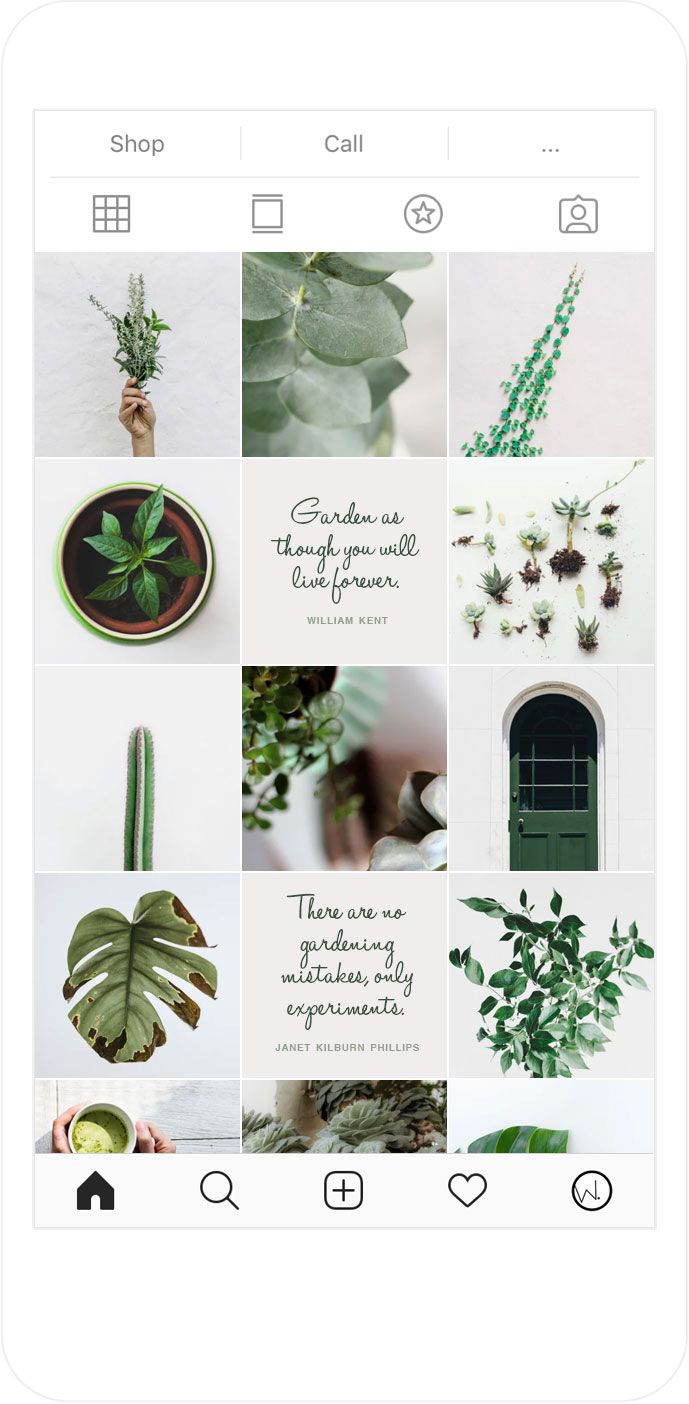
How to Organize Your Instagram Feed: Tips And Tricks
As a content creator, having an organized Instagram feed is crucial to showcasing your brand or personal style effectively. In this article, we’ll provide you with tips and tricks on how to perfect your profile, make it more attractive for visitors, and create a strong identity on the famous social network.
Understanding Your Feed
Before we dive into the tips, let’s first understand what makes up your Instagram feed. The contents that you post in your personal feed end up in the public feed of those who follow your account. This means that it’s essential to organize your content effectively so that it resonates with your target audience.
Adding New Contents
One way to enhance your feed is by adding new contents regularly. Here are some steps to add a new post:
- Access the Instagram app on your Android or iOS device.
- Tap on the “+” icon in the top-right corner of the screen.
- Select “Post” from the menu.
- Choose the content you want to upload (photo, video, carousel, etc.).
- Edit and apply filters as desired.
- Add a caption, location tag, and mentions if necessary.
- Tap on the “Share” button to post your content.
Modifying Existing Contents
If you’ve already posted something but want to enhance it, here’s how:
- Access the Instagram app.
- Scroll through your feed until you find the content you want to modify.
- Tap on the three dots icon next to the post.
- Select “Edit” from the menu.
- Modify the caption, add or remove tags, and apply new filters if desired.
- Tap on the “Save” button to update your post.
Filing And Deleting Contents
To give your feed a nice facelift, you can file or delete contents that no longer align with your profile. Here’s how:
- Access the Instagram app.
- Scroll through your feed until you find the content you want to file or delete.
- Tap on the three dots icon next to the post.
- Select “File” or “Delete” from the menu.
- Confirm that you want to file or delete the content.
Having an Effective Feed
To have an effective feed, follow these tips:
- Identify a topic for your profile: This will help you stay focused and avoid posting irrelevant contents.
- Choose colors for your profile: Selecting a consistent color scheme can give your profile a cohesive look.
- Edit your content to create a personal style: Use editing apps to apply filters and effects consistently throughout your posts.
- Use apps to organize your feed: There are various apps available that can help you schedule and manage your Instagram contents.
App Recommendations
Here are some app recommendations for organizing your Instagram feed:
- Planner For Instagram: A free app that allows you to visualize and program your posts in a simple and intuitive way.
- Plann +: A helpful app for organizing your profile, with a user-friendly interface and access to all functions available through subscription.
- Planoly: A free app with various functions for managing your Instagram account, including reminders and content scheduling.
- Later: Another free app that allows you to manage your Instagram account, set reminders, and schedule contents.
Conclusion
In conclusion, organizing your Instagram feed requires effort and attention to detail. By following these tips and tricks, you can perfect your profile, create a strong identity, and make your feed more attractive for visitors. Remember to use apps to help you schedule and manage your contents effectively.
Frequently Asked Questions (FAQs)
- Q: How do I Add New Contents to my Instagram Feed?
A: To add new contents, access the Instagram app, tap on the “+” icon, select “Post,” choose your content, edit and apply filters, and share. - Q: Can I Modify Existing Contents on Instagram?
A: Yes, you can modify existing contents by accessing the Instagram app, scrolling to the post, tapping on the three dots icon, selecting “Edit,” modifying the caption, adding or removing tags, and applying new filters if desired. - Q: How do I File or Delete Contents on Instagram?
A: To file or delete contents, access the Instagram app, scroll to the content, tap on the three dots icon, select “File” or “Delete,” confirm your action, and save or delete the post. - Q: What Are Some Apps That Can Help me Organize my Instagram Feed?
A: Some recommended apps include Planner for Instagram, Plann +, Planoly, and Later. - Q: How do I Create a Personal Style on Instagram?
A: Use editing apps to apply filters and effects consistently throughout your posts, and edit your content to create a unique look. - Q: Can I Use Apps to Schedule my Instagram Contents?
A: Yes, many apps, including Planner for Instagram and Plann +, allow you to schedule your Instagram contents in advance. - Q: How do I Identify a Topic For my Instagram Profile?
A: Choose a topic that aligns with your brand or personal style, and use it as a guide for posting relevant and consistent content. - Q: Can I Choose Colors For my Instagram Profile?
A: Yes, select a color scheme that reflects your brand or personality, and use it consistently throughout your posts.
I hope this article has provided you with valuable insights on how to perfect your Instagram feed!


