
Protecting Your Privacy: A Guide to Downloading Files Safely on Emule
In today’s digital age, downloading files from the internet has become an essential part of our daily lives. With the rise of peer-to-peer (P2P) file sharing platforms like eMule, it’s easier than ever to access and share files with others. However, this convenience comes with a price – your privacy.
In this article, we’ll explore the risks associated with downloading files on eMule, including server spyware and fake files. We’ll also provide you with practical tips on how to protect yourself from these threats and ensure a safe and enjoyable experience when using eMule.
What is Server Spyware?
Server spyware refers to software that is designed to collect information about your account without your knowledge or consent. These programs can be used to steal sensitive data, such as login credentials, IP addresses, and browsing history. Once installed on your computer, server spyware can transmit this information to third-party companies, which can then use it for their own purposes.
The Risks of Fake Files
Fake files are programs that masquerade as legitimate software but contain malicious code or spyware. When you download a fake file from eMule, you’re essentially installing malware on your computer without realizing it. This can lead to a range of problems, including data theft, system crashes, and even identity theft.
How to Protect Yourself
To avoid falling victim to server spyware and fake files, follow these simple steps:
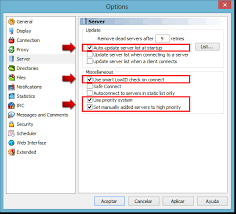
Download a List of Safe Servers
The first step in protecting yourself from server spyware is to download a list of safe servers. This will help you avoid connecting to malicious programs that can compromise your privacy.
- To do this, navigate to the eMule menu and select “Server” from the top menu bar.
- Click on the “Update Servers” button, which will automatically populate the list with trusted servers.
- You can also manually update the server list by clicking on the “Update” button next to each server.
Filter Out Malicious Servers
Once you have a list of safe servers, it’s essential to filter out any malicious programs that may be masquerading as legitimate software.
- To do this, navigate to the eMule menu and select “Options” from the top menu bar.
- Click on the “Security” tab and check the box next to “Filter also servers.”
- Enter the following address in the filter text field: Http://Upd.Emule-security.Org/ipfilter.Zip
- Click on the “Apply” button to save the changes.
Use The Net Kad of Emule
The Net Kad is a peer-to-peer network that allows you to connect directly with other users, without the need for a central server. This can help improve download speeds and reduce the risk of malware infections.
- To use the Net Kad, navigate to the eMule menu and select “Kad” from the top menu bar.
- Click on the “Bootstrap” button to connect to the Net Kad network.
- Once connected, you’ll be able to see other users in real-time and download files directly from their computers.
Open Ports in Your Router
To allow eMule to communicate with the external world, you may need to open ports in your router. This will enable eMule to exchange data with other users on the network.
- To do this, navigate to the router’s configuration page and create a new rule for each port that needs to be opened (TCP and UDP).
- Enter the local IP address of your computer and assign a name to the rule.
- Save the changes and restart eMule to ensure that it can communicate with other users.
Optimize Emule Performance
If you’re experiencing slow download speeds, try optimizing eMule performance by following these tips:
- Close unnecessary programs running on your computer.
- Update your operating system and eMule software regularly.
- Adjust the priority of eMule processes to ensure they receive adequate CPU resources.
By following these steps, you can enjoy a safe and enjoyable experience when using eMule. Remember to always be cautious when downloading files from unknown sources, and never click on suspicious links or attachments. Happy downloading!
Frequently Asked Questions
Here are some additional questions related to the topic:
- What is Server Spyware?
Server spyware is a type of software designed to collect sensitive information about your account without your knowledge or consent. - How Can I Protect Myself From Server Spyware And Fake Files?
You can protect yourself by downloading a list of safe servers, filtering out malicious programs, using the Net Kad, opening ports in your router, and optimizing eMule performance. - What Are The Risks Associated With Fake Files?
Fake files can lead to data theft, system crashes, and even identity theft when downloaded from untrusted sources.
Conclusion
Protecting yourself from server spyware and fake files is essential when using file sharing platforms like eMule. By following these simple steps, you can ensure a safe and enjoyable experience while downloading files online. Always be cautious when downloading files from unknown sources, and never click on suspicious links or attachments.


