
How Email Function: A Comprehensive Guide
Are you curious about how email functions? Maybe you’ve been asked this question before, but never really thought about it much. Well, wonder no more! In this guide, we’ll take a detailed look at the inner workings of email and explore its various components.
Understanding How Email Works
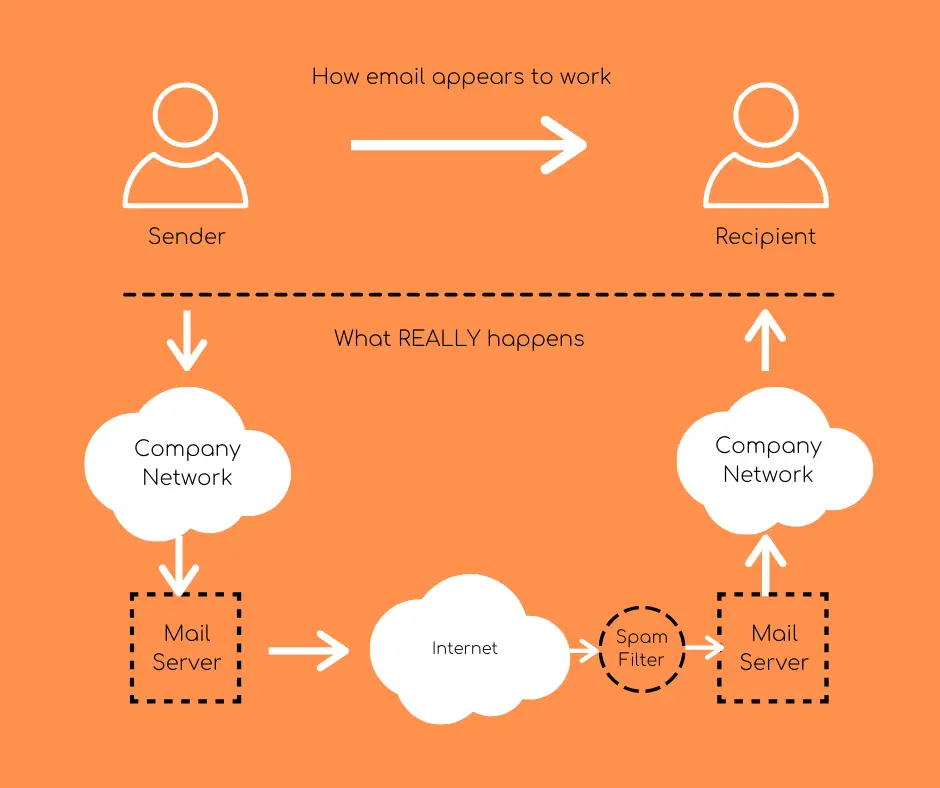
Email is a form of electronic communication that allows users to send and receive messages electronically. When you forward an email, the message is sent to a server, which then delivers it to the recipient’s inbox. But how does this process work?
The Role of Servers in Email Functionality
A server is a remote computer where data is stored and made available over the internet. In the case of email, the server receives messages from users and forwards them to the intended recipient. When you send an email, your message is sent to the server associated with your email service (e.G., Gmail), which then forwards it to the recipient’s server.
How Email Clients Fit Into The Picture
An email client is a software program that allows users to access their emails using a desktop or mobile device. Email clients can be either web-based (e.G., Outlook) or installed on your device (e.G., Mail for Apple). When you use an email client, it connects to your server and downloads your messages in real-time.
Pop3 Vs. Imap: Understanding The Differences
Two protocols that govern how emails are retrieved from a server are POP3 and IMAP. POP3 is an older technology that downloads messages from the server to your device and then deletes them from the server. IMAP, on the other hand, keeps all emails on the server and synchronizes your device with the server’s state.
The Risks of Unencrypted Emails
Emails sent without encryption can be intercepted by unauthorized parties, compromising sensitive information. However, many email services use protocols like TLS/STARTTLS to encrypt messages between servers.
What Are Certified Electronic Mail (PEC)?
Certified electronic mail (PEC) is a type of email that uses digital signatures and cryptography to ensure the authenticity and integrity of messages. PECs are often used for official communication, such as business transactions or government correspondence.
How Outlook Email Works
Outlook is a popular email service offered by Microsoft. It can be accessed through a web browser (Webmail) or installed on your device as an application. Outlook also offers a free version and a paid subscription with additional features like calendar and contact management.
The Anatomy of a Pec
A certified electronic mail consists of two main parts: The message itself and the digital signature. The signature is created by encrypting the message using a private key, which can only be decrypted by the intended recipient’s public key.
Conclusion
Emails are an essential part of modern communication, but their inner workings often go unnoticed. By understanding how email functions, you’ll appreciate the complexity behind this seemingly simple technology. Whether it’s POP3 or IMAP, servers or clients, encryption or PECs – we’ve covered all the essential aspects of email functionality.
Frequently Asked Questions (FAQs)
- What is The Difference Between Pop3 And Imap?
- POP3 downloads emails from the server to your device and then deletes them from the server. IMAP keeps all emails on the server and synchronizes your device with the server’s state.
- How do I Secure my Email Communications?
- Use encryption protocols like TLS/STARTTLS, or consider using certified electronic mail (PEC).
- What is Pec?
- PEC is a type of email that uses digital signatures and cryptography to ensure the authenticity and integrity of messages.
- How do I Access my Outlook Email?
- You can access your Outlook email through a web browser or install it on your device as an application.
- What Are The Benefits of Using Pec?
- PEC ensures the authenticity and integrity of emails, making them suitable for official communication.
- Can I Use Pec With my Existing Email Service?
- Yes, you can use PEC with many popular email services, including Outlook.
- What Are Some Common Email Protocols Used Today?
- Some widely used email protocols include POP3, IMAP, and SMTP.
- How do I Protect Sensitive Information in Emails?
- Use encryption protocols or certified electronic mail (PEC) to ensure the security of your messages.
By understanding how email functions, you’ll become more aware of its potential risks and benefits. Whether it’s using encrypted emails or certified electronic mail, take control of your digital communications today!


