
Understanding Adwcleaner: A Comprehensive Guide
Are you tired of pesky adware, spyware, and toolbar promotions taking over your computer? Look no further than AdwCleaner, a powerful and free antimalware software that can help you regain control over your digital space.
What is Adwcleaner?
AdwCleaner is an innovative software designed to detect and remove unwanted programs from your Windows PC. Developed by Xplode Software, this tool has gained popularity among computer users worldwide due to its effectiveness in eliminating adware, spyware, and other malicious threats.
Why Use Adwcleaner?
Using AdwCleaner offers numerous benefits, including:
- Comprehensive Scanning: AdwCleaner scans your entire system for potential threats, providing a detailed report of any issues found.
- Easy-to-use Interface: The software boasts an intuitive design, making it accessible to users of all skill levels.
- Free And Lightweight: AdwCleaner is completely free and doesn’t consume excessive resources on your computer.
How Does Adwcleaner Work?
Here’s a step-by-step guide to using AdwCleaner:
- Download Adwcleaner: Visit the official website and download the software.
- Install Adwcleaner: Run the downloaded file, and follow the prompts to install the program.
- Launch Adwcleaner: Double-click the AdwCleaner icon on your desktop or taskbar to launch the software.
- Initiate a Scan: Click “Scan” to begin the scanning process.
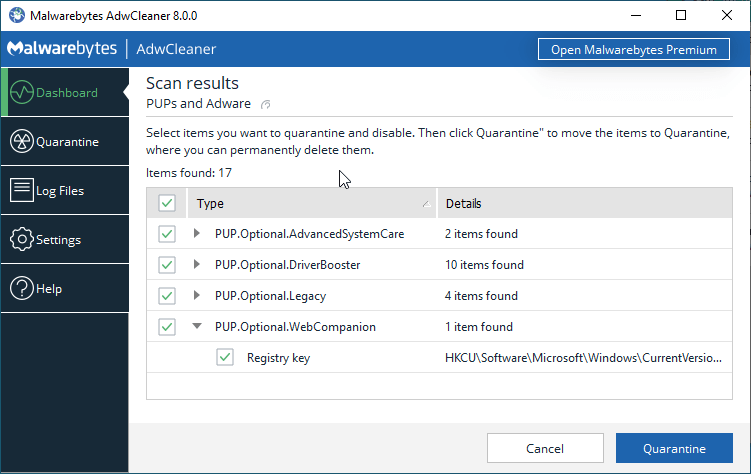
- Review Results: Once the scan is complete, review the report to identify any potential threats.
Advanced Options in Adwcleaner
AdwCleaner offers advanced features that can be tailored to your specific needs:
- Settings: Access the settings menu to customize the software’s behavior and preferences.
- Exclusions: Add or remove exclusions to specify which files or folders you want to keep safe from removal.
Disabling Adwcleaner
If you’ve finished using AdwCleaner, you can easily uninstall it:
- Access Settings: Click on the “Settings” icon in the AdwCleaner interface.
- Applications: Navigate to the “Applications” tab.
- Uninstall Adwcleaner: Select the option to uninstall the software.
Alternative Antimalware Solutions
While AdwCleaner is an excellent tool, it’s essential to consider other antimalware options for comprehensive protection:
- Malwarebytes: This free antimalware software complements AdwCleaner by providing additional security features.
- Other Alternatives: Research and explore other reputable antimalware solutions that can provide robust protection.
Conclusion
AdwCleaner is a powerful tool in the fight against adware, spyware, and toolbar promotions. By following this guide, you’ll learn how to effectively use AdwCleaner to regain control over your digital space. Remember to consider additional antimalware options for comprehensive protection.


