
How to Take Beautiful Photos With Your Smartphone
In today’s digital age, taking beautiful photos with your smartphone has become an essential skill. With the rise of social media, people are more interested in capturing high-quality images than ever before. However, many of us still struggle to take great photos with our mobile devices.
In this article, we will provide you with tips and tricks on how to take stunning photos with your smartphone. From cleaning the lens to choosing the right lighting, we’ll cover everything you need to know to become a pro at taking beautiful photos.
Cleaning The Lens
The first step in taking great photos is to clean the lens of your camera. A dirty lens can ruin an otherwise perfect shot, so it’s essential to keep it clean. To do this, use a microfiber cloth and gently wipe away any dirt or smudges on the lens.
You can also use a specialized lens cleaning kit that comes with a soft brush and a cleaning solution. These kits are available online and at most camera stores.
Using The Right Lighting
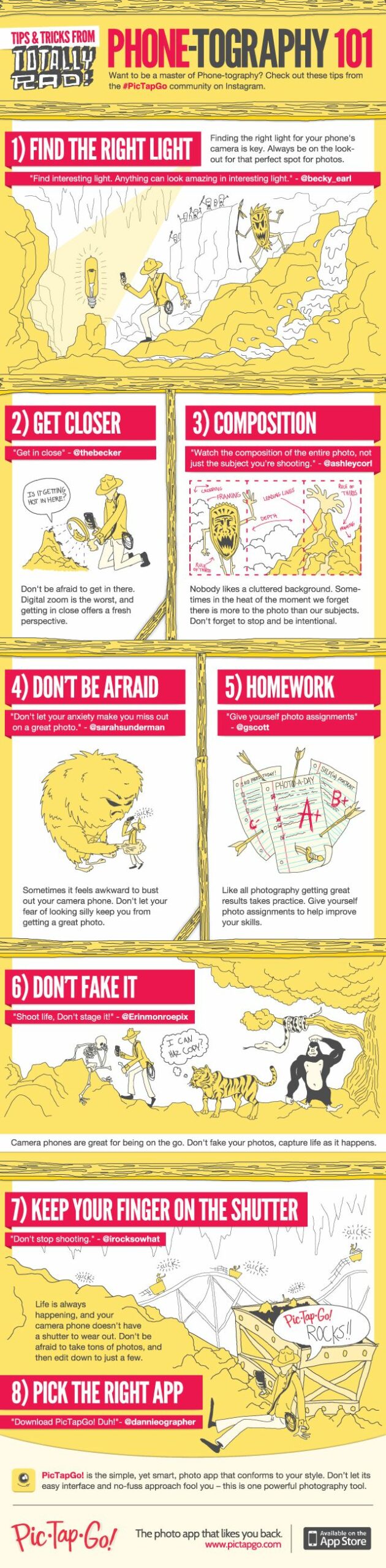
Lighting is one of the most critical factors in photography. Natural light is always the best option, so try to take photos near a window or outside during the golden hour (the first hour after sunrise or before sunset).
If you’re taking photos indoors, use artificial lighting that’s soft and even. Avoid harsh overhead lights, which can create unflattering shadows.
Choosing The Right Composition
Composition is another crucial element in photography. When choosing a composition, think about the rule of thirds. This means placing your subject off-center, with the horizon line or other important elements along one-third lines.
You can also use leading lines to guide the viewer’s eye to the subject. Leading lines are paths that lead the viewer’s eye to the main subject of the photo.
Using The Right Mode
Most smartphones come with multiple camera modes, such as portrait, landscape, and night mode. Experiment with different modes to find what works best for your shot.
For example, if you’re taking a photo of a person, use the portrait mode to blur the background and emphasize the subject.
Tips For Taking Beautiful Photos With Your Smartphone
Here are some additional tips for taking beautiful photos with your smartphone:
- Use a tripod or stabilizer to reduce camera shake and ensure sharp images.
- Experiment with different angles and perspectives to add interest to your photos.
- Pay attention to the lighting conditions and adjust your settings accordingly.
- Don’t overdo it with editing apps – sometimes, less is more.
- Practice makes perfect! The more you practice taking photos, the better you’ll become.
Conclusion
Taking beautiful photos with your smartphone requires some knowledge and practice. By following these tips and tricks, you can improve your photography skills and capture stunning images that will impress your friends and family.
Remember to always clean the lens, use the right lighting, and choose a great composition. With a little practice and patience, you’ll be taking amazing photos in no time!
Faqs
- What is The Best Smartphone Camera?
The best smartphone camera depends on several factors, including your budget and personal preferences. However, some of the top-rated smartphones with excellent cameras include the Samsung Galaxy S22, Apple iPhone 13 Pro, and Google Pixel 6.
- How Can I Clean my Phone’s Camera Lens?
To clean your phone’s camera lens, use a microfiber cloth and gently wipe away any dirt or smudges on the lens. You can also use a specialized lens cleaning kit that comes with a soft brush and a cleaning solution.
- What is The Rule of Thirds in Photography?
The rule of thirds is a composition technique that involves placing your subject off-center, with the horizon line or other important elements along one-third lines. This helps to create balanced and visually appealing photos.
- How Can I Take Better Portraits With my Smartphone?
To take better portraits with your smartphone, use the portrait mode to blur the background and emphasize the subject. Experiment with different angles and perspectives to add interest to your photos. Pay attention to the lighting conditions and adjust your settings accordingly.
- What is The Best Editing App For Smartphones?
The best editing app for smartphones depends on your personal preferences and needs. However, some popular options include Adobe Lightroom Mobile, VSCO, and Snapseed.
- How Can I Take Better Photos in Low-light Conditions?
To take better photos in low-light conditions, use a tripod or stabilizer to reduce camera shake and ensure sharp images. Experiment with different modes, such as night mode or HDR, to capture the best possible image.
- What is The Difference Between Digital Zoom And Optical Zoom?
Digital zoom is a feature that allows you to zoom in on your subject without actually changing the lens. Optical zoom, on the other hand, uses a physical lens to change the focal length and provide a clearer image.
- How Can I Take Better Photos of Landscapes With my Smartphone?
To take better photos of landscapes with your smartphone, use the landscape mode to capture wide-angle shots. Experiment with different angles and perspectives to add interest to your photos. Pay attention to the lighting conditions and adjust your settings accordingly.


