
How to Change a Password: A Comprehensive Guide
Are you tired of using the same password for all your online accounts? Do you want to improve your digital security but don’t know where to start? Look no further! In this article, we’ll guide you through the process of changing passwords on various platforms, including Google, Facebook, Netflix, Spotify, PayPal, and more.
Why Change Passwords?
Changing passwords regularly is essential for maintaining good online security. If your password is compromised, it can lead to identity theft, hacking, or other malicious activities. By changing your passwords frequently, you can reduce the risk of your accounts being accessed without permission.
How to Change a Password: A Step-by-step Guide
- Choose a Strong Password: Before changing your password, choose a strong and unique one. Avoid using easily guessable information such as your name, birthdate, or common words.
- Log in to Your Account: Log in to the account you want to change the password for.
- Look For The Password Option: Search for the password option in the settings or preferences section of the account.
- Enter The Current Password: Enter your current password to verify that you’re the owner of the account.
- Create a New Password: Create a new, strong password and confirm it by re-entering it in the designated field.
- Save Changes: Save the changes to apply the new password.
Changing Passwords on Specific Platforms
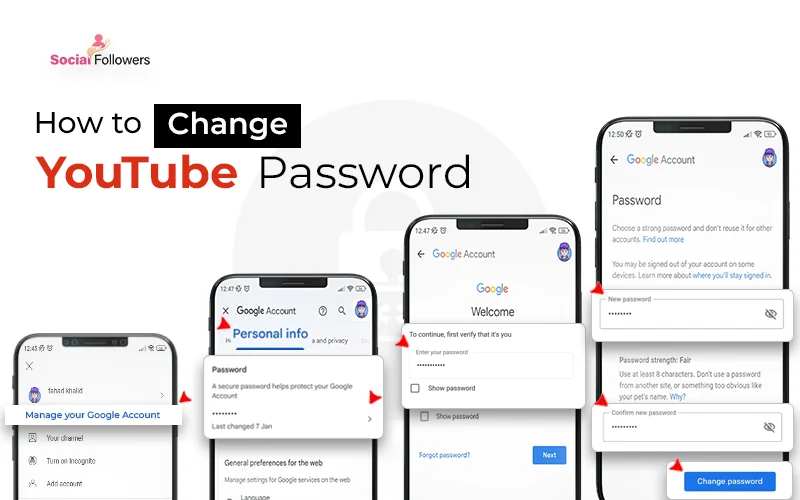
Changing Google Password
To change your Google password:
- Go to myaccount.Google.Com.
- Click on “Sign in” and enter your current password.
- Click on “Security” from the left menu.
- Scroll down to the “Password” section.
- Enter your new password and confirm it.
Changing Facebook Password
To change your Facebook password:
- Go to facebook.Com.
- Click on the three horizontal lines in the top right corner.
- Select “Settings & Account.”
- Click on “Security and Login.”
- Click on “Edit” next to “Change Password.”
- Enter your new password and confirm it.
Changing Netflix Password
To change your Netflix password:
- Go to netflix.Com.
- Log in to your account.
- Click on the profile icon in the top right corner.
- Select “Account” from the dropdown menu.
- Click on “Change Password.”
- Enter your new password and confirm it.
Changing Spotify Password
To change your Spotify password:
- Go to spotify.Com.
- Log in to your account using a web browser.
- Click on the profile icon in the top right corner.
- Select “Account” from the dropdown menu.
- Click on “Password.”
- Enter your new password and confirm it.
Changing Paypal Password
To change your PayPal password:
- Go to paypal.Com.
- Log in to your account.
- Click on the profile icon in the top right corner.
- Select “Settings” from the dropdown menu.
- Click on “Password.”
- Enter your new password and confirm it.
Tips For Choosing a Strong Password
- Use a combination of uppercase and lowercase letters, numbers, and special characters.
- Avoid using easily guessable information such as your name, birthdate, or common words.
- Make sure the password is at least 12 characters long.
- Change your password regularly to maintain good online security.
Conclusion
Changing passwords is an essential part of maintaining good online security. By following these steps and choosing strong passwords, you can reduce the risk of your accounts being accessed without permission. Remember to change your passwords regularly and use a combination of uppercase and lowercase letters, numbers, and special characters.
Faqs
- What if I Forget my Password?
If you forget your password, click on “Forgot Password” or “Reset Password” depending on the platform. - How Often Should I Change my Password?
Change your password every 60-90 days to maintain good online security. - Can I Use The Same Password For Multiple Accounts?
No, it’s recommended to use a unique and strong password for each account. - What if I’m Locked Out of my Account?
Contact the platform’s support team or reset your password using their system. - How Can I Protect Myself From Identity Theft?
Use a combination of security measures such as 2-factor authentication, strong passwords, and monitoring your accounts regularly.
Still Have Questions?
Feel free to ask us any further questions you may have!


