
How to Speed Up Your Ps4: Tips And Tricks
Are you tired of waiting for your games to load on your PlayStation 4? Do you find yourself frustrated with slow performance and laggy gameplay? You’re not alone! Many gamers have experienced these issues, but the good news is that there are ways to speed up your PS4. In this article, we’ll explore some tips and tricks to help you optimize your gaming experience.
Why is My Ps4 So Slow?
Before we dive into the solutions, let’s take a look at why your PS4 might be slow in the first place. There are several reasons that could be contributing to the issue:
- Overloaded Cache: If your PS4’s cache is filled with too many games and apps, it can cause slow performance.
- Corrupted Database: A corrupted database can also lead to slow loading times and laggy gameplay.
- Outdated Software: Make sure you’re running the latest version of the PS4 operating system to ensure optimal performance.
Tip 1: Clean Your Cache
One of the simplest ways to speed up your PS4 is to clean its cache. Here’s how:
- Turn off your PS4 completely (no rest mode).
- Hold down the power button until you see the fast menu appear.
- Select “Turn off” and let the console turn off completely.
- Unplug the power cord for at least 15 seconds, then plug it back in.
- Press the power button again to turn on your PS4.
This process will clear out any corrupted cache files and give your PS4 a fresh start.
Tip 2: Rebuild Your Database
Another way to speed up your PS4 is to rebuild its database. This process can help fix any corrupted data that might be causing slow performance:
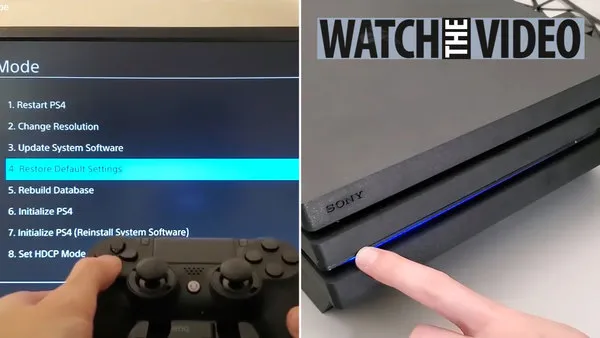
- Put your PS4 in safe mode by holding down the power button until it turns off.
- Plug the power cord back in and press the power button again, releasing it as soon as you hear the first beep (this indicates the system is in safe mode).
- Select “Initialize PS4” from the menu.
Tip 3: Clean Your Console
Dust buildup can also contribute to slow performance on your PS4. Make sure to clean your console regularly:
- Turn off your PS4 completely.
- Remove any dust or debris from the vents and fans.
- Use a soft cloth to wipe down the exterior of your PS4.
Tip 4: Install a Solid-state Drive (SSD)
Upgrading to an SSD can significantly improve loading times and overall performance on your PS4:
- Purchase an SSD compatible with your PS4 model (e.G., Slim, Fat, Pro).
- Follow our guide on how to install an SSD in your PS4.
Tip 5: Optimize Your Internet Connection
If you’re experiencing laggy gameplay or disconnections during online play, it might be worth optimizing your internet connection:
- Check with your ISP to ensure you have a stable and fast internet connection.
- Restart your router and modem if necessary.
- Adjust your PS4’s network settings to prioritize gaming traffic.
Tip 6: Speed Up Your Download
If you’re waiting for an update or downloading a large game, here are some tips to speed up the process:
- Close any unnecessary apps on your PS4.
- Prioritize your download by setting it as the top priority in the menu.
- Consider upgrading to a faster internet plan.
Conclusion
In conclusion, there are several ways to speed up your PS4 and improve overall performance. By following these tips and tricks, you can:
- Clean your cache
- Rebuild your database
- Clean your console
- Install an SSD
- Optimize your internet connection
- Speed up your download
Remember to always follow the manufacturer’s instructions when performing any maintenance tasks on your PS4.
Frequently Asked Questions (FAQs)
- Q: Why is my Ps4 so Slow?
A: There could be several reasons, including an overloaded cache, corrupted database, or outdated software. - Q: How do I Clean my Cache?
A: Turn off your PS4 completely, unplug the power cord for 15 seconds, then plug it back in and press the power button again to turn it on. - Q: How do I Rebuild my Database?
A: Put your PS4 in safe mode, select “Initialize PS4” from the menu, and follow the on-screen instructions. - Q: Can I Clean my Console Myself?
A: Yes, simply turn off your PS4, remove any dust or debris from the vents and fans, and wipe down the exterior with a soft cloth. - Q: Will Installing an Ssd Improve Performance?
A: Yes, upgrading to an SSD can significantly improve loading times and overall performance on your PS4. - Q: How do I Optimize my Internet Connection?
A: Check with your ISP for stable and fast internet connectivity, restart your router and modem if necessary, and adjust your PS4’s network settings to prioritize gaming traffic. - Q: Can I Speed up my Download?
A: Yes, close any unnecessary apps on your PS4, prioritize your download by setting it as the top priority in the menu, and consider upgrading to a faster internet plan.
Remember, always follow proper safety precautions when performing maintenance tasks on your PS4!


