
How to Download Youtube Videos: A Step-by-step Guide
Are you tired of watching videos on YouTube without being able to download them? Look no further! In this article, we will guide you through the process of downloading YouTube videos using various methods and tools.
Why Download Youtube Videos?
Downloading YouTube videos can be useful for several reasons:
- You can watch your favorite videos offline, without relying on an internet connection.
- You can share downloaded videos with friends or family members who may not have access to the internet.
- You can use downloaded videos in educational or commercial projects.
Method 1: Using Youtube Premium
The first method we will discuss is using YouTube Premium. This service allows you to download videos for offline viewing, and it’s available on both Android and iOS devices. To get started, follow these steps:
- Download the YouTube app on your device.
- Subscribe to YouTube Premium.
- Open the YouTube app and navigate to the video you want to download.
- Tap the three dots next to the video title and select “Download.”
Method 2: Using a Third-party App (TubeMate)
The second method we will discuss is using a third-party app called TubeMate. This app allows you to download videos from YouTube, as well as other video-sharing platforms.
- Download the TubeMate APK file from the developer’s website.
- Install the APK file on your device.
- Open the TubeMate app and navigate to the YouTube section.
- Search for the video you want to download and tap the download button.
Method 3: Using a Browser Extension (SaveFrom)
The third method we will discuss is using a browser extension called SaveFrom. This extension allows you to download videos from YouTube, as well as other video-sharing platforms.
- Download the SaveFrom extension for your browser.
- Navigate to the YouTube video you want to download and click on the SaveFrom button.
- Select the quality of the video you want to download and click “Download.”
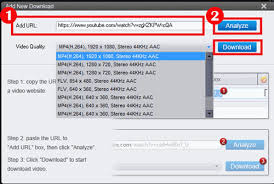
Method 4: Using a Video Converter (WinX Video Converter)
The fourth method we will discuss is using a video converter called WinX Video Converter. This software allows you to convert YouTube videos into various formats, including MP4, AVI, and MKV.
- Download the WinX Video Converter software from the developer’s website.
- Install the software on your device.
- Open the software and navigate to the YouTube section.
- Search for the video you want to download and convert, and select the format you want to output.
Method 5: Using a Media Player (VLC)
The fifth method we will discuss is using a media player called VLC. This software allows you to play and download videos from various sources, including YouTube.
- Download the VLC software from the developer’s website.
- Install the software on your device.
- Open the software and navigate to the YouTube section.
- Search for the video you want to download and click on the “Download” button.
Conclusion
Downloading YouTube videos can be a useful tool for various purposes, including offline viewing, sharing with friends or family members, and using in educational or commercial projects. In this article, we have discussed five methods for downloading YouTube videos, including using YouTube Premium, TubeMate, SaveFrom, WinX Video Converter, and VLC.
Frequently Asked Questions
- Is it Legal to Download Youtube Videos?
Yes, it is legal to download YouTube videos for personal use, but be sure to check the copyright laws in your country.
- Can I Share Downloaded Youtube Videos With Others?
Yes, you can share downloaded YouTube videos with friends or family members, but be sure to get their consent first.
- What Are The Advantages of Using Tubemate Over Other Methods?
TubeMate has several advantages over other methods, including a user-friendly interface and the ability to download videos from multiple sources.
- Can I Convert Downloaded Youtube Videos Into Different Formats?
Yes, you can convert downloaded YouTube videos into different formats using software like WinX Video Converter or VLC.
- Is it Safe to Use Browser Extensions Like Savefrom?
Yes, browser extensions like SaveFrom are generally safe to use and do not pose any security risks.
Recommended Tools
- TubeMate
- SaveFrom
- WinX Video Converter
- VLC
Note: This article is for informational purposes only and should not be considered as a guide on how to engage in copyright infringement or other illegal activities.


