
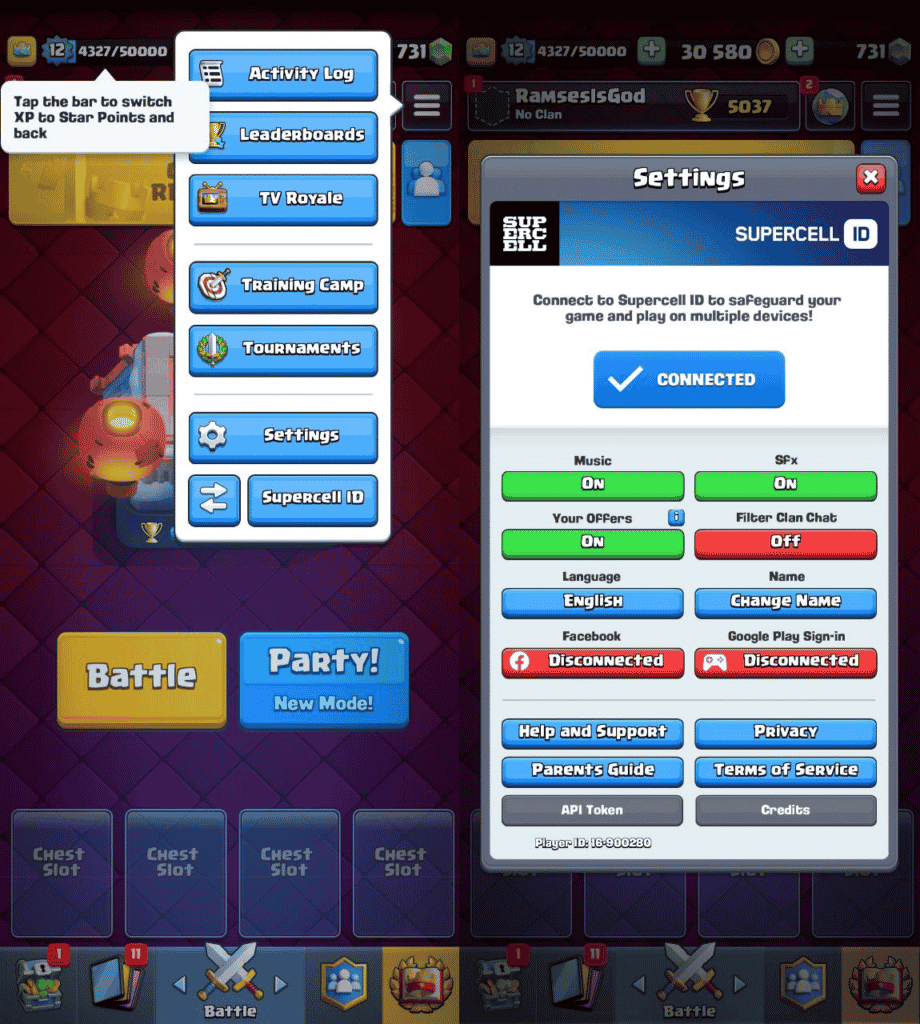
Transferring Your Clash Royale Account: A Step-by-step Guide
Are you thinking of upgrading your smartphone or switching to a new device? If so, you’re likely concerned about transferring your Clash Royale account and progress without losing anything in the process. In this article, we’ll walk you through the steps to transfer your account seamlessly.
Why You Need a Supercell ID
Before we dive into the nitty-gritty of transferring your account, it’s essential to understand why you need a Supercell ID. A Supercell ID is a unique identifier that allows you to synchronize your progress and access Clash Royale on multiple devices. Think of it as a master key that unlocks your gaming experience across different platforms.
Transferring Your Account: The Easy Part
Transferring your Clash Royale account from one device to another is relatively straightforward. Here’s how:
- Initiate The Transfer: On your old device, initiate the transfer process by tapping on the gear icon in the top-right corner and selecting the option to create a Supercell ID.
- Link Your Account: Follow the prompts to link your account to the new device. You’ll need to enter your email address associated with your Supercell ID and confirm the transfer.
- Transfer Progress: Once you’ve linked your account, your progress will be transferred seamlessly.
The PC Option: Using Google Play Gamings
You can also play Clash Royale on your computer using Google Play Gamings. This platform allows you to access mobile games on your PC with ease. Here’s how:
- Download The Client: Visit the official website of Google Play Gamings and download the client.
- Install And Configure: Follow the installation prompts and configure your account to connect to your Supercell ID.
- Play Clash Royale: Once configured, you can play Clash Royale on your PC using your mouse and keyboard.
Tips And Tricks
To ensure a smooth transfer process:
- Make sure you have a stable internet connection
- Use the same email address associated with your Supercell ID across all devices
- Save your login credentials to make it easier to access your account
Common Questions And Answers
Q: What is a Supercell ID, and why do I need one?
A: A Supercell ID is a unique identifier that allows you to synchronize your progress and access Clash Royale on multiple devices.
Q: Can I transfer my account from an Android device to an iOS device or vice versa?
A: Yes, you can transfer your account from one mobile platform to another using the same Supercell ID.
Q: How do I link my account to a new device?
A: Follow the prompts to initiate the transfer process, and then link your account to the new device.
Conclusion
Transferring your Clash Royale account is a relatively straightforward process. By following these steps, you can ensure that your progress and login credentials are transferred seamlessly from one device to another. Remember to save your Supercell ID and keep it secure to avoid any potential issues in the future. Happy gaming!
Frequently Asked Questions (FAQs)
-
Q: How do I transfer my Clash Royale account?
A: Follow the steps outlined above to initiate the transfer process and link your account to a new device. -
Q: What is a Supercell ID, and why do I need one?
A: A Supercell ID is a unique identifier that allows you to synchronize your progress and access Clash Royale on multiple devices. -
Q: Can I transfer my account from an Android device to an iOS device or vice versa?
A: Yes, you can transfer your account from one mobile platform to another using the same Supercell ID. -
Q: How do I link my account to a new device?
A: Follow the prompts to initiate the transfer process, and then link your account to the new device. -
Q: Can I play Clash Royale on PC?
A: Yes, you can play Clash Royale on your computer using Google Play Gamings. -
Q: How do I configure my account for PC gaming?
A: Visit the official website of Google Play Gamings and follow the prompts to download and install the client. -
Q: What if I encounter issues during the transfer process?
A: Contact Supercell support or visit their community forums for assistance. -
Q: How do I save my login credentials for future use?
A: Make sure to save your Supercell ID and login credentials securely to avoid any potential issues in the future.


