
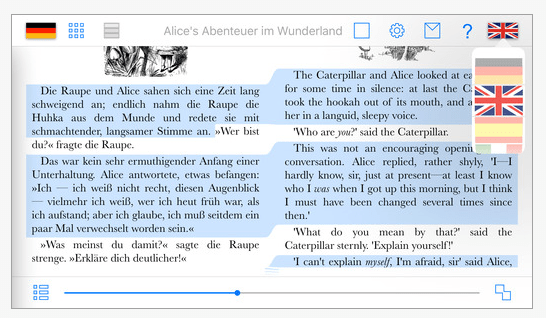
Are you an avid reader looking to explore the world of English literature? Or perhaps you’re a language learner seeking to improve your skills in English? Look no further! In this comprehensive guide, we’ll introduce you to the best apps that enable you to read books in English with translation, making it easier than ever to enhance your language abilities.
Why Learn English?
English is the global language of communication, and speaking it can open doors to new opportunities, cultures, and experiences. Whether you’re a student, professional, or simply a curious individual, learning English can broaden your horizons and enrich your life.
The Benefits of Reading Books in English With Translation
Reading books in English with translation offers numerous benefits, including:
- Improved Language Skills: By reading translated texts, you’ll improve your comprehension and vocabulary.
- Enhanced Cultural Understanding: Through translated literature, you’ll gain insights into the cultures and perspectives of different societies.
- Increased Access to Knowledge: Translated books provide a gateway to previously inaccessible information, allowing you to explore new ideas and concepts.
Top Apps For Reading Books in English With Translation
Here are the top apps that enable you to read books in English with translation:
- Idiom
- Available on: Android, iOS, iPadOS
- Features: Reads books in English, translates text in real-time, provides pronunciation and grammar analysis
- Ewa
- Available on: Android, iOS, iPadOS
- Features: Offers a vast library of translated books, includes video explanations and news updates
- Books in English And Translation
- Available on: Android, iOS, iPadOS
- Features: Translates digital books, provides pronunciation and grammar analysis, allows you to import your own files
- Duobooks
- Available on: IOS, iPadOS
- Features: Offers a vast library of translated books, includes video explanations and news updates
How to Use These Apps
Here’s a step-by-step guide on how to use these apps:
- Download the app from your respective app store.
- Choose the language you want to learn and set up your profile.
- Browse through the library or import your own files.
- Select a book to read, and tap on individual words for translation.
- Use the app’s built-in features, such as pronunciation, grammar analysis, and video explanations.
Conclusion
Reading books in English with translation is an excellent way to enhance your language skills, gain cultural understanding, and access new knowledge. These top apps make it easy to explore the world of English literature while learning a new language. Whether you’re a beginner or advanced learner, these apps cater to your needs, providing a seamless reading experience.
Frequently Asked Questions (FAQs)
Q: What are the benefits of using these apps?
A: They improve language skills, enhance cultural understanding, and increase access to knowledge.
Q: Which app is best for beginners?
A: Idiom and Books in English and Translation are great options for beginners, offering a user-friendly interface and comprehensive features.
Q: Can I import my own files into the apps?
A: Yes, some apps allow you to import your own digital books or ePubs.
Q: Are these apps available on both Android and iOS devices?
A: Most of the apps are available on multiple platforms, including Android, iOS, and iPadOS.
Q: Can I access news updates within the apps?
A: Some apps, like Ewa and duoBooks, offer news updates to help you stay informed about current events and cultural trends.
Q: Are there any paid versions or subscription plans?
A: Yes, some apps offer premium features or subscription plans for advanced users.
Get Started Today!
Don’t wait – explore the world of English literature with these top apps. Enhance your language skills, broaden your knowledge, and unlock new experiences with every read.


