
Unlocking The Power of Nordvpn: A Comprehensive Guide
Are you tired of feeling vulnerable online? Do you want to protect your data and browse the internet with peace of mind? Look no further than NordVPN, one of the most popular and reliable virtual private networks (VPNs) on the market.
In this article, we’ll take a deep dive into the world of NordVPN, exploring its features, benefits, and uses. We’ll also provide you with step-by-step instructions on how to set up and use NordVPN on various devices, including Android, iPhone, PC, Mac, Smart TV, and more.
What is a Vpn?
Before we dive into the specifics of NordVPN, let’s take a moment to explain what a VPN is. A VPN is a virtual private network that allows you to browse the internet securely and anonymously by encrypting your internet traffic and routing it through a server in another location.
This means that anyone trying to intercept or monitor your online activity will only see the encrypted data, making it virtually impossible for them to access any sensitive information.
Nordvpn: The Ultimate Vpn Solution
So, what sets NordVPN apart from other VPNs on the market? Here are just a few of its key features and benefits:
- Unparalleled Security: With NordVPN, your internet traffic is encrypted with military-grade security protocols, making it virtually impossible for anyone to intercept or monitor your online activity.
- Fast Connection Speeds: NordVPN’s servers are optimized for fast connection speeds, ensuring that you can browse the internet without any lag or interruptions.
- Extensive Server Network: With over 5,000 servers in more than 60 countries, NordVPN provides you with access to a global network of high-speed servers.
- User-friendly Interface: NordVPN’s user-friendly interface makes it easy to set up and use, even for those who are new to VPNs.
Setting Up Nordvpn on Various Devices
Now that we’ve covered the basics of NordVPN, let’s move on to the fun part: Setting it up on various devices. Here are step-by-step instructions for setting up NordVPN on Android, iPhone, PC, Mac, Smart TV, and more:
Using Nordvpn on Android
To set up NordVPN on your Android device, follow these steps:
- Download and install the NordVPN app from the Google Play Store.
- Launch the app and sign in with your NordVPN account credentials.
- Choose a server to connect to by tapping on the “Fast Connection” button.
- Wait for the connection to establish, then tap on the “OK” button.
Using Nordvpn on Iphone
To set up NordVPN on your iPhone or iPad, follow these steps:
- Download and install the NordVPN app from the App Store.
- Launch the app and sign in with your NordVPN account credentials.
- Choose a server to connect to by tapping on the “Fast Connection” button.
- Wait for the connection to establish, then tap on the “OK” button.
Using Nordvpn on Pc
To set up NordVPN on your Windows computer, follow these steps:
- Download and install the NordVPN app from the official website.
- Launch the app and sign in with your NordVPN account credentials.
- Choose a server to connect to by clicking on the “Fast Connection” button.
- Wait for the connection to establish, then click on the “OK” button.
Using Nordvpn on Mac
To set up NordVPN on your Mac computer, follow these steps:
- Download and install the NordVPN app from the official website.
- Launch the app and sign in with your NordVPN account credentials.
- Choose a server to connect to by clicking on the “Fast Connection” button.
- Wait for the connection to establish, then click on the “OK” button.
Using Nordvpn on Smart Tv
To set up NordVPN on your Smart TV, follow these steps:
- Download and install the NordVPN app from the Google Play Store or App Store (depending on your TV’s operating system).
- Launch the app and sign in with your NordVPN account credentials.
- Choose a server to connect to by tapping on the “Fast Connection” button.
- Wait for the connection to establish, then tap on the “OK” button.
Using Nordvpn on Router
To set up NordVPN on your router, follow these steps:
- Check if your router is compatible with NordVPN (most routers are).
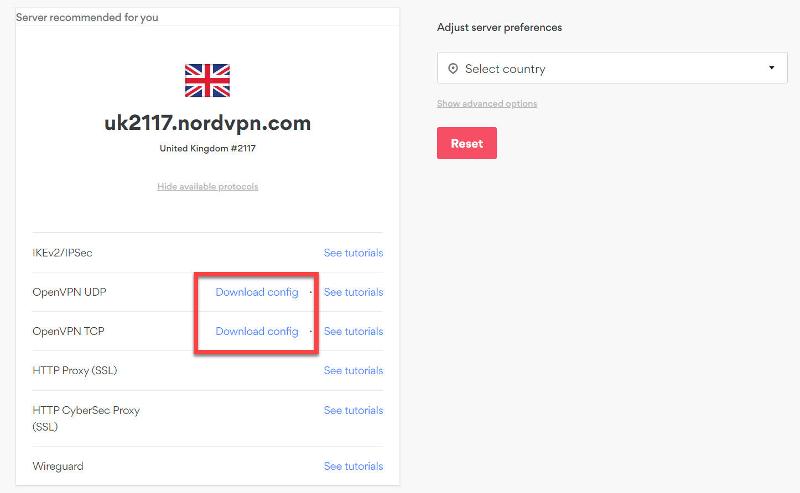
- Configure your router to use NordVPN by setting it as a VPN client.
- Connect your devices to the router and enjoy secure internet browsing.
Using Nordvpn For Flights
Did you know that using a VPN can also help you save money on flights? By encrypting your IP address, you can avoid being targeted with price increases based on your location. Here’s how to use NordVPN for flights:
- Download and install the NordVPN app.
- Connect to a server in a different country (ideally one that has lower flight prices).
- Compare prices for your desired flight to see if you can save money by using NordVPN.
Conclusion
In conclusion, NordVPN is an excellent choice for anyone looking to protect their online identity and browse the internet with peace of mind. With its user-friendly interface, extensive server network, and unparalleled security features, it’s no wonder that NordVPN has become one of the most popular VPNs on the market.
Whether you’re using it on your Android or iPhone device, PC or Mac computer, Smart TV, or even router, NordVPN makes it easy to stay safe online. And with its affordable pricing plans and excellent customer support team, it’s no wonder that NordVPN is a favorite among VPN enthusiasts worldwide.
So what are you waiting for? Sign up for a NordVPN account today and start browsing the internet with confidence!
Faqs
- Q: What is a Vpn?
A: A VPN (Virtual Private Network) is a service that allows you to browse the internet securely and anonymously by encrypting your traffic and routing it through a server in another location. - Q: How do I Set up Nordvpn on my Android Device?
A: To set up NordVPN on your Android device, download and install the app from the Google Play Store, launch the app, sign in with your account credentials, choose a server to connect to, and wait for the connection to establish. - Q: Can I Use Nordvpn on my Iphone or Ipad?
A: Yes! You can set up NordVPN on your iPhone or iPad by downloading and installing the app from the App Store, launching the app, signing in with your account credentials, choosing a server to connect to, and waiting for the connection to establish. - Q: How do I Use Nordvpn on my Pc?
A: To set up NordVPN on your Windows computer, download and install the app from the official website, launch the app, sign in with your account credentials, choose a server to connect to, and wait for the connection to establish. - Q: Can I Use Nordvpn on my Router?
A: Yes! You can set up NordVPN on your router by checking if it’s compatible (most routers are), configuring your router to use NordVPN as a VPN client, connecting your devices to the router, and enjoying secure internet browsing. - Q: How do I Save Money on Flights Using Nordvpn?
A: By encrypting your IP address, you can avoid being targeted with price increases based on your location. Connect to a server in a different country (ideally one that has lower flight prices), compare prices for your desired flight, and see if you can save money by using NordVPN. - Q: Is Nordvpn Safe to Use?
A: Yes! With its military-grade security protocols and extensive server network, NordVPN provides unparalleled security features that ensure your online identity remains protected at all times. - Q: How do I Contact Nordvpn Customer Support?
A: To contact NordVPN’s excellent customer support team, visit their official website, click on the “Support” tab, and fill out a support request form.
We hope this comprehensive guide has helped you understand how to use NordVPN on various devices! If you have any further questions or need assistance with setting up NordVPN, don’t hesitate to reach out.


